
Upwork in Pakistan: How to Start, Win Clients, and Get Paid in 2026

Pakistani freelancers earned $959 million in foreign exchange through IT and computer services in the first 10 months of FY2025–26, a 49% increase year-on-year according to 2026 SBP data on IT export earnings. That figure outpaces India, China, and the UAE in growth momentum over the same period.
According to 2026 PSEB data on Pakistan's freelance workforce, 2.37 million Pakistanis are now active in the freelance market, and Upwork is one of the primary platforms driving those numbers.
This guide is for Pakistani freelancers who are either starting on Upwork or have an account that isn't converting. It covers how the platform works, how to build a profile that gets found, how to write proposals that win, how to understand the fee structure, and how to withdraw without leaving money in exchange rate gaps.
What Is Upwork and How Does It Work for Pakistani Freelancers?
Upwork is a proposal-based freelance marketplace where clients post jobs and freelancers submit proposals to win them, using a virtual currency called Connects. A client posts a job, you spend Connects to submit a proposal, and the client reviews all submissions before hiring.
Now, here's the distinction that matters: Upwork is not a gig platform like Fiverr, where clients browse and find you. On Upwork, you pitch to the client, which means your proposal does most of the selling.
That difference shapes everything from how you build your profile to how you spend your time on the platform.
Upwork supports both hourly and fixed-price contracts, and hourly contracts come with built-in payment protection through Upwork's time-tracking system, which captures screen activity as evidence of billable time so disputes over unpaid hours are far less common.
How to Create Your Upwork Account in Pakistan
To create an Upwork account in Pakistan, go to upwork.com, select "Work as a Freelancer," and complete sign-up with your email address.
Before you start, gather these 4 things so the process doesn't stall halfway:
- Your CNIC or passport for identity
- A bank account for withdrawal setup
- A professional photo
- Portfolio samples (self-initiated projects count)
No business registration or NTN is required at sign-up. Those become relevant at the tax filing stage, not here.
The W-8BEN form is a required step for all non-US freelancers. It confirms you are not a US taxpayer. Completing it does not mean you owe US tax, and it won't delay your account if you fill it in correctly the first time.
That said, account approval is not guaranteed. Upwork rejects accounts in oversupplied categories, and a generic profile gives reviewers no reason to approve it.
A profile with a specific headline and at least one portfolio item before submission is meaningfully more likely to pass than a blank or vague one.
How to Build a Profile That Gets Noticed
To build a profile that gets noticed on Upwork, focus on 4 elements. A profile with all 4 converts at higher rates than one with generic content in each field, because each element does a specific job in how Upwork's search and client behaviour work:
- Headline: Name the exact service, not your job title. "Shopify Developer for E-Commerce Stores" gets found in search. "Experienced Freelancer with Strong Skills" does not, because no client is typing those words.
- Overview: Write in first person. Address what you deliver and who you have helped. Don't list skills here. Clients read the Skills section for that.
- Portfolio: Add at least one item before sending proposals. A profile with zero portfolio items reads as unproven even to clients who never explicitly ask about one.
- Photo: Professional and clear. This is the first visual signal a client receives, and it affects whether they read your overview at all.
The most common mistake Pakistani freelancers make on Upwork is a generic headline that matches thousands of other profiles. That single error costs more proposals than any other.
High-Demand Skills for Pakistani Freelancers on Upwork
The skills that earn the most on Upwork in Pakistan are not necessarily the hardest to learn. They're the ones where international client demand is strong and Pakistani freelancers already have a documented track record, which means clients who've hired from Pakistan before are already looking for these.
Higher-rate skills that international clients pay premium rates for include:
- Web development in React, Node.js, and Shopify
- UI/UX design using Figma and Framer
- Mobile app development for iOS and Android
- AI automation and prompt engineering
- SEO strategy and content planning
Accessible starting skills for freelancers with no prior client history include data entry, virtual assistant work, social media management, transcription, and basic graphic design. These are competitive on price but accessible for building a first few reviews. Starting here is reasonable. Staying here long-term limits the income ceiling significantly.
High-income niches where Pakistani freelancers report the highest hourly rates include Shopify and e-commerce development, SaaS product development, Amazon seller services (VA, PPC management, listing optimisation), and AI/ML engineering.
A Shopify developer with 5 reviews charging $40 to $60 per hour is competitive in this market. That combination of niche specificity and a short track record is enough to get hired consistently.
How to Win Your First Job on Upwork in Pakistan
Winning a first job on Upwork is genuinely the hardest part. A profile with zero reviews competes directly against profiles with dozens, and clients can't tell the difference between a new freelancer who's excellent and one who isn't. The path through this problem is specific, not general.
How to Write a Proposal That Gets Read
To write a proposal that gets read, your opening line must address the client's specific problem, not introduce yourself.
Most proposals from Pakistani freelancers open with: "Dear Hiring Manager, I am a skilled freelancer with X years of experience." Clients ignore these instantly because every other proposal sounds the same.
A winning proposal uses this structure:
- First sentence names the problem or outcome the client wants.
- Second sentence shows you understand their specific situation.
- Third sentence gives one relevant credential or example.
- Close with a clear, low-friction next step.
- Here's what that looks like in practice:
Weak opening: "I am an experienced developer with 3 years in Django and MERN. I am very interested in this position."
Strong opening: "Your Django backend has a performance issue in the authentication layer. I've resolved that exact problem in 2 SaaS products and can show you the approach in a 10-minute call."
That second version works because it names the client's problem before naming anything about you.
Discussions within Pakistani freelancing communities as early as 2025 report that communication quality and proposal personalisation are consistently the factors separating freelancers who win their first job within 30 days from those who wait 6 months.
How to Use Connects Efficiently
Connects are the currency you spend before earning anything, so how you use them determines whether the platform costs you money before it makes you any. Each proposal costs 1 to 8 Connects depending on the job tier.
The Basic plan gives 10 free Connects per month, and additional Connects cost $0.15 each. Freelancer Plus at $19.99 per month includes 100 Connects plus 0% service fees.
Apply this rule if you're starting out: spend Connects only on jobs posted in the last 24 hours with fewer than 10 proposals already submitted.
Spraying proposals at older, saturated jobs wastes your Connects and damages your proposal acceptance rate, which the Upwork algorithm uses to determine how prominently your proposals appear.
Getting Your First Review
The fastest path to a first review is through small, fast-turnaround fixed-price jobs under $100. Win at a competitive rate, deliver well, ask for a review.
The first job's purpose is social proof, not income, and one five-star review changes how your profile converts for every subsequent proposal.
A second route: bring a contact from outside Upwork onto the platform as a direct contract client.
Upwork allows this, it generates a legitimate review, and you bypass the competition entirely.
Mistakes That Kill Upwork Accounts Early
These 4 mistakes end more Upwork careers than skill gaps do:
- Generic proposals that open with a self-introduction
- A profile headline that matches hundreds of others in the same category
- Applying for every job regardless of fit, which lowers Job Success Score trajectory
- Setting rates so low they signal low quality rather than value to international clients
Upwork Fees Explained for Pakistani Freelancers
Before pricing your services, you need to know exactly what Upwork takes, because the fee structure changed significantly in May 2025 and most guides still describe the old model.
The old model: 20% on the first $500 earned per client, 10% up to $10,000, and 5% above $10,000.
The current model (since May 2025): A variable service fee of 0% to 15% per contract, determined by Upwork based on supply and demand. The rate is shown before you submit a proposal and locked for that contract's duration. In practice, most freelancers see approximately 10%.
According to 2025 Upwork help documentation on fees, Freelancer Plus members pay 0% service fees, making the $19.99 per month plan worthwhile once earnings consistently exceed $200 per month on the platform.
Contract initiation fee: Each time a contract starts with a new client, Upwork charges $0.99 to $14.99 as a one-time initiation fee. This is separate from the service fee and applies to both contract types.
Connects cost: At $0.15 per Connect for paid Connects beyond the free allocation, a freelancer sending 20 proposals per month beyond the Basic plan's 10 free Connects spends approximately $1.50 to $3.00 in Connects alone.
That cost compounds quickly when win rates are low, which is why proposal quality matters more than proposal volume.
How Pakistani Freelancers Get Paid on Upwork
Before any withdrawal is possible, Upwork holds earnings during a security period. For hourly contracts, the hold is 10 days after the billing week ends.
For fixed-price contracts, the hold is 5 days after client approval. This is a platform hold, not a banking delay, and it can't be shortened.
As of May 2026, Pakistani freelancers have 5 withdrawal options, and the method chosen directly affects how much of the USD income reaches them in PKR.
nsave
nsave gives Pakistani freelancers a USD account with their own ACH routing number and account number, which is exactly the format Upwork's Direct to US Bank method requires.
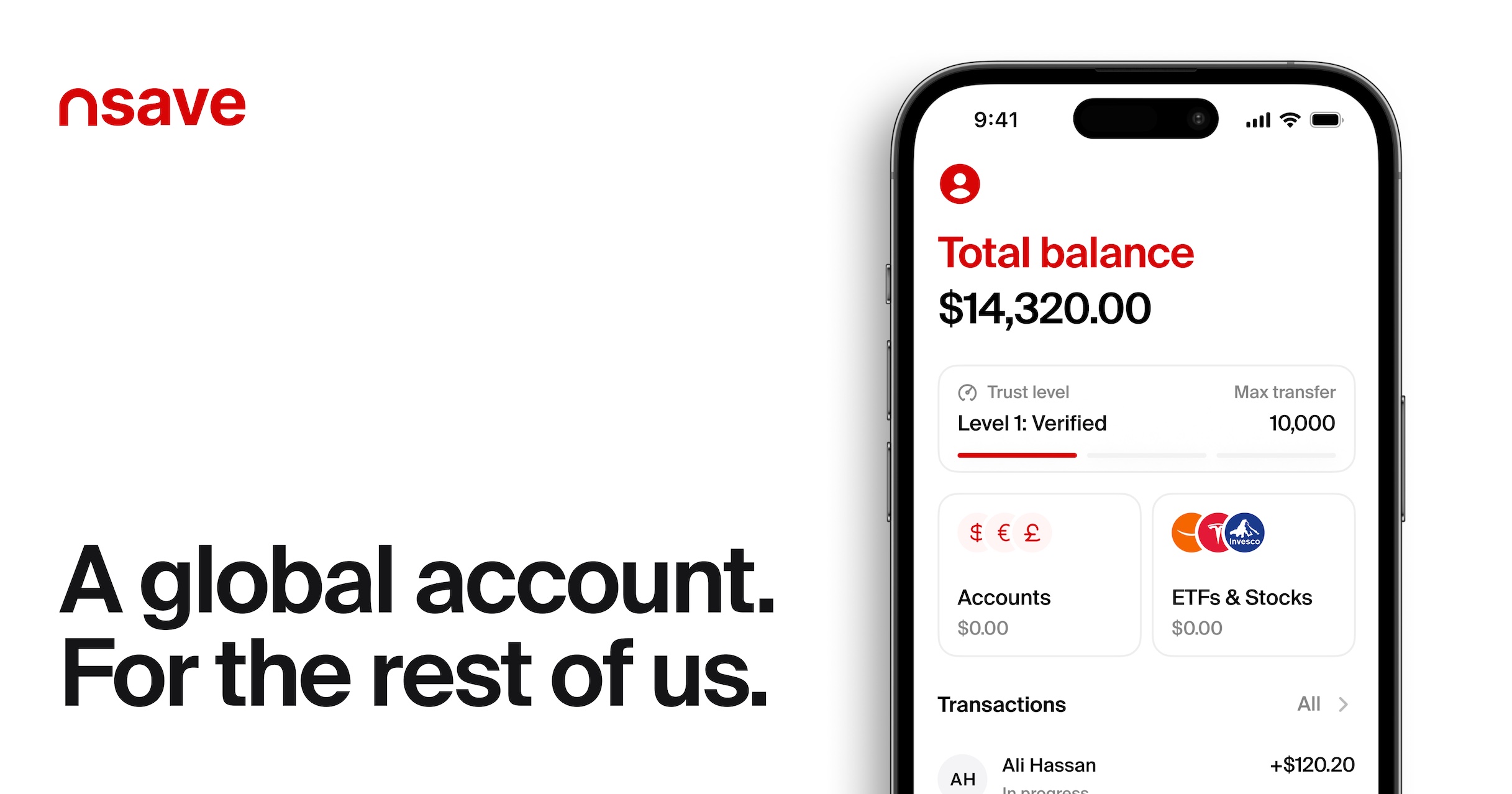
Upwork sends the transfer free of charge, earnings land in USD with no conversion applied, and you convert to PKR when the rate suits you, paying a minimum $1 fee per transfer to any Pakistani bank.
Beyond the payout flexibility, nsave's Standard plan at $0 per month also includes 3.2% annual rewards on idle USD balance paid daily, and access to 500+ US stocks, ETFs, bonds, and gold indices from $1 with zero order fees.
nsave is not a bank, and funds held with nsave are not FSCS-protected. Customer funds are held in regulated UK and EEA financial institutions, separated from company funds, and protected through safeguarding rules designed for electronic money services.
Direct to Local Bank (PKR)
Withdrawing directly to a Pakistani bank costs $0.99 per transfer and takes up to 4 business days to arrive. Upwork converts your USD to PKR at its own rate, which sits typically 3 to 5 rupees per dollar below the interbank rate. That gap doesn't feel significant on a single withdrawal, but across 12 months of consistent earnings it quietly removes a meaningful slice of your income before it reaches you. Supported banks include HBL, UBL, Meezan Bank, MCB, and Bank Alfalah.
Discussions within Pakistani freelancing communities as early as 2025 report that nsave is used by freelancers to receive and hold USD without the forced conversion restrictions that apply to Pakistani bank accounts.
Payoneer
Upwork sends your earnings to Payoneer free of charge, but Payoneer applies its own conversion fee when you withdraw PKR to a local Pakistani bank. Setup is simple because Payoneer is natively integrated with Upwork, which is why it became the default choice for most Pakistani freelancers starting out.
That said, discussions within Pakistani freelancing communities as early as 2025 report that Payoneer's PKR conversion rate is less favourable than holding USD and converting separately.
Direct to US Bank (ACH)
Withdrawing to a US bank account via ACH is free from Upwork's side and takes 3 to 5 business days. Earnings arrive in USD with no conversion applied, which means you decide when to convert and at what rate. This method requires an account with its own ACH routing number and account number.
Now, a local Pakistani bank freelancer account isn't quite the same thing. Discussions within Pakistani freelancing communities as early as 2025 report that freelancer USD accounts at local Pakistani banks cap USD retention at $5,000 or 50% of monthly earnings, and that physically withdrawing USD inside Pakistan is not permitted under current SBP rules.
That combination of caps and restrictions is why internationally registered USD accounts such as nsave, which carry none of those limits, are a meaningfully different option for freelancers who want full control over when they convert.
Wire Transfer (USD)
Withdrawing via wire transfer costs a flat $30 per transfer and takes 5 to 7 business days, with earnings arriving in USD. That flat fee makes it impractical for regular monthly withdrawals, but it becomes cost-effective for large, infrequent transfers where $30 represents a small fraction of the total amount moving.
Discussions within Pakistani freelancing communities as early as 2025 also note that nsave is recommended over ElevatePay specifically because ElevatePay may only accept inward transfers from business accounts rather than individual senders, which rules it out for freelancers working with individual clients.
nsave is not a bank. Funds held with nsave are not FSCS-protected. Customer funds are held in regulated UK and EEA financial institutions, separated from company funds, and protected through safeguarding rules designed for electronic money services.
Tax on Upwork Earnings in Pakistan
The tax picture for Pakistani freelancers receiving foreign income is straightforward once you understand the key split as where the money comes from determines which rate applies, and PSEB registration is the lever that changes that rate.
Discussions within Pakistani Remote workers communities as early as 2025 report that foreign income received into a Pakistani bank account may automatically attract a 1% withholding tax, and that this withholding may satisfy the annual tax obligation for that income.
Registering with PSEB reduces that rate. Pakistani freelancing communities as early as 2025 also confirm that PSEB-registered Pakistani freelancers may qualify for a 0.25% IT export withholding tax rate in 2026, and that obtaining a Proceeds Realization Certificate for each inbound transfer is needed to claim this rate at annual filing.
Income earned from Pakistani clients or within Pakistan remains taxable under normal income slabs regardless of PSEB registration. That distinction, not the amount earned, is what determines which tax framework applies.
Scams Targeting Pakistani Freelancers on Upwork
Upwork has strong payment protection, but only when work is done inside an official contract. Most scams targeting Pakistani freelancers exploit the moment a freelancer steps outside that system, which means the protection disappears the instant you agree to work or receive payment through any other channel.
These are the 4 patterns most commonly reported in the Pakistani freelancing community:
1. Off-platform payment requests
A client asks to pay via EasyPaisa or JazzCash directly, claiming it saves fees. Once outside the platform, Upwork's payment protection does not apply and there is no recourse if payment doesn't arrive. Never work or accept payment outside an official Upwork contract.
2. Fake "Upwork Company" job offers via WhatsApp
Scammers impersonate Upwork recruiters on WhatsApp or Telegram, offer PKR 300 as an initial task payment to build trust, then escalate to so-called "welfare tasks" that require the victim to send money. Upwork has never established a Pakistan office and does not recruit via WhatsApp or Telegram.
3. Unpaid test tasks
A client asks for a sample deliverable before any contract is created. Any task taking more than 30 minutes should be inside a paid contract. Legitimate clients do not require full deliverables before contracts exist.
4. Personal information harvesting
A client requests CNIC, passport scans, or financial details through Upwork chat before a contract exists. Legitimate clients never request identity documents through Upwork messages at this stage.
Discussions within Pakistani Remote Workers report that the "Upwork Pakistan Telegram group" task scam is widely documented, with victims reporting losses above 2.8 million PKR (approximately $9,900 USD) in individual cases.
Taking the initial PKR 300 bait and blocking the sender is the right response. Sending any money at any stage is the mechanism that activates the loss, because the recovery of earlier payments is always used as the reason to send more.
Discussions within Pakistani freelancers as early as 2026 report that nsave is used by freelancers to receive and hold USD without the forced conversion restrictions that apply to Pakistani bank accounts. That flexibility is the main reason freelancers who track exchange rates use it alongside or instead of Payoneer.
How to Withdraw Upwork Earnings with nsave
To withdraw Upwork earnings to a nsave USD account, add your nsave ACH routing number and account number as a "Direct to U.S. Bank (ACH)" withdrawal method in Upwork's payment settings, this withdrawal is free.
Step 1: Open Your nsave USD Account

To open a nsave USD account, download the nsave app, verify your identity using your passport or CNIC, and complete onboarding in under 10 minutes. There's no branch visit, no minimum deposit, and no paperwork to post anywhere.
The Standard plan costs $0 per month. Once verified, nsave issues you a personal US ACH routing number and account number, which is the exact detail Upwork asks for when you set up Direct to US Bank withdrawal.
That's the connection that makes free ACH withdrawal from Upwork possible for Pakistani freelancers, without needing a US address, a US bank, or a third-party intermediary taking a cut in the middle.
New to nsave? Watch how to set up your account in under 10 minutes
Step 2: Add nsave as Your Upwork Withdrawal Method

To add nsave as your withdrawal method on Upwork, go to Settings → Get Paid → Add Withdrawal Method, select "Direct to U.S. Bank (ACH)," and enter your nsave routing number and account number.
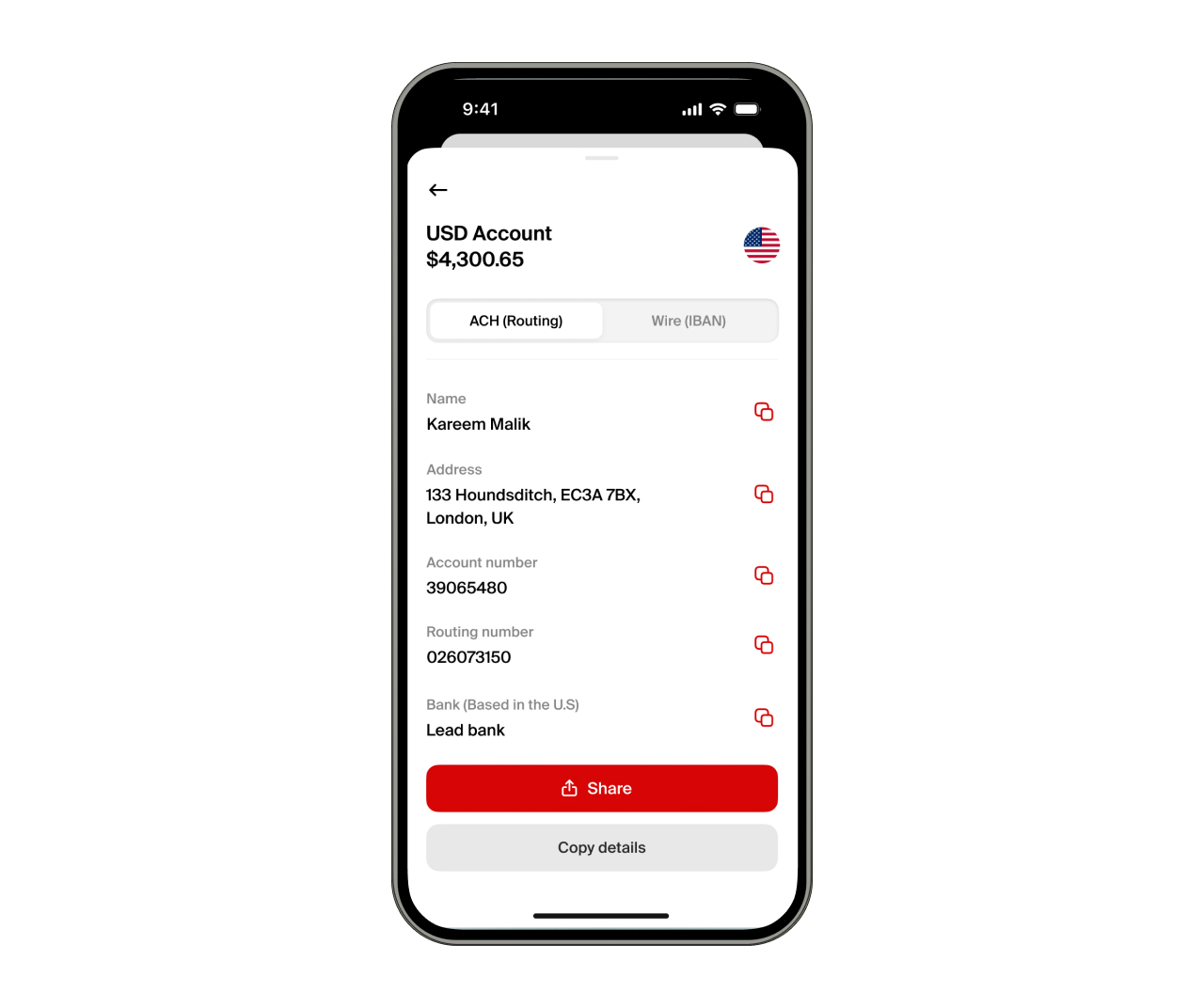
The method activates after a three-calendar-day security hold. This is Upwork's standard process for all new withdrawal methods, ot specific to nsave. Once active, you can withdraw manually or set up automatic withdrawals on a schedule. Withdrawal via ACH is free on Upwork's end.
Step 3: You can Earn Rewards while Holding
To earn on your nsave USD balance between withdrawal and conversion, no additional action is needed. The Standard plan pays 3.2% annual rewards on USD holdings, credited daily. The Pro plan ($9.99/month) pays 4.2%.
For freelancers who want to invest a portion of their earnings rather than converting everything to BDT, nsave provides access to 500+ US stocks, ETFs, bonds, and gold indices from $1 (check nsave app for current fees as fees may change).
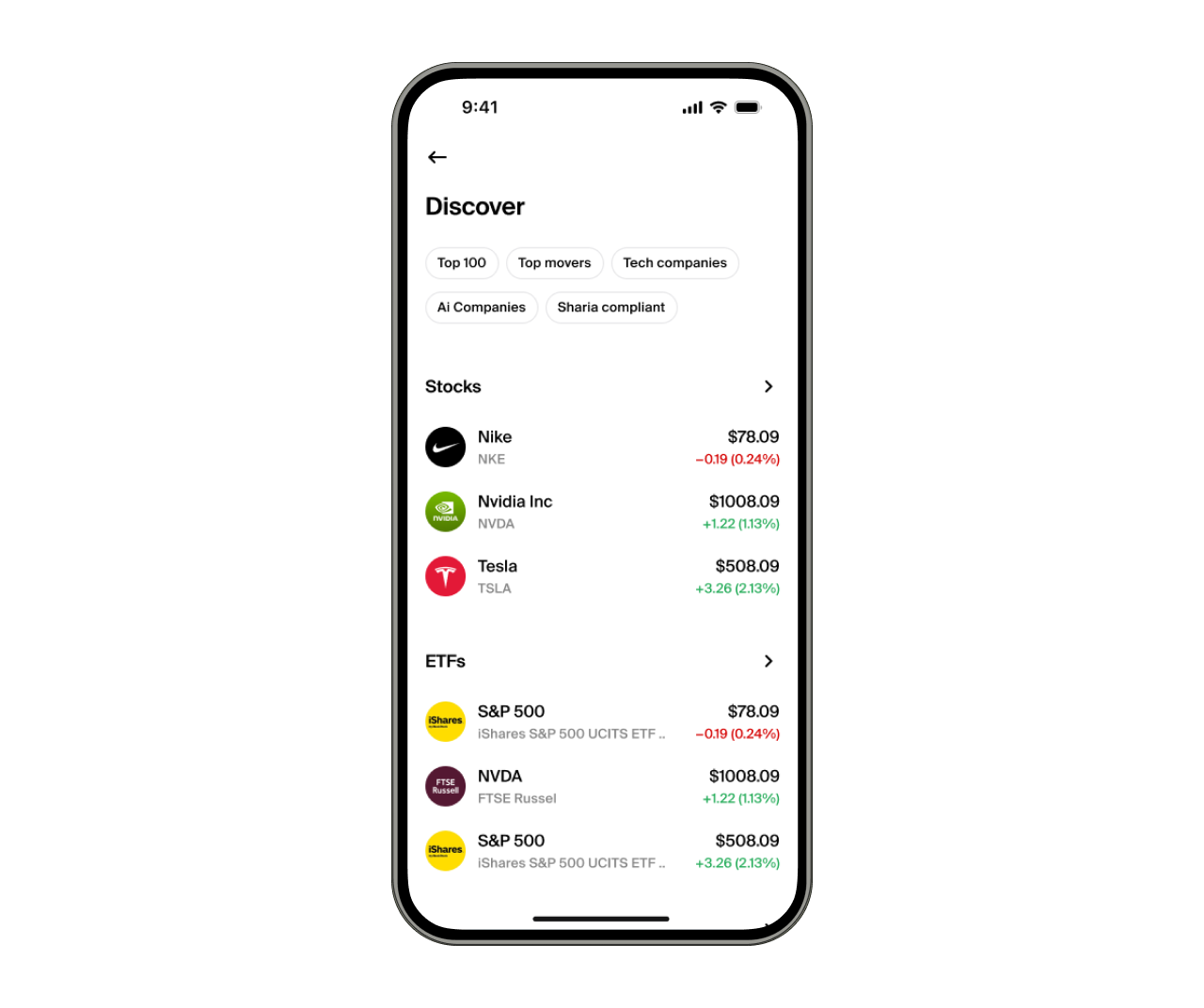
Investments involve risks, including the potential loss of capital. Past performance is not indicative of future results. Data provided is for illustrative purposes only. Consult a licensed financial advisor before making any investment decisions. Investment accounts are provided by a third-party broker dealer
Step 4: Convert to PKR and Send to Your Local Account
To send your USD earnings to a Pakistani bank account, open the nsave app, tap the payout option, enter the amount you want to send, and review the exact PKR figure and fee before confirming. The app shows you precisely what lands in your account before you commit to the transaction, so there are no conversion surprises at the destination bank.

The minimum payout fee is $1 per transfer, though fees may change so it's worth checking the current rate in the app before sending. Once confirmed, funds land in your Pakistani bank account after processing, with mobile wallet transfers arriving faster than standard bank transfers. That transparency upfront, knowing the exact PKR amount before you tap confirm, is what makes the payout process straightforward rather than something you have to reverse-calculate after the fact.
Frequently Asked Questions
Is Upwork legal in Pakistan?
Yes, Upwork is fully accessible and legal to use in Pakistan.
Do I need Payoneer to use Upwork?
No. Direct to Local Bank and Direct to US Bank (ACH) are also supported withdrawal methods.
How much does Upwork take from Pakistani freelancers?
A variable service fee of 0% to 15% per contract (typically around 10% in practice) plus a contract initiation fee of $0.99 to $14.99 per new client, applicable since May 2025.
How long does it take to receive an Upwork payment in Pakistan?
Hourly contracts: 10 days after the billing week ends. Fixed-price contracts: 5 days after client approval. Then a further 2 to 5 business days depending on the withdrawal method chosen.
Does Upwork support JazzCash or Easypaisa?
No. Supported withdrawal methods in Pakistan are Direct to Local Bank, Payoneer, Direct to US Bank (ACH), and wire transfer.
What tax rate applies to Upwork earnings in Pakistan?
Foreign income typically attracts a 1% withholding tax on receipt into a Pakistani bank account. PSEB registration reduces this to 0.25% for income declared as IT export services.
Can a beginner with no reviews get hired on Upwork?
Yes. Apply to small fixed-price jobs, write personalised proposals, and treat the first job as an investment in a review score rather than an income target. One five-star review changes a profile's conversion rate for every proposal that follows.
Every Pakistani freelancer earning consistently on Upwork today went through the same sequence: a profile that looked empty, proposals that went unanswered, a first job that paid less than expected. What separated those who kept going from those who stopped wasn't usually skill. It was a system: a profile that communicates something specific, proposals that open on the client's problem, and a withdrawal setup that doesn't quietly take 3 to 5 rupees per dollar on every payment. The platform is learnable. The income is real. What changes the outcome is running the right process from the start.
The information in this article is provided for general informational and educational purposes only and does not constitute financial, legal, or tax advice from nsave or any of its affiliates. It is not a substitute for advice from a qualified financial adviser. We make no representations or warranties, whether expressed or implied, that the content is accurate, complete, or up to date.
Fees, exchange rates, incentives, and product availability may change and can vary by user and jurisdiction. Examples are illustrative only. Before making any financial decisions, seek advice from a qualified financial adviser who can assess your individual circumstances and objectives.
nsave helps freelancers and professionals from Bangladesh, Nigeria, Pakistan, Egypt, and other emerging markets receive and manage USD abroad. As a non-bank payment provider, your money is not protected by the Financial Services Compensation Scheme (FSCS). Customer funds are held in regulated, UK and EEA financial institutions, separated from company funds, and protected through safeguarding rules designed for electronic money services.
