
Rocket Mobile Banking: How to Open an Account
According to Dutch-Bangla Bank PLC, Rocket by Dutch-Bangla Bank was the first mobile banking service launched in Bangladesh , starting March 31, 2011, years before bKash or Nagad existed. Today it remains one of the country's three largest mobile financial service (MFS) providers, with one distinction no competitor can match. According to Bangladesh Bank regulatory filings, Rocket is unique among major providers as it is operated directly as a division of DBBL rather than a subsidiary. It means your Rocket wallet connects directly to a Dutch-Bangla Bank PLC (DBBL) core banking account , and transfers from DBBL to Rocket cost nothing.
This guide covers account opening, the USSD code, current cash-out rates, transaction limits, and how the DBBL bank connection works. It also covers what Rocket cannot do , receive USD from foreign clients , and the fastest path to get international income into BDT.
What Is Rocket?
Rocket is the mobile banking service of Dutch-Bangla Bank PLC (DBBL), Bangladesh's first MFS platform, launched in 2011. It lets any mobile user send money, cash in, cash out, pay bills, and receive remittances without visiting a bank branch. According to Rocket’s official user portal, customers can access services via the *322# USSD code or call the 16216 helpline. Your account number is your registered mobile number.
Rocket is regulated by Bangladesh Bank and operated as a product division of DBBL , not as a separate corporate entity. Community analysis notes that this governance structure directly constrained Rocket's speed and autonomy in product decisions relative to competitors like bKash, which operates as a separate BRAC Bank subsidiary.
No interest is paid on a Rocket wallet balance and the app is available in Bengali and English.
Types of Rocket Accounts
Rocket offers four account types: a general personal account for individuals, a salary/stipend account for employees receiving payroll disbursements, a merchant account for businesses, and an agent account for cash service operators.
General personal account: This is the standard individual account, tied to your mobile number and National ID (NID).
Salary/stipend account: The Salary/Stipend account is set up by employers or institutions for payroll disbursements. Rocket salary disbursement operates as a centralised batch process: DBBL debits the corporate account once and credits all employee accounts simultaneously, not as individual real-time pushes , meaning all employees receive funds at the batch processing time regardless of when the corporate submitted the instruction. Users may find themselves on this account type if their employer uses Rocket payroll.
Merchant account: The Rocket Merchant account is for businesses accepting Rocket payments. Separate setup. Not covered here.
Agent account: The Rocket agent Account is for agents facilitating cash in and cash out for customers. Not covered here.
How to Open a Rocket Account
To open a Rocket account, download the Rocket app, complete digital KYC by scanning your NID and taking a selfie, set your PIN, and the account activates immediately , or visit any Rocket agent point or DBBL branch with your NID and a passport-size photograph.
Via the Rocket app (recommended)
To open Rocket Account via the Rocket App, follow the 6 major steps
- Download the Rocket app from Google Play or the Apple App Store.
- Select "Register Account."
- Scan both sides of your National ID. The app reads your details automatically.
- Take a selfie for identity verification.
- Set a 4-digit PIN. This PIN authenticates every transaction.
- The account activates immediately.
To open an account, you'll need a Bangladeshi National ID, an active SIM card from any operator, and a smartphone.
Via agent point or DBBL branch:
Visit any Rocket agent point, DBBL branch, FastTrack ATM, or DBBL Mobile Banking office. Bring your NID and one passport-size photograph. The agent or branch staff opens your account using the KYC form. You receive a confirmation SMS once the account is active.
Account opening is free. One NID equals one personal Rocket account. Your account number is your registered mobile number.
How to Access Your Rocket Account
To access your Rocket account, open the app and log in with your mobile number and 4-digit PIN , or dial *322# from your registered SIM for USSD access without an internet connection.
App login: Enter your mobile number, then your PIN. Available in Bengali and English.
USSD access (*322#): Dial from your registered SIM, enter your PIN, and navigate the menu. No internet required. Works on basic handsets. Supported actions: balance check, send money, cash out, mobile recharge.
For support, call the local helpline at 16216 (within Bangladesh) or reach the international line at (8802) 47110465. If you forget your PIN, use the "Forgot PIN" option in the app, visit your nearest DBBL Mobile Banking office or FastTrack, or call 16216.
Rocket Services
Rocket supports cash in, cash out at agent points and DBBL ATMs, peer-to-peer transfers, DBBL bank account transfers, utility bill payments, mobile recharge, merchant payments, foreign remittance receiving, salary disbursement, and government allowance receipt.
Money movement:
- Cash in: At any Rocket agent, DBBL branch, or FastTrack. Free for general accounts. Cash in has historically been free at both agent and branch level , a differentiator from bKash and Nagad.
- Cash out: At any Rocket agent, DBBL ATM/FastTrack, or branch. Although Rates differ by method , see the charges section below.
- Send money (P2P): Transfer to any other Rocket account
- DBBL bank account to Rocket: Free to transfer from DBBL bank account to Rocket.
- Rocket to DBBL bank account: 0.9% charge (BDT 9 per BDT 1,000).
- Add money: Fund your Rocket wallet via the Rocket app.
Payments:
- Utility bill payment: Electricity, gas, water, internet, and other bills via app or USSD.
- Merchant payment: Pay at Rocket-affiliated merchants via app or USSD. Free for the customer.
- Mobile recharge: Recharge any Bangladeshi mobile number.
Receiving:
- Foreign remittance: Receive international remittances directly into your Rocket account.
- Salary disbursement: Employers disburse salaries directly via Rocket.
- Government allowances: Social service allowances, government grants, and education stipends.
Since November 2025, Bangladesh Bank requires all MFS providers , including Rocket , to support interoperable transfers via NPSB. This means you can send and receive funds directly between Rocket and other MFS wallets such as bKash and Nagad. Interoperable transfer limits are not universal: each institution sets its own ceilings based on account type.
Rocket Charges and Transaction Limits
According to the DBBL Schedule of Charges (2026), Rocket's cash-out rate at DBBL ATMs is approximately BDT 9 per BDT 1,000 (0.9%) , the cheapest ATM withdrawal rate among Bangladesh's major MFS providers.
| Transaction type | Charge | Notes |
|---|---|---|
| Account | ||
| Account opening | Free | Requires NID and biometric registration |
| Wallet balance | No interest | Rocket does not provide interest on wallet balances |
| Cash in | ||
| Cash in — general account | Free | At any Rocket Agent, DBBL Branch, or FastTrack |
| Cash in — salary / stipend | 0.9% or Tk 10Higher applies | At DBBL Branches only |
| Cash out | ||
| Cash out — Rocket Agent | 1.67% General 0.9% Salary | General accounts pay Tk 16.70 per Tk 1,000 |
| Cash out — DBBL ATM / FastTrack | 0.9%Tk 9 per Tk 1,000 | Lowest withdrawal rate for General accounts |
| Cash out — DBBL Branch | 0.9% or Tk 10Higher applies | Minimum Tk 10 fee applies |
| Transfers | ||
| P2P send money — Rocket App | Free | Currently free via the Rocket App |
| P2P send money — USSD (*322#) | Tk 5 flat | Flat fee per transaction |
| Rocket → DBBL bank account | 0.9%Tk 9 per Tk 1,000 | Mobile Wallet to Core Banking |
| DBBL bank account → Rocket | Free | Core Banking to Mobile Wallet |
| Payments | ||
| Merchant payment | Free | No charge to the customer |
Under current Bangladesh Bank guidelines, Cash Out is permitted up to 50 times per day and 100 times per month (with a daily limit of Tk 30,000). While the central bank allows for higher daily totals, Rocket-to-bank transfers (MBS to CBS) are currently capped by the platform at BDT 25,000 per transaction, with a cumulative daily limit of BDT 50,000.
The app displays the exact charge before you confirm any transaction.
How to Check Your Rocket Account Information
To check your Rocket balance, open the Rocket app and tap the balance button , or dial *322# and select Balance Inquiry, then enter your PIN.
Balance: To check your account balance, navigate to the App home screen (one tap). Or via USSD, dial *322# → Balance Inquiry → enter PIN.
Account number: Your Rocket account number is your registered mobile number. You can view it in the app under Account Inquiry.
Transaction history: In the Rocket app under Statement Inquiry. Full statement: visit a DBBL Mobile Banking office. Mini statements are available in the app.
Find nearest agent, ATM, or branch: Use the "Find Nearest" feature in the Rocket app to locate nearby DBBL ATMs, agents, branches, and merchants.
Common Rocket Account Issues
The most common Rocket account issues are failed transactions due to exceeded limits, PIN-related login failures, and SIM or NID mismatches during account opening.
Wrong PIN / account locked: Three wrong PIN entries lock the account. Call 16216 or visit the nearest DBBL Mobile Banking office for PIN recovery.
Transaction failed (limit reached): To fix a transaction failed in Rocket, Check your remaining daily limits in the app. Cash out is capped at 5 times per day. If the daily limit is reached, wait until the next calendar day.
SIM mismatch: To fix SIM Mismatch, ensure the SIM in your phone must match the registered Rocket number. Do not attempt to register using a SIM not physically in your device.
Lost SIM: If your SIM is lost, visit a DBBL Mobile Banking office to close the old account and open a new one linked to a new number.
"Request Money" scam: Rocket's Request Money feature has historically been exploited for fake VAT, tax, and lottery scams , a fraud pattern where fraudsters send payment requests framed as official government demands. Reject any unsolicited Request Money notification you did not initiate.
How to Receive International Income and Convert to BDT with nsave
To receive international income and convert it to BDT for your Rocket account or local bank, open a nsave USD account, direct your foreign earnings to it using your personal ACH routing number and account number, and initiate a local currency withdrawal when you are ready.
Rocket handles money movement inside Bangladesh. It cannot receive USD from a foreign employer, international freelance platform, or overseas client. For that, you need a USD account first.
Step 1: Open Your nsave USD Account
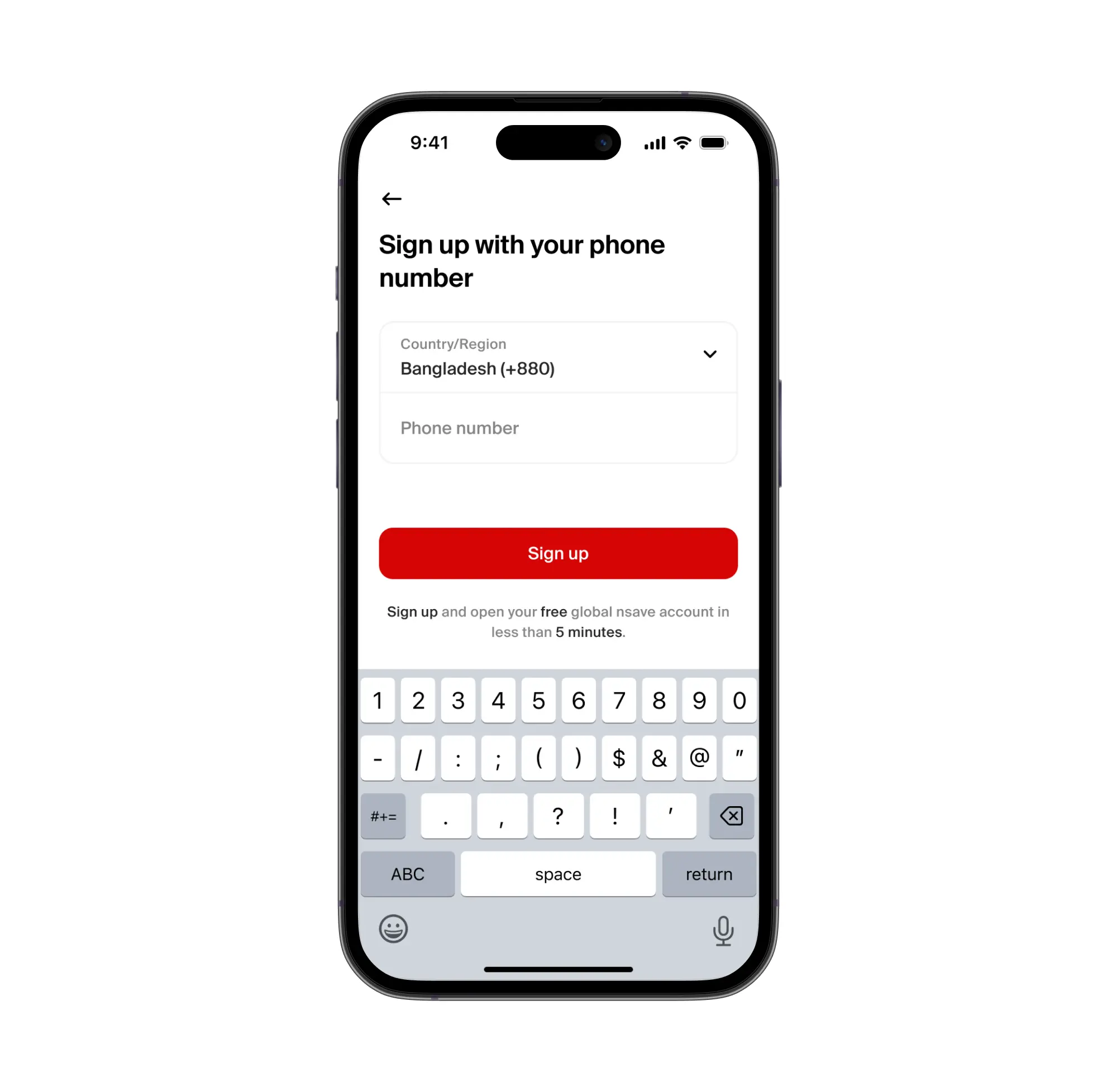
To open a nsave USD account, download the nsave app and complete identity verification using your passport or national ID , the process takes under 10 minutes. The Standard plan costs $0/month (check the nsave app as fees are subject to change). Once verified, nsave assigns a personal US ACH routing number and account number. No branch visit required. No physical card needed to start.
New to nsave? Watch how to set up your account in under 10 minutes:
Step 2: Set nsave as Your Payout Destination
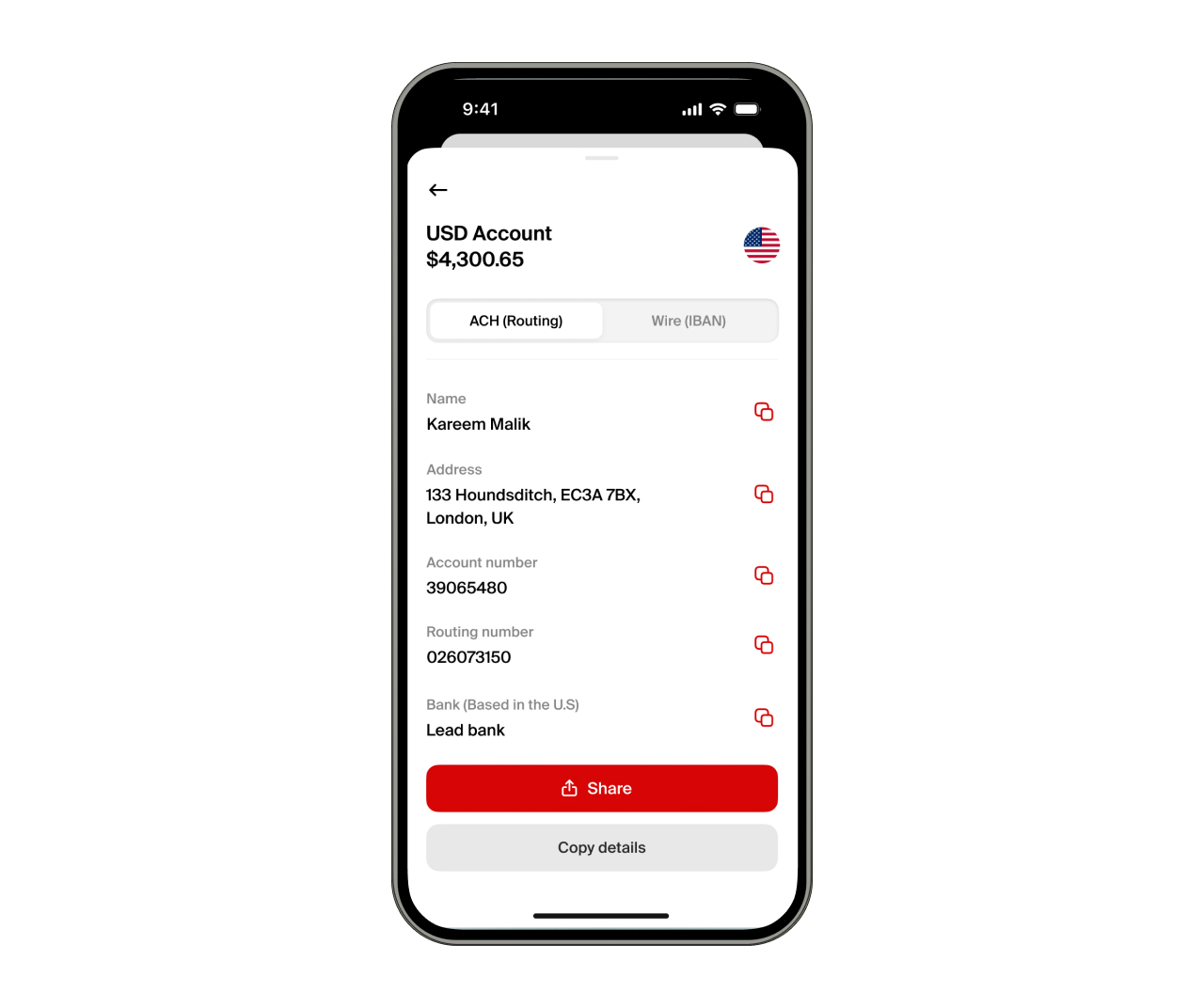
To receive international income via nsave, share your ACH routing number and account number with the platform or client paying you. Any platform that pays to a US bank account , Upwork, Fiverr, Toptal, Deel, PeoplePerHour, Freelancer.com, Payoneer, or Wise , can send funds directly to your nsave account. Receiving via ACH or SWIFT is free on both Standard and Pro plans (check the nsave app as fees are subject to change).
Step 3: Convert to BDT and Transfer to Your Local Account or Rocket
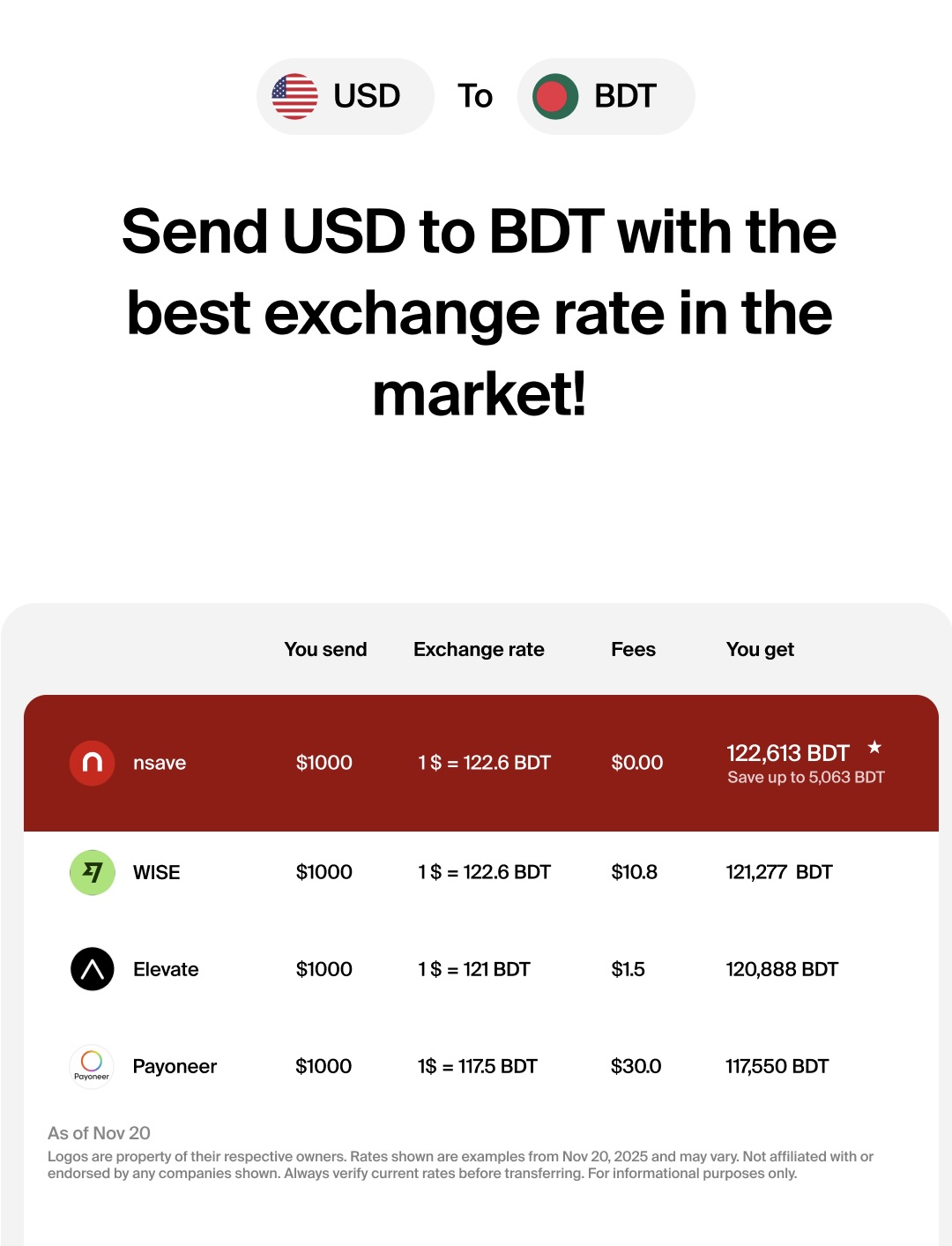
To convert USD to BDT, initiate a local currency withdrawal in the nsave app. The app shows the exact BDT amount before you confirm. Minimum payout fee: $1 (check the nsave app as fees are subject to change). Funds arrive in your Bangladeshi bank account , from which you can transfer to Rocket directly (DBBL to Rocket: free), or use for any other local purpose.
For users with longer-term goals: nsave supports investing in 500+ US stocks, ETFs, bonds, and gold indices from $1 with zero order fees (check the nsave app for current fees and availability). Sharia-compliant investing is also available.
Investments involve risks, including the potential loss of capital. Past performance is not indicative of future results. Data provided is for illustrative purposes only. Consult a licensed financial advisor before making any investment decisions. Investment accounts are provided by a third-party broker dealer.
Is Nagad a Good Alternative to Rocket?
Nagad is a viable alternative to Rocket for domestic transfers and cash-out in Bangladesh, but its agent network reliability and two-tier fee structure create practical limitations that Rocket does not share.
Nagad operates under Bangladesh Bank administration as of August 2024 and holds an interoperability licence issued in December 2025, meaning Nagad wallets connect to bKash, Rocket, and scheduled banks through the National Payment Switch Bangladesh (NPSB). A Nagad user can send funds directly to a Rocket wallet or any DBBL-linked account via this NPSB infrastructure.
Is bKash a Good Alternative to Rocket?
bKash is Bangladesh's largest mobile financial service by active users and agent count, making it the most accessible alternative to Rocket for domestic cash-out and person-to-person transfers.
bKash operates on a BRAC Bank–backed infrastructure with over 350,000 agents nationwide. Its daily cash-out limit is BDT 30,000 per day and BDT 200,000 per month as of March 2025, following a Bangladesh Bank upward revision ahead of Eid-ul-Fitr. The maximum account balance is BDT 500,000. By comparison, Rocket's daily limits are lower and its agent network is concentrated in urban DBBL-affiliated outlets.
Can I Use Payoneer to Receive International Payments and Convert to BDT?
Yes, Payoneer is widely used in Bangladesh for receiving freelance income from Upwork, Fiverr, and Freelancer.com, and withdrawing to a local Bangladeshi bank account in BDT.
Can I Use Wise to Receive and Convert International Payments?
Wise supports USD to BDT conversions and is competitive on exchange rates, but does not issue a personal US ACH routing number that can be used as a direct payout destination on freelance platforms like Upwork or Fiverr.
Wise is useful for one-off transfers but cannot serve as a full USD receiving account with a personal ACH number , which is what recurring freelance payouts require. For users who need both a US ACH payout address and a BDT conversion path, nsave covers the full chain. BDT reaches Rocket via a standard DBBL bank transfer, which is free.
Key Takeaways
Rocket is the mobile banking service of Dutch-Bangla Bank PLC , the first MFS in Bangladesh, launched in 2011. Open an account via the Rocket app (NID scan + selfie) or at any DBBL agent or branch. The USSD code is *322#. Cash out costs 0.9% (BDT 9 per BDT 1,000) at agent points and approximately BDT 9 per BDT 1,000 at DBBL ATMs , the cheapest ATM rate among major MFS providers. DBBL-to-Rocket transfers are free. Rocket-to-DBBL transfers cost 0.9%. No interest is paid on the Rocket wallet balance.
Rocket's strongest feature is its direct link to DBBL's commercial banking infrastructure. For users receiving income from abroad, the USD side comes first: nsave provides a personal ACH routing number, and converts to BDT with a minimum $1 fee (check the nsave app as fees are subject to change), which then reaches Rocket via a free DBBL bank-to-Rocket transfer.
The information in this article is provided for general informational and educational purposes only and does not constitute financial, legal, or tax advice from nsave or any of its affiliates. It is not a substitute for advice from a qualified financial advisor. We make no representations or warranties, whether expressed or implied, that the content is accurate, complete, or up to date.
Fees, exchange rates, incentives, and product availability may change and can vary by user and jurisdiction. Examples are illustrative only. Before making any financial decisions, seek advice from a qualified financial advisor who can assess your individual circumstances and objectives.
nsave helps freelancers and professionals from Bangladesh, Nigeria, Pakistan, Egypt, and beyond receive and manage USD abroad. As a non-bank payment provider, your money is not protected by the Financial Services Compensation Scheme (FSCS).
