
Nagad Account: How to Open, Use, and Manage

Nagad grew from zero to Bangladesh's second-largest MFS provider within seven months of its commercial launch on 26 March 2019, the fastest MFS adoption in the country's history. Today it serves tens of millions of users through 300,000+ Uddokta agent points.
This guide is for someone opening a Nagad account for the first time, or someone who just opened one and wants to understand what it can do. By the end, you will know how to open a Nagad account, what the USSD code is, current cash out charges, the March 2025 transaction limit update, and how to switch to the Nagad Islamic account.
What Is Nagad?
Nagad is a mobile financial service (MFS) operated under Bangladesh Post Office and regulated by Bangladesh Bank, offering cash in, cash out, fund transfers, bill payments, and remittance receiving via a smartphone app or USSD code.
Nagad now operates under Bangladesh Bank administration following the August 2024 regime change. Nagad is not a bank, it is a licensed MFS provider. The USSD code to access Nagad on a mobile phone is *167#. Nagad Helpline is 16167.
Your Nagad account number is your registered mobile number. Nagad operates through 300,000+ Uddokta agent points across Bangladesh.
Nagad's most distinctive feature among major MFS providers is the Nagad Islamic account, an interest-free, Shariah-compliant toggle available directly inside the standard personal account, without requiring a separate registration or product. That single feature sets it apart from bKash, Rocket, and most other MFS options in the market.
What Are the Types of Nagad Accounts?
Nagad offers a personal account for individual users, a Nagad Islamic account for users who want an interest-free Shariah-compliant option, a merchant account for businesses, and an Uddokta account for Nagad agents.
Personal account: This is a standard account for individuals, tied to a mobile number and NID. This article covers this account type.
Nagad Islamic account: The Nagad Islamic Account is not a separate account. It is a toggle within the personal account. Existing users switch by going to "My Nagad" → Account Type → Nagad Islamic. Interest-free, supervised by Nagad's Shariah Supervisory Committee.
Merchant account: The merchant account is for businesses accepting Nagad payments. Requires a trade licence and its a separate onboarding process.
Uddokta account: This is for agents providing cash in and cash out services to customers.
How to Open a Nagad Account
To open a Nagad account, download the Nagad app from Google Play or the App Store, upload both sides of your NID, take a selfie, provide your signature, and set your PIN.
Via Nagad app (recommended)
To open a Nagad account via the Nagad app, follow the below steps:
- Download the "Nagad" app from Google Play or the Apple App Store.
- Open the app and select "Open Account."
- Choose your NID type and upload photos of both sides of your National ID.
- Take a selfie , the app uses face verification to match your photo with the NID.
- Read and accept the terms and conditions.
- Provide your digital signature.
- Set a 4-digit PIN. This PIN authenticates every transaction.
- Your account activates instantly.
The major requirements to open an account from the Nagad App include; Bangladeshi NID, active SIM on any operator, smartphone.
Via Uddokta (agent point)
You visit any Nagad Uddokta with your NID. The agent uses the Nagad eKYC process to register your account. You receive a confirmation SMS. Your account number is your mobile number.
Account opening is free. One NID = one personal Nagad account.
How to Access Your Nagad Account
To access your Nagad account, open the app and log in with your registered mobile number and PIN or dial *167# from your registered SIM for USSD access without an internet connection.
App login: To access your Nagad account via the App, enter your mobile number → enter your PIN. Biometric login is available after initial setup. The app supports Bengali and English.
USSD (*167#): To access your Nagad Account without an internet connection, you can use “USSD”. Dial from your registered SIM → enter PIN → navigate the menu. No internet required. Works on basic handsets. Covers: balance check, send money, cash out, and mobile recharge.
Forgot PIN: If you forget your PIN, you can use the "Forgot PIN" option in the app or call helpline 16167. Identity verification is required before a PIN reset is processed.
To contact Nagad support, call 16167 if you're in Bangladesh, or 096 096 16167 if you're calling from outside the country.
Nagad Services
Nagad supports cash in, cash out at Uddokta points and ATMs, peer-to-peer money transfers, bank account transfers, utility bill payments, mobile recharge, QR code merchant payments, remittance receiving from abroad, salary disbursement, and government social service allowance receipt.
Money Movement
Nagad supports 4 money movement functions: cash deposit, cash withdrawal, peer-to-peer transfer, and bank transfer.
- Cash in: Deposit at any Nagad Uddokta point, via bank transfer, or by adding funds from a card.
- Cash out: Withdraw at Nagad Uddokta points or via ATM at BRAC Bank, City Bank, and Q-Cash terminals. Withdrawal fees vary by access method:App (Regular): BDT 11.48 + VAT (~BDT 12.99 total)
- App (Islamic): BDT 15.00
- USSD (all account types): BDT 15.00 — 20% higher than the app Regular rate, applied on every cash-out via feature phone
Payments
Nagad supports 3 payment functions: utility bills, merchant QR payments, and mobile recharge.
- Utility bill payment: Pay for electricity, gas, water, and internet. Available 24/7 via the app.
- Merchant payment: QR code payments at any Nagad-affiliated merchant. No charge to the customer.
- Mobile recharge: Recharge any major Bangladeshi mobile operator directly from the app.
Receiving
Nagad accounts can receive funds through 3 channels: international remittance, government disbursements, and employer salary payments.
- International remittance: Receive inward remittances from abroad directly into your Nagad account.
- Government allowances: Receive old age allowances, disability allowances, student stipends, and other social service disbursements directly to Nagad.
- Salary disbursement: Employers disburse salaries directly into Nagad accounts.
Nagad Islamic Account
Nagad Islamic is an interest-free, Shariah-compliant account mode activated by a toggle inside the standard Nagad app, supervised by Nagad's internal Shariah Supervisory Committee.
What Nagad Islamic is?
Nagad Islamic is not a separate account, it's a mode switch within your existing personal account. When activated, the account interface turns green to confirm the change.
How to Switch to Nagad Islamic
To activate Nagad Islamic, follow these 5 steps:
- Open the Nagad app
- Tap "My Nagad" at the bottom of the screen
- Select "Account Type"
- Tap "Nagad Islamic"
- Confirm on the pop-up
The switch takes effect immediately. Account type can only be changed once per calendar month — switching back to a regular account counts as that month's change.
What Changes When You Switch
Activating Nagad Islamic changes 3 things:
- No profit (interest) is earned on the balance
- Funds are held in Islamic banks rather than conventional ones
- All transactions are managed under Shariah principles
Features Unique to Nagad Islamic
Nagad Islamic unlocks 4 features not available on a standard account:
- Takaful (Islamic insurance) premium payments
- Hajj and Umrah tour payments
- Zakat contributions and donations to Islamic organisations
- Daily Ibadat reminder inside the app
Nagad Islamic Merchant Accounts
Islamic merchant accounts are available separately for business owners. To open one, a trade licence is required and onboarding is completed via nagadislamic.com.bd. A green indicator on the merchant account confirms Shariah-compliant status, with funds routed through Islamic banks.
Nagad Transaction Limits and Charges
As of March 2025, Bangladesh Bank raised MFS transaction limits for Nagad and all other MFS providers , daily cash in via Uddokta agent is now BDT 50,000, and daily cash out via Uddokta agent is BDT 30,000. While standard daily limits are BDT 50,000 (In) and BDT 30,000 (Out), users should be aware of temporary regulatory 'cooling periods.' For example, in February 2026, P2P transfers were temporarily capped at BDT 1,000 per transaction for a 96-hour period due to national security mandates.
| Transaction type | Daily limit | Monthly limit | Charge |
|---|---|---|---|
| Cash in | |||
| Cash in — Uddokta | BDT 50,000 | BDT 3,00,000 | Free |
| Cash out | |||
| Cash out — Uddokta (app) | BDT 30,000 | BDT 2,00,000 | BDT 12.99/1,000 |
| Cash out — USSD (*167#) | BDT 30,000 | BDT 2,00,000 | BDT 15.00/1,000 |
| Cash out — bank / card channels | BDT 50,000 | BDT 3,00,000 | BDT 7.00/1,000Lowest cash-out rate |
| Transfers | |||
| Send money — P2P (app) | BDT 25,000 | BDT 2,00,000 | Free first 5/month BDT 5 per transaction after |
| Bank transfer from Nagad | BDT 50,000 | BDT 3,00,000 | 0.85%NPSB standard rate |
| Payments | |||
| Merchant payment (QR) | — | No limit | FreeFor customer |
| Account limits | |||
| Maximum account balance | BDT 5,00,000 | — | — |
While the November 2025 mandate standardised the framework and fees for interoperable transactions, as of March 2026, it did not create a single, universal transaction limit for all users. This means interoperable transfer limits are not universal and are set by each institution based on the account type. Hence, each bank (like BRAC Bank), MFS (like bKash), and PSP (like Upay) sets its own interoperability ceilings based on the specific type of account held by the customer.
The app shows the exact charge before you confirm any transaction. Always check in-app before proceeding.
How to Check Your Nagad Account Information
To check your Nagad balance, open the app and tap the balance button on the home screen, or dial *167# → select Balance Inquiry → enter your PIN.
Your Nagad account number is your registered mobile number. Find it under "My Nagad" in the app.
Transaction history is available under the Statement or Transaction History section in the app. Each entry shows the amount, date, time, transaction type, and transaction ID.
Common Nagad Account Issues
NID Verification Failed
NID verification fails when the submitted photos are unclear or the selfie doesn't match the NID photo. To resolve this, photograph both sides of the NID clearly and ensure the selfie matches the NID photo directly. If verification still fails after resubmission, visit a Nagad Uddokta point for in-person registration via agent-assisted eKYC.
Login Failure (Wrong PIN)
3 consecutive wrong PIN attempts lock the account. To regain access, call helpline 16167 or use the in-app Forgot PIN option — identity verification is required before the PIN resets.
Transaction Failed
A failed transaction has 2 likely causes: insufficient balance or an exceeded daily limit. Check both in the app before retrying. If the transaction continues to fail after confirming balance and limit are clear, call 16167.
Daily and Monthly Limits
Daily cash-out via Uddokta is capped at BDT 30,000. The daily limit resets at midnight. Monthly limits reset on the 1st of each month.
Can I Use bKash Instead of Nagad?
Yes, bKash is the largest mobile financial service in Bangladesh with 80 million+ customers and 330,000+ agent points , and it performs the same core functions as Nagad, including cash in, cash out, P2P transfers, utility bill payments, mobile recharge, and remittance receiving.
The practical difference between bKash and Nagad comes down to two things: cash-out rate and agent reliability. Nagad's app cash-out rate is BDT 12.99 per BDT 1,000 , lower than bKash's standard agent rate of BDT 18.50. On paper, Nagad wins on cost.
In practice, Nagad agents are mostly small shopkeepers, a phone accessories seller, a small grocery, who do not keep large amounts of cash on hand. When you show up and ask for BDT 10,000 in physical cash, the Nagad agent often says "no cash available" because Nagad pays agents a lower commission per transaction. bKash agents are better funded and almost always have cash ready. That reliability is what users are paying for when they choose bKash, not the brand name.
For daily cash out needs below BDT 3,000–5,000, Nagad's lower rate gives you a real saving. For larger withdrawals in areas without a well-funded Nagad agent point, bKash is the more reliable choice. Since November 2025, both platforms are connected via NPSB, you can send money from a Nagad wallet to a bKash wallet and vice versa at the standard MFS-to-MFS interoperability fee. For receiving international income, neither bKash nor Nagad accepts direct USD payouts , both require BDT to arrive from a Bangladeshi bank account first.
Can I Use Rocket Instead of Nagad?
Yes, Rocket is a mobile financial service operated by Dutch-Bangla Bank Limited (DBBL) that covers cash in, cash out, P2P transfers, utility bill payments, and salary disbursement, accessible via USSD at *322# or the Rocket app.
Rocket's agent cash-out rate is 0.9% (BDT 9 per BDT 1,000) , lower than Nagad's BDT 12.99 app rate on paper. However, Rocket's 0.9% is a percentage, not a flat fee. Withdraw BDT 5,000 and the fee is BDT 45, not BDT 9. The flat-fee product is Rocket's ATM withdrawal, which charges a fixed BDT 5–9 regardless of the amount, that is where the "BDT 9" reputation originates, and it gets incorrectly applied to the agent rate.
Rocket has reported 239,000+ active agents nationwide, smaller than Nagad's 300,000+ Uddokta points. Rocket's cash-in has historically been free at both agent and branch level , a differentiator that Nagad does not match. For salary disbursement specifically, Rocket has a long-standing presence via DBBL's corporate payroll infrastructure.
Both Rocket and Nagad are now NPSB-connected , wallet-to-wallet transfers between them are supported at the standard MFS-to-MFS interoperability fee. For receiving international income in USD, Rocket has the same limitation as Nagad: it cannot receive direct USD payouts from platforms like Upwork or Fiverr. A nsave USD account receives that income first, converts at the right time, and sends BDT to your local bank , from which Rocket or Nagad can receive via NPSB bank-to-MFS transfer.
Can I Use mCash Instead of Nagad?
Yes, mCash is the mobile financial service of Islami Bank Bangladesh PLC (IBBPLC) and covers the same core functions as Nagad , cash in, cash out, P2P transfers, utility bill payments, remittance receiving, and salary disbursement , accessible via app, USSD at *259#, or the CellFin app.
The primary difference between mCash and Nagad is Shariah compliance. Nagad offers a Shariah-compliant toggle via the Nagad Islamic account option. mCash is structurally built on Islamic Mudaraba principles from the ground up , returns on balance are profit-sharing, not interest. For users who need full institutional Shariah compliance at the infrastructure level rather than a toggle, mCash is the stronger choice.
On cash-out rates, mCash charges BDT 7 per BDT 1,000 at IBBL ATMs and branches , cheaper than Nagad's BDT 12.99 app rate. At mCash agent points, the rate is BDT 13.90 per BDT 1,000 , slightly higher than Nagad. For salary recipients in particular, mCash has historically offered zero ATM cash-out fees, a benefit unavailable through Nagad.
The tradeoff is network reach. mCash operates through approximately 2,800 IBBL agent outlets, compared to Nagad's 300,000+ Uddokta points. Outside major cities, finding an mCash agent is less predictable. Both mCash and Nagad are NPSB-connected, so wallet-to-wallet transfers between them are supported. For international income, the same upstream path applies: a nsave USD account receives USD, converts at the right rate, and sends BDT to your local bank before reaching any MFS wallet.
Can I Use a Bangladeshi Bank Account Instead of Nagad?
Yes , any Bangladeshi bank account at a scheduled bank such as BRAC Bank, Dutch-Bangla Bank, City Bank, or Islami Bank Bangladesh supports cash transactions, P2P transfers, utility payments, and remittance receiving , the same core functions as Nagad.
The practical difference is setup friction and daily usability. Nagad opens in minutes from your phone with a NID scan and selfie. A bank account requires documentation, an onboarding process that takes 1–7 working days, and typically a debit card for ATM access. For users who already have both, the bank account handles larger transactions and qualifies for the 2.5% government cash incentive on inward remittances. Nagad handles smaller, faster daily payments and cash-out through its 300,000+ Uddokta points.
For receiving international income specifically, a bank account has one clear advantage over Nagad: it can receive SWIFT wire transfers directly from foreign clients or employers. Nagad cannot. However, most Bangladeshi banks apply their own exchange rate and processing fees on inward wire transfers, and those rates are not always displayed upfront. A nsave USD account solves this differently , it receives USD from any platform, shows the exact BDT conversion amount before you confirm, and sends to your Bangladeshi bank with a minimum $1 fee (check the nsave app as fees are subject to change). From the bank, funds can be transferred to Nagad via the standard NPSB bank-to-MFS route at 0.15% (BDT 1.50 per BDT 1,000).
Can I Use Upay Instead of Nagad?
Upay is a Mobile Financial Service (MFS) provider, not just a Payment Service Provider (PSP). It is a subsidiary of United Commercial Bank (UCB). This means it has the same regulatory standing as Nagad or bKash. It supports QR-based merchant payments, P2P transfers, utility bill payments, and mobile recharge , primarily through the Upay app, accessible to any Bangladeshi with a mobile number and NID.
Upay's core use case is merchant payments and digital transactions rather than agent-based cash out. It does not operate a large agent cash-out network comparable to Nagad's 300,000+ Uddokta points. If your primary need is cash out at an agent point , withdrawing physical BDT , Nagad is the more practical choice on reach and infrastructure. If your primary need is digital payments, QR transactions, and bill settlements, Upay is a functional alternative within the same licensed MFS framework.
Since November 2025, Upay participates in NPSB interoperability as a payment service provider , transfers between Upay and bank accounts or MFS wallets including Nagad are supported at the PSP-to-bank or PSP-to-MFS fee of 0.20% (BDT 2.00 per BDT 1,000).
For international income, Upay has the same limitation as all local MFS providers and PSPs: it cannot receive direct USD payouts. The path runs the same way , nsave USD account receives foreign earnings, converts to BDT, sends to your Bangladeshi bank, and the BDT reaches Upay or Nagad via NPSB from there.
Nagad handles the BDT side of your financial life. But if you earn in USD , from Upwork, Fiverr, a foreign employer, or an overseas client , that money needs a USD account first. The right USD account doesn't just receive funds; it holds them securely until you're ready to convert.
How to Receive International Income and Convert to BDT
To receive international income and convert it to BDT for your Nagad account or local bank, open a nsave USD account, direct your foreign earnings to it using your personal ACH routing number and account number, and initiate a local currency withdrawal when ready.
Step 1: Open Your nsave USD Account
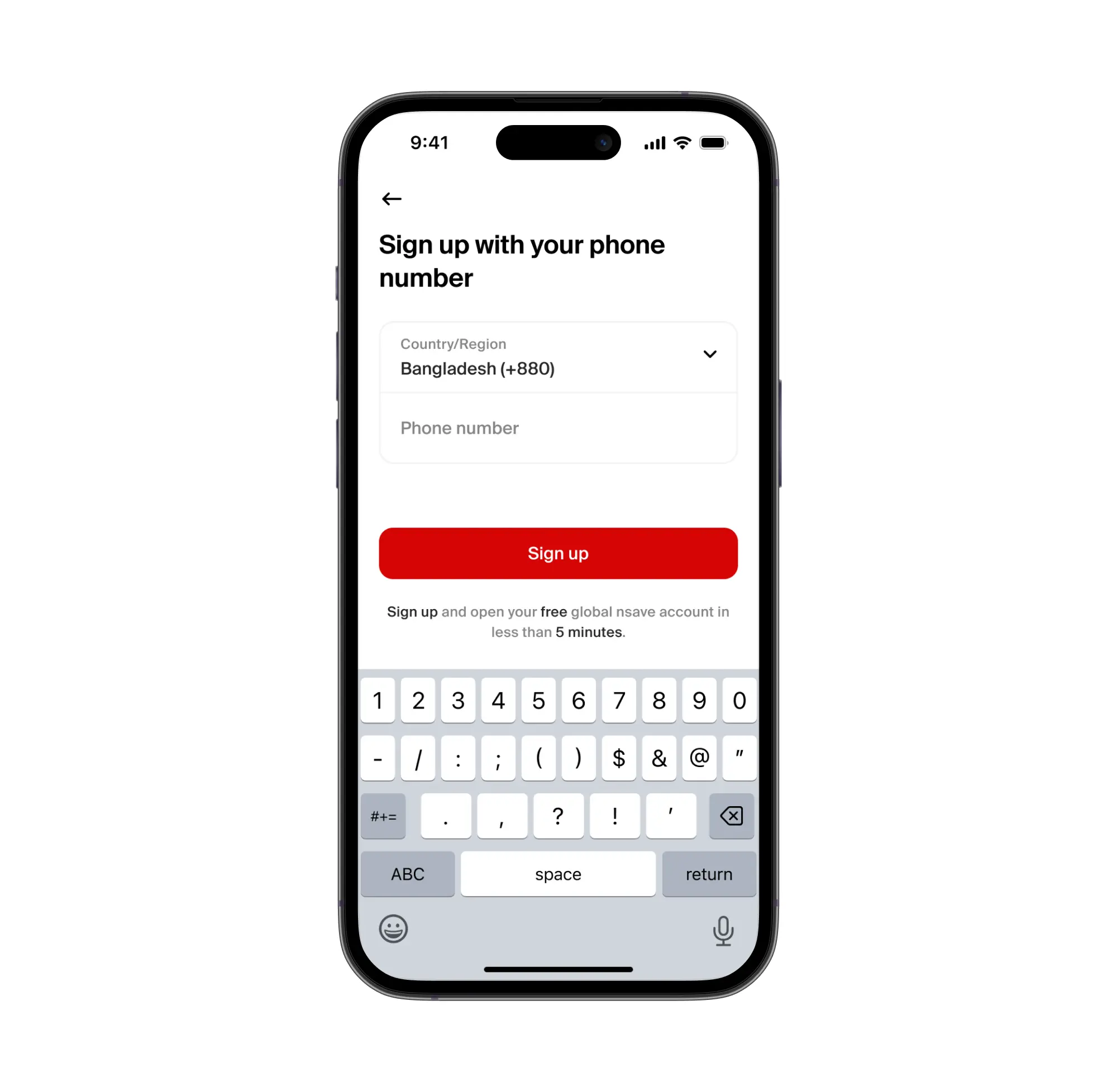
To open a nsave USD account, download the nsave app and complete identity verification using your passport or national ID , the process takes under 10 minutes. The Standard plan costs $0 per month (check the nsave app as fees are subject to change). Once verified, nsave assigns a personal US ACH routing number and account number. No branch visit. No card required to start.
Step 2: Direct Your Foreign Income to nsave
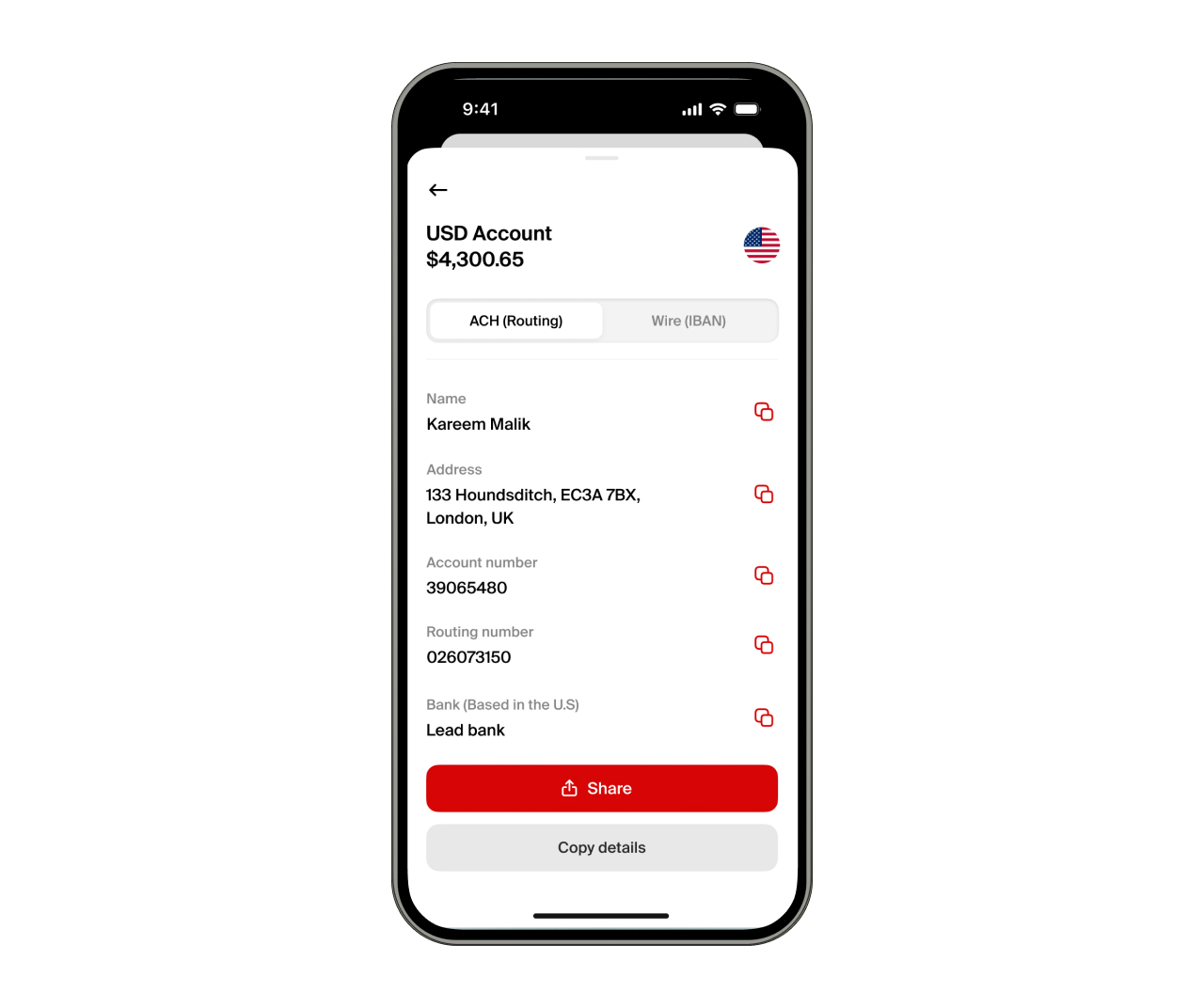
To receive international income via nsave, share your ACH routing number and account number with the paying platform or client. The following platforms support direct transfers to nsave accounts: Upwork, Fiverr, Toptal, Deel, PeoplePerHour, Freelancer.com, Payoneer, and Wise.
Receiving funds via ACH or SWIFT is free on both Standard and Pro plans. Check the nsave app for current rates before transacting, as fees are subject to change.
Step 3: Convert to BDT and Transfer to Your Local Account

To convert USD to BDT, initiate a local currency withdrawal in the nsave app. The exact BDT amount displays before you confirm. The minimum payout fee is $1, check the nsave app for current rates before transacting, as fees are subject to change.
Funds arrive in your Bangladeshi bank account. From there, add money to Nagad via the bank link feature in the Nagad app.
Nagad and International Income
For Bangladeshis earning from abroad, Nagad handles the local end. The international leg, receiving USD, holding it, and converting when you're ready, requires a separate tool. The table below shows where each option stands.
| nsave | Payoneer | Wise | Nagad | |
|---|---|---|---|---|
| Personal US ACH routing number | Yes | Yes | No | No |
| Receive from Upwork / Fiverr directly | YesFree | Yes | Limited | No |
| Hold USD and earn | YesCheck rates on nsave app | No | No | No |
| Convert to BDT | YesMin $1 fee | Yes$1.50–$3.00 + FX | YesFX fee varies | No |
| Send BDT to Nagad | Via bank transfer | Via bank transfer | Via bank transfer | Is Nagad |
| Invest in US stocks / ETFs | Yes | No | No | No |
| Shariah-compliant investing | Yes | No | No | N/A |
Confirm current rates and fees on nsave app as they may change
Investments involve risks, including the potential loss of capital. Past performance is not indicative of future results. Data provided is for illustrative purposes only. Consult a licensed financial advisor before making any investment decisions. Investment accounts are provided by a third-party broker dealer.
Key Takeaways
A Nagad account is a mobile financial service account operated under Bangladesh Post Office, opened free via the Nagad app in minutes using a NID scan, selfie, digital signature, and PIN setup. The USSD code is *167#. Current charges: cash out via app BDT 12.99 per BDT 1,000; cash out via USSD BDT 15.00 per BDT 1,000; send money via app BDT 5 flat. Limits updated March 2025: daily cash in via Uddokta BDT 50,000; daily cash out via Uddokta BDT 30,000. Nagad Islamic is a toggle within the standard account , interest-free, supervised by a Shariah committee, and used for Zakat, Takaful, and Hajj payments.
For users earning from abroad, Nagad handles BDT spending and local transfers. The USD end , receiving from Upwork, Fiverr, or international clients, and converting to BDT with a minimum $1 fee (check the nsave app as fees are subject to change) , is where nsave closes the loop.
Frequently Asked Questions
How to open a Nagad account?
Download the Nagad app, enter your active mobile number, take clear photos of both sides of your National ID (NID), take a live selfie for face verification, provide a digital signature on your screen, and set a 4-digit PIN. The account activates instantly.
What is the Nagad USSD code?
The Nagad USSD code is *167#. Dialing this from your registered mobile phone allows you to access basic Nagad services—like sending money, checking your balance, or cashing out—without needing a smartphone or internet connection.
How to check Nagad balance?
Open the Nagad app and simply tap the "Tap for Balance" button at the top of the home screen. If you are using a basic handset, dial *167#, select the "My Nagad" option, choose "Balance Inquiry," and enter your PIN.
What is the Nagad cash out charge?
If you cash out using the Nagad app, the charge is BDT 12.99 per BDT 1,000 (including VAT). If you cash out using the *167# USSD code or have a Nagad Islamic account, the charge is BDT 15.00 per BDT 1,000.
Can I open Nagad without an NID?
No. A valid Bangladeshi National ID (NID) is a strict regulatory requirement mandated by Bangladesh Bank to open a personal Nagad account.
What is the Nagad Islamic account?
Nagad Islamic is an interest-free, Shariah-compliant version of the standard Nagad account. It is supervised by a Shariah Supervisory Committee and ensures your funds are held in Islamic banks. It also includes unique features for paying Zakat, Islamic insurance (Takaful), and Hajj/Umrah payments.
How to switch to Nagad Islamic?
You do not need a separate app. Open your standard Nagad app, go to "My Nagad" at the bottom of the screen, select "Account Type," tap "Nagad Islamic," and confirm. The app interface will turn green to confirm the switch. You can change your account type once per month.
The information in this article is provided for general informational and educational purposes only and does not constitute financial, legal, or tax advice from nsave or any of its affiliates. It is not a substitute for advice from a qualified financial advisor. We make no representations or warranties, whether expressed or implied, that the content is accurate, complete, or up to date.
Fees, exchange rates, incentives, and product availability may change and can vary by user and jurisdiction. Examples are illustrative only. Before making any financial decisions, seek advice from a qualified financial advisor who can assess your individual circumstances and objectives.
nsave helps freelancers and professionals from Bangladesh, Nigeria, Pakistan, Egypt, and beyond receive and manage USD abroad. As a non-bank payment provider, your money is not protected by the Financial Services Compensation Scheme (FSCS).
