
e-KYC: How to Open a Bank Account in Bangladesh Using e-KYC and NID

Bangladesh Bank has made it mandatory for all banks to support e-KYC account opening , meaning any Bangladeshi with a valid NID and a smartphone can open a savings account without visiting a branch. The process that used to take days and require multiple documents now takes under 10 minutes for most people.
This guide is for anyone who wants to open a bank account digitally , students, freelancers, salaried workers, and anyone who has been putting it off because of the branch visit requirement. By the end, you will know exactly what e-KYC is, what you need, how to complete the process, which banks support it, and what the transaction limits mean for you.
What Is e-KYC in Bangladesh Banking?
e-KYC (Electronic Know Your Customer) is a digital identity verification process that allows Bangladeshi banks to confirm who you are using your NID number and biometric data, without physical paperwork or a branch visit.
Traditional KYC required you to fill out forms, submit photocopied NID documents, provide a photograph, obtain an introducer, and visit a branch in person. e-KYC replaces all of this with a digital process that takes minutes.
The e-KYC system works by matching your NID number and date of birth against the NID database held by Bangladesh's Election Commission. Your face is compared to the photograph stored in that database to confirm you are the real owner of the NID , not someone using your document.
As of April 2026, Bangladesh banks can open accounts entirely online including accepting digitally collected signatures, through their own apps or through the BIDA, BEZA, BEPZA, and Hi-Tech Park Authority OSS portals.
e-KYC applies to all financial products , savings accounts, current accounts, loans, insurance, and capital market accounts. The mandatory e-KYC requirement covers all banks and financial institutions operating in Bangladesh.
What You Need to Open an Account via e-KYC
To open a bank account using e-KYC in Bangladesh, you need a valid NID, a smartphone with a front-facing camera, an active mobile phone number, and your nominee's NID and photo.
Mandatory for all e-KYC accounts:
- Valid NID (National Identity Card) , Smart NID or old laminated NID are both accepted. Your NID number and date of birth must match the Election Commission database exactly
- Smartphone with a front-facing camera , for taking a live selfie during face verification
- Active mobile phone number , for OTP (one-time password) verification
- Nominee's NID and photograph , required at most banks
Required if monthly transactions will exceed BDT 1 lakh:
- Scanned copy of proof of income , salary slip, business documents, or a bank statement
Optional (some banks request):
- e-TIN (tax identification number)
- Utility bill or proof of address
- Signature , submitted digitally or collected later
Smart NID vs old NID
Both are accepted. Smart NID (the card with a chip and barcode) speeds up data entry at banks that support chip or barcode scanning. Old laminated NIDs require manual NID number entry. Neither is rejected.
When registering for a bank account, ensure you use valid and matching income source documents as invalid source documents can cause accounts to be placed on "view-only" hold which often requires in-person branch visits for verification.
How e-KYC Account Opening Works
To open a bank account via e-KYC, download your chosen bank's app, enter your mobile number for OTP verification, provide your NID number and date of birth, take a live selfie, and submit , the account activates automatically once verified.
Step 1: Download the Bank App and Start
Your account opening starts in your chosen bank's mobile app, available on Google Play, or on the bank's digital account opening web portal. Select "Open an Account" and choose your account type. Savings is the standard option for individuals.
Step 2: Verify Your Mobile Number
Enter your mobile phone number. You will receive a one-time password (OTP) via SMS. Enter it to confirm the number is yours. This links your account to your registered phone number and satisfies AML-related SIM verification requirements.
Step 3: Enter Your NID Details
Enter your NID number and date of birth exactly as they appear on your NID card. The system sends these details to Bangladesh's Election Commission NID database. If the details match a valid registered NID, the process continues. If there is a mismatch, the application stops at this step.
Step 4: Take Your Live Selfie
The app opens your front-facing camera and prompts a live selfie. The image is compared against the photograph stored in the NID database. Liveness detection checks that you are a real, live person , not a printed photo or video replay. Good lighting directly on your face, a plain background, and no glasses improve the success rate on the first attempt.
Step 5: Submit and Activate
Your personal details , name, father's name, mother's name, address , auto-fill from the NID database. Review them, add your nominee's NID number and photo, and submit. For most banks, the account activates immediately or within a few minutes. You receive your account number via SMS.
For example, with Eastern Bank's EBL Insta, no hard-copy form is required. The only physical step is signing a two-page pre-printed form , which some banks send by courier, and others let you sign digitally.
Self e-KYC vs Assisted e-KYC
Self e-KYC lets you complete the entire account opening process through your phone with no bank staff involvement; assisted e-KYC requires a bank agent or branch staff member to be present, usually for fingerprint verification.
Self e-KYC is completely digital. You complete everything through the bank's app, NID entry, live selfie, nominee information, and submission. No branch visit, no agent. This is the most common method for urban smartphone users and what most people mean when they say "digital account opening."
Assisted e-KYC involves a bank agent or branch staff member. This is typically used when face matching fails repeatedly, when fingerprint verification is preferred over face recognition, or when a customer is not comfortable completing the process independently. An agent travels to the customer's location or the customer visits a branch. Fingerprint devices match the customer's biometrics directly against the NID database.
Transaction Limits on e-KYC Accounts
According to Bangladesh Financial Intelligence Unit (BFIU) guidelines, A simplified e-KYC account in Bangladesh has a transaction limit of BDT 1,00,000 (1 lakh) per month , deposits and withdrawals combined , set by Bangladesh Bank for accounts opened with basic e-KYC verification. To remove this limit, upgrade to full KYC.
For most people using an account for daily expenses, salary receipt, or utility payments, BDT 1 lakh per month is sufficient. For freelancers or business owners receiving larger amounts regularly, the limit becomes a constraint within the first month.
How to Upgrade to full KYC
To upgrade to full KYC, submit additional documentation to your bank , typically a proof of income (salary slip, business registration documents, or bank statement), your e-TIN, and a utility bill for address verification. To upgrade your simplified e-KYC account to full KYC at your bank, open the bank's app, navigate to "Account Upgrade" or "KYC Upgrade," and upload a scanned copy of your income proof and e-TIN. The bank reviews and removes the monthly limit once full KYC is confirmed.
Bangladesh Bank also mandates a Transaction Profile update within 6 months of account opening based on actual observed transaction behaviour, meaning the bank reviews your limit tier against your real usage.
Banks That Support e-KYC Digital Account Opening
Most major private banks in Bangladesh now support digital account opening via e-KYC , the most widely noted include Eastern Bank (EBL), City Bank, BRAC Bank, Dutch-Bangla Bank (DBBL), UCB, Mutual Trust Bank (MTB), NCC Bank, and Islami Bank.
1. Eastern Bank , EBL Insta Account: Frequently cited as Bangladesh's first fully digital bank account. No physical documents retained by the bank. Automated account activation with SMS and email confirmation. EBL is also one of the most consistently recommended banks for receiving foreign income due to its Freelancer Suite account.
2. City Bank: Strong digital banking reputation. Partners with bKash for nano-loans. City Ekhoni is its digital onboarding product. City Bank is one of the most cooperative banks for handling foreign income documentation, per community experience.
3. BRAC Bank , Astha App: As of March 2026, BRAC Bank's Astha app provides an instant account number, but the account typically remains in a "view-only" mode, restricting transactions until mandatory backend verification and, often, debit card activation are complete. While the initial application is immediate, full operational status usually requires 1–2 working days or up to 7 days for manual checks. BRAC Bank accepts a passport as a valid alternative to a utility bill for address verification in their digital onboarding process, particularly for accounts where the address on the passport matches the declared residence.
4. Dutch-Bangla Bank (DBBL) , Rocket: Largest ATM and electronic banking network in Bangladesh. Good for users who need wide ATM access alongside digital onboarding.
5. UCB (United Commercial Bank): Cited alongside EBL and City Bank for fast e-KYC onboarding.
6. Mutual Trust Bank (MTB) , MTB Neo: According to Euromoney's Awards for Excellence 2025, MTB Neo app Won Best Digital Bank award for 2025/26. App-based savings account with instant e-KYC activation.
7. Islami Bank , CellFin: Best option for Shariah-compliant digital banking. CellFin supports instant account opening via e-KYC and handles international remittance from 26+ countries.
8. State-owned banks (Sonali, Janata, Agrani): e-KYC systems are available but digital onboarding is generally slower and less streamlined than at private banks. These banks are better suited to users who need wide physical branch access or government-linked payment flows.
Common Problems with e-KYC and How to Fix Them
The most common problems with e-KYC account opening in Bangladesh are face verification failure, NID data mismatch, SIM verification failure, and portal login issues , all of which have straightforward fixes.
Face verification failure
Usually caused by poor lighting, glasses, head covering, or a cluttered background. To fix the face verification failure, ensure bright, even lighting directly on your face, remove glasses if possible, use a plain wall as background, and ensure your face fills the camera frame. If face matching fails repeatedly, contact the bank and request assisted e-KYC with fingerprint verification instead.
NID data mismatch
Your NID number, date of birth, or name does not match what is stored in the Election Commission database. To fix the NID data mismatch, check your NID card carefully , enter the number exactly as printed, including any leading zeros. If the mismatch is an error in the database itself, visit your local Election Commission office to request a correction before reapplying.
SIM verification failure
Some banks require your mobile number to be biometrically verified , linked to your NID via your SIM registration. To fix the SIM verification failure, ensure your SIM is registered under your own NID. If it is registered under another person's NID (such as a family member's), the verification step fails. Visit a mobile operator service centre , Grameenphone, Robi, Banglalink, or your carrier, to complete biometric SIM registration under your own NID before reapplying.
Portal login issues under high load
Login failures are common on government-connected banking portals during peak hours. To fix the portal login issues, try during off-peak hours, early morning or late evening, clear your browser cache, or use the mobile app instead of the web portal.
Is e-KYC Safe?
Yes , e-KYC in Bangladesh is regulated by Bangladesh Bank and BFIU, with mandatory data protection requirements and anti-spoofing checks built into the verification process.
Three practical safety points:
- Data protection: Customer data collected through e-KYC cannot be transmitted outside Bangladesh without prior approval from Bangladesh Bank and BFIU. Banks are required to comply with government IT security policy at all times.
- Liveness detection: The selfie process uses liveness detection , the system checks that a real, present person is taking the photo, not a printed photograph or video replay. This prevents someone from using your NID photo to impersonate you.
- NID database verification: Your identity is verified against the Election Commission's NID database, not just checked against what you upload. Forged or altered documents are detected at the database comparison step , the system confirms the NID number corresponds to a real registered identity with matching biometrics.
Once your bank account is open, the most common next question for freelancers and remote workers is: how do I actually receive my USD earnings? A Bangladeshi bank account is the BDT destination , but there is a layer between earning in USD and depositing in BDT that most people manage badly. Some freelancers prefer to hold USD and convert on their own schedule, rather than converting on the day payment arrives.
Opening a Bangladeshi bank account is the right first step. For freelancers and remote workers who receive USD from international clients, the question is what happens before the money reaches your bank , and what rate you convert it at. nsave provides a non-resident USD account with real ACH receiving details.
How to Receive USD and Convert to BDT with nsave
To receive USD from international clients and send BDT to your Bangladeshi local account, open a nsave USD account, share your ACH details as your payout destination, and initiate a BDT conversion whenever you are ready.
Step 1: Open Your nsave USD Account
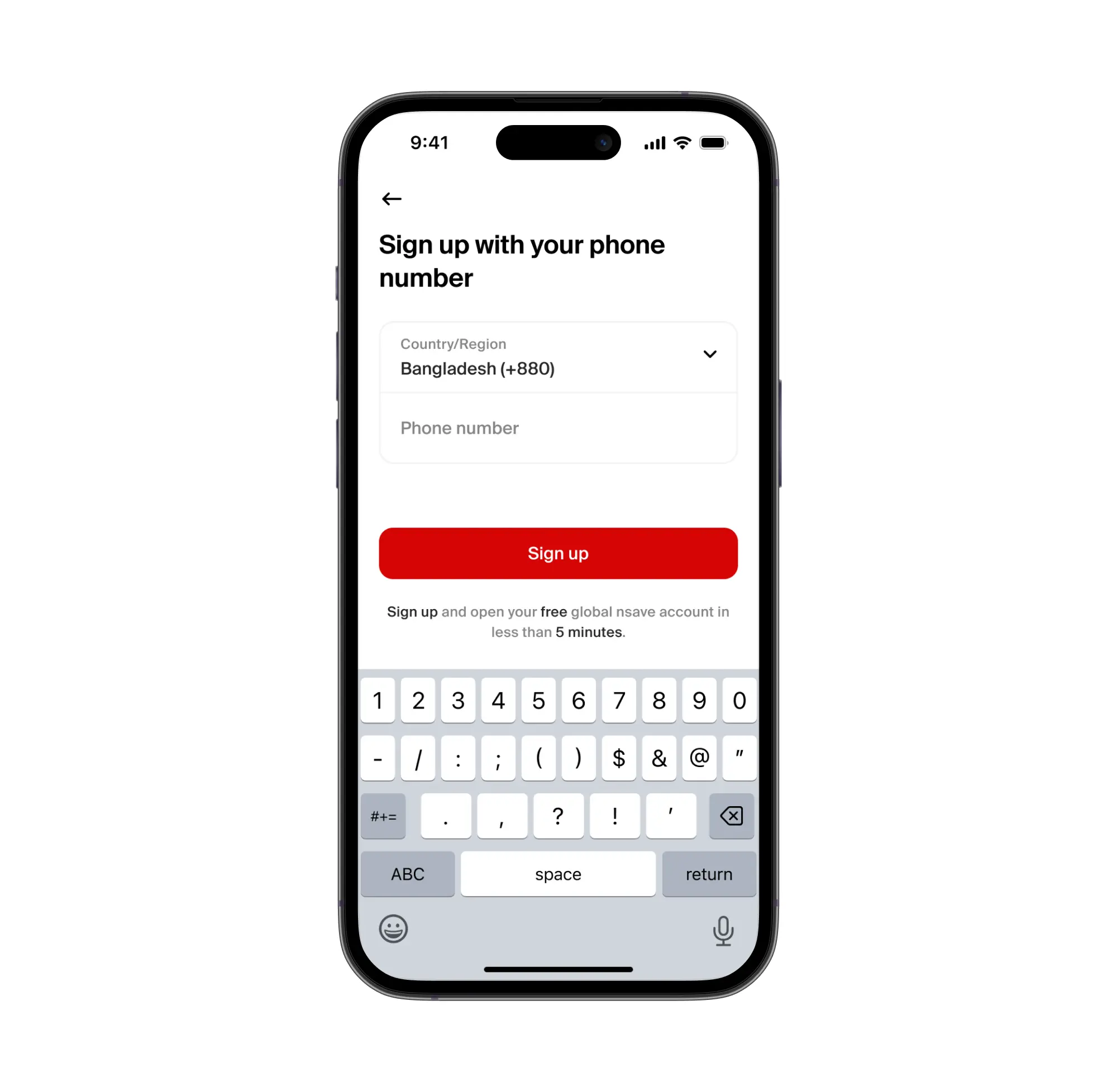
Your nsave account is free on the Standard plan ($0/month). Download the nsave app, complete identity verification using your passport or national ID, under 10 minutes, no branch visit. Once verified, nsave assigns a personal ACH routing number and account number which any international client or platform can use to pay you in USD.
Step 2: Share Your nsave ACH Details with Your Clients or Platforms
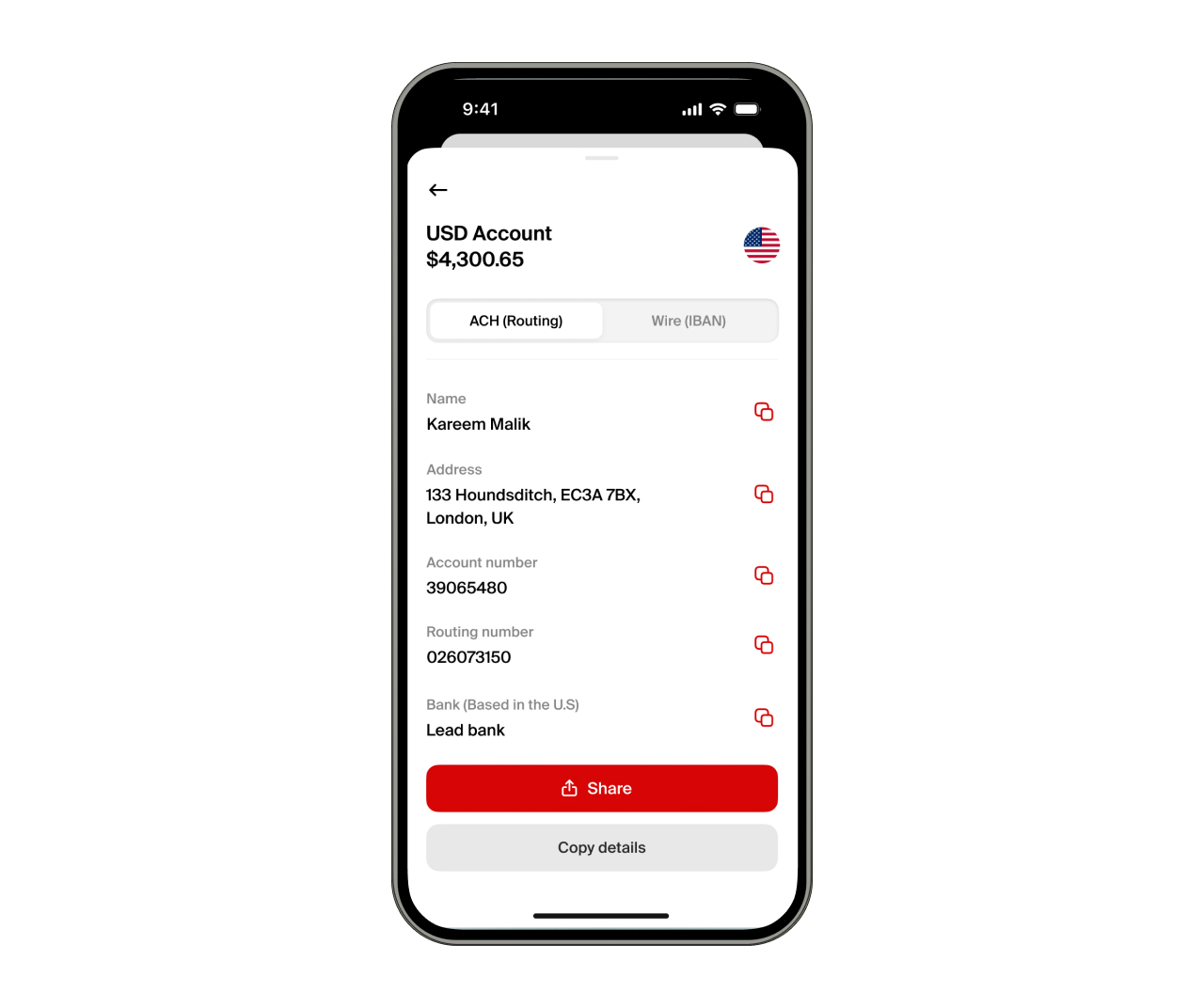
To receive USD via nsave, share your ACH routing number and account number as the payout destination on Upwork, Fiverr, Toptal, Freelancer.com, PeoplePerHour, or Deel. Direct clients can pay via SWIFT. Payoneer and Wise can also transfer to your nsave account. Receiving via ACH or SWIFT is free on both Standard and Pro plans.
Step 3: Convert and Send to Your Bangladeshi Bank Account

To convert, initiate a local currency withdrawal inside the nsave app. The exact BDT amount is shown before you confirm. Minimum fee: $1, (fees subject to change, check the nsave app for current rates). Funds arrive in your Bangladeshi bank account or bKash wallet, the account you just opened via e-KYC is exactly where this lands.
nsave is not a bank, nsave provides global USD and GBP accounts tailored for freelancers, remote workers, and individuals in emerging markets, allowing them to receive, manage, and hold international payments securely. As a non-bank payment provider, your money is not protected by the Financial Services Compensation Scheme (FSCS).
Key Takeaways
e-KYC allows any Bangladeshi with a valid NID and a smartphone to open a bank account digitally , without a branch visit. The process takes under 10 minutes: enter your NID number and date of birth (verified against the Election Commission database), take a live selfie (matched against your NID photo via liveness detection), add nominee information, and submit. The account activates automatically. The monthly transaction limit on a simplified e-KYC account is BDT 1,00,000 , submitting income proof upgrades the account to full KYC and removes this limit. Banks with strong e-KYC onboarding include Eastern Bank (EBL Insta), City Bank, BRAC Bank's Astha app, MTB Neo, and DBBL.
For freelancers and remote workers who receive USD, the Bangladeshi local account is the BDT destination. nsave provides the USD receiving and holding layer , a non-resident USD account with ACH details, and BDT conversion on demand at a $1 minimum fee (check the nsave app for current rates).
Frequently Asked Questions
Can I open a bank account without visiting a branch?
Yes, self e-KYC allows complete digital account opening via your phone, with no branch visit required. Most major private banks in Bangladesh support this.
Is Smart NID required or does the old NID work?
Both work. Smart NID and the old laminated NID are both accepted for e-KYC. Smart NID speeds up the process at banks that support barcode or chip scanning.
What is the monthly transaction limit?
BDT 1,00,000 (1 lakh) per month for simplified e-KYC accounts. You can upgrade to full KYC by submitting income proof to your bank, which removes this limit.
What happens if face verification fails repeatedly?
Contact the bank and request assisted e-KYC , a bank agent will use fingerprint verification instead of face recognition.
Which bank has the best digital account opening?
Eastern Bank (EBL Insta), City Bank, MTB Neo, and BRAC Bank's Astha app are most frequently cited for fast, smooth digital onboarding.
The information in this article is provided for general informational and educational purposes only and does not constitute financial, legal, or tax advice from nsave or any of its affiliates. It is not a substitute for advice from a qualified financial advisor. We make no representations or warranties, whether expressed or implied, that the content is accurate, complete, or up to date.
Fees, exchange rates, incentives, and product availability may change and can vary by user and jurisdiction. Examples are illustrative only. Before making any financial decisions, seek advice from a qualified financial advisor who can assess your individual circumstances and objectives.
nsave helps freelancers and professionals from Bangladesh, Nigeria, Pakistan, Egypt, and beyond receive and manage USD abroad. As a non-bank payment provider, your money is not protected by the Financial Services Compensation Scheme (FSCS).
