
bKash Account: How to Open, Use, and Manage
According to bKash's corporate profile, bKash processes over 60% of all mobile money transactions in Bangladesh, with more than 80 million customers and 330,000 agent points across the country. For millions of Bangladeshis , including people without a traditional bank account , bKash is how money moves. This guide is for someone opening a bKash account for the first time, or someone who just opened one and wants to know what it can do. By the end, you will know how to open an account, what the USSD code is, what each service costs, and what the current transaction limits are after the March 2025 Bangladesh Bank update.
What Is bKash?
bKash is a mobile financial service (MFS) operated by bKash Limited , an affiliate of BRAC Bank , that lets anyone with a Bangladeshi mobile number send money, cash out, pay bills, and receive remittances from abroad without needing a traditional bank account.
Regulated by Bangladesh Bank, bKash operates via its mobile app and USSD code *247#. It works on any mobile phone , smartphone or basic handset. Your bKash account number is your registered mobile number. The platform serves 80 million+ customers through 330,000+ agents and 550,000+ merchants across Bangladesh. bKash is not a bank , it is a licensed mobile financial service provider that holds customer funds in pooled accounts at partner banks under Bangladesh Bank's safeguarding rules.
Understanding what bKash is, and is not , prevents the most common user confusion: it cannot receive international wire transfers directly, and it is not the same as a bank account. Those distinctions matter when you are deciding how to route income from abroad.
Types of bKash Accounts
bKash offers three main account types: a personal account for individual users, a merchant account for businesses accepting payments, and an agent account for bKash agents who facilitate cash in and cash out transactions.
Personal account: This is for individuals. Tied to a mobile number and NID. One NID links to only one personal account. This is the account type this article covers.
Merchant account: This is for shops, online businesses, and service providers that want to accept bKash payments via QR code. Requires a separate setup process and uses the bKash merchant app.
Agent account: This is for bKash agents who provide cash in and cash out services to customers at agent points. Requires a formal agreement with bKash.
This article covers the personal account only.
How to Open a bKash Account
To open a bKash account, download the bKash app from Google Play or the App Store, select "Register," scan your National ID, complete a face scan, and set your PIN.
Via bKash app (recommended)
- Download the "bKash" app from Google Play or the Apple App Store.
- Open the app and tap "Register."
- Enter your mobile number , must be an active SIM in your phone on Grameenphone, Robi, Banglalink, Airtel, or Teletalk.
- Scan your National ID (NID). The app uses OCR to read your details automatically.
- Complete a face scan. Your photo is cross-checked with the National Election Commission database for identity verification (eKYC).
- Set a 4-digit PIN. This PIN authenticates every transaction , do not share it.
- Your account activates instantly.
Requirements to open a bKash account in Bangladesh include; Bangladeshi NID, active SIM, smartphone.
bKash performs live face matching against the NID photograph during account opening. Submitting someone else's NID while taking your own selfie will fail because bKash's KYC matches the selfie to the NID photo for confirming biometric verification, not just document submission.
Via agent point
Visit any bKash agent with your NID and one passport-size photograph. The agent completes the account opening form using the eKYC app. You receive an SMS confirmation once the account is active.
Via USSD (*247#): Basic account registration is available without a smartphone by dialing *247# and following the menu. Account opening is free. One NID = one personal bKash account.
How to Access Your bKash Account
To access your bKash account, open the bKash app and log in with your mobile number, OTP, and PIN , or dial *247# from your registered mobile number for USSD access.
bKash app login: Enter your mobile number, receive an OTP, then enter your PIN. Biometric login using Face ID or fingerprint is available after initial setup. The app supports Bengali and English.
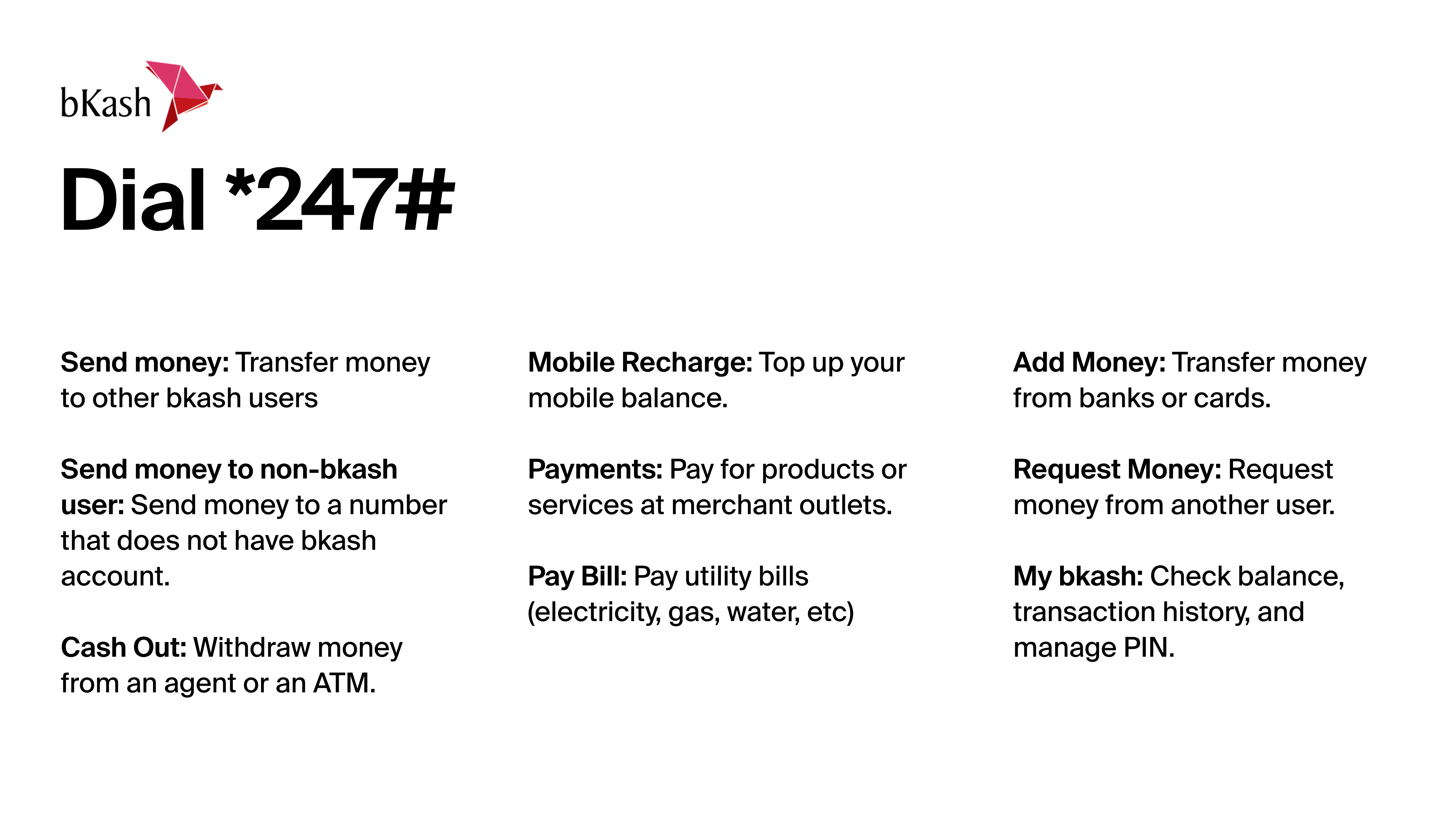
USSD (*247#): To access bKash from your mobile phone, without internet connection , you dial from your registered mobile number, enter your 4-digit PIN, and navigate the menu. No internet connection required. Works on any phone including basic handsets. Use for balance check, send money, cash out, and mobile recharge.
The bKash Helpline is 16247.
Forgot PIN: Select "Forgot PIN" in the app or contact bKash via the in-app Live Chat. PIN recovery requires NID verification.
bKash Services
bKash supports sending money, receiving remittances from abroad, cash out at agents and ATMs, adding money from a bank account or card, paying utility bills, mobile recharge, QR code merchant payments, and bank account transfers.
Send Money (P2P): Transfer money from your bKash account to any other bKash number. Send money fee: BDT 5 flat for amounts up to BDT 25,000; BDT 10 flat above BDT 25,000. Use the app or dial *247#. Group Send Money allows transfers to 2–7 accounts in one transaction.
Cash Out Withdraw: BDT from your bKash balance at any agent point, ATM, or IBBL ATM via NPSB. Set up to 2 Priyo Agent numbers to get the lower cash-out rate of BDT 14.90 per BDT 1,000, capped at BDT 50,000 per calendar month.
Add Money: You can fund your bKash account by transferring from any Bangladeshi bank account or Visa/Mastercard linked in the app.
Bank Transfer: You can send from your bKash balance to a Bangladeshi bank account.
It should be noted that bKash to bank transfer fees actually vary by the receiving bank.
- Agrani and Sonali charge the least at Tk 10 per Tk 1,000.
- While City Bank and BRAC Bank charge Tk 11.5 per Tk 1,000.
- UCB Visa charges Tk 12.5 per Tk 1,000.
Hence, the receiving bank determines your bKash-to-bank transfer fee.
Utility Bill Payments: You can use bKash account to pay electricity, gas, water, internet, and other bills directly from the app.
Mobile Recharge: You can use the bKash account to recharge any Bangladeshi prepaid number: minimum BDT 10, maximum BDT 1,000 per transaction. Postpaid: maximum BDT 7,000.
Merchant Payment (QR): You can also use bKash to scan any merchant's QR code to pay in-store or online at 550,000+ merchants.
Remittance Receiving : You can receive international remittances directly to your bKash account from abroad. Maximum BDT 2,50,000 per transaction. Bangladesh Bank adds a 2.5% government cash incentive to each qualifying remittance received.
Note, According to bKash's official Remittance Service guideline Payoneer-to-bKash transfers do not qualify for the 2.5% incentive , confirmed by bKash's official website.
bKash Transaction Limits and Charges
According to Bangladesh Bank's MFS regulatory circular from March 2025, bKash transaction limits were updated by Bangladesh Bank in March 2025, the daily cash in and send money limits both increased to BDT 50,000, and the maximum account balance was raised to BDT 5,00,000.
| Transaction type | Daily limit | Monthly limit | Charge |
|---|---|---|---|
| Inflows | |||
| Cash in | BDT 50,000 | BDT 3,00,000 | Free |
| Remittance receiving | BDT 2,50,000per transaction | — | Free+ 2.5% govt incentive |
| Transfers | |||
| Send money (P2P) | BDT 50,000 | BDT 3,00,000 | BDT 5 up to BDT 25,000 BDT 10 above BDT 25,000 |
| Bank transfer | BDT 50,000 | BDT 3,00,000 | BDT 10–12.50/1,000Varies by receiving bank |
| Cash out | |||
| Cash out — Priyo Agent | BDT 30,000 | BDT 50,000at 1.49% rate | BDT 14.90/1,000 |
| Cash out — other agents | BDT 30,000 | BDT 2,00,000 | BDT 18.50/1,000 |
| Cash out — ATM | — | — | BDT 14.90/1,000 |
| Payments | |||
| Merchant payment (QR) | — | — | Free |
| Mobile recharge (prepaid) | — | — | Free |
| Account limits | |||
| Maximum account balance | BDT 5,00,000 | — | — |
bKash's account registration form includes income source, monthly income bracket, and occupation as mandatory fields, not just optional profile data and these declarations almost certainly determine which transaction limit tier the new account receives, though no official documentation confirms this mapping. While bKash's public documentation shows a standard set of limits (e.g., Tk 30,000 daily cash-in, Tk 25,000 daily cash-out), the data you provide at registration feeds into a Transaction Profile (TP) mandated by Bangladesh Bank's Anti-Money Laundering (AML) guidelines.
The app shows the exact service charge before you confirm any transaction. Check in-app before proceeding.
How to Check Your bKash Account Information
To check your bKash balance, open the bKash app and tap the balance button on the home screen , or dial *247# and select the balance inquiry option.
Balance: To check you balance on bKash, go to the App home screen (one tap) or *247# → Balance Inquiry. Balance hides automatically after a few seconds for privacy.
Account number: Your bKash account number is your registered mobile number. View it in the "My bKash" section of the app.
Transaction history: In the app under "Statement." Shows transaction type, amount, date, time, and Transaction ID. Monthly summary available. Not accessible via USSD.
Remaining transaction limits: In the app under "Check Limit" , shows a real-time view of how much you have left to transact in the current day and month.
Common bKash Account Issues
The most common bKash account issues are PIN-related login failures, failed transactions due to insufficient balance or exceeded limits, and SIM or NID mismatch errors during registration.
Login failure (wrong PIN): Three wrong PIN entries lock the account. Contact bKash Live Chat via the app or call 16247 for PIN recovery.
Transaction failed: Check your balance on the app home screen and your remaining daily limit under Check Limit. If both are clear, retry. If the failure continues, call 16247.
Limit exceeded: Daily limits reset at midnight. Monthly limits reset on the 1st of each month.
SIM or NID mismatch: Ensure the SIM in your phone matches your registered bKash number. During registration, your NID data must match Election Commission records.
If you're locked out of your bKash account or can't complete registration, the fix depends on what went wrong.
Account locked: If your account gets locked which happens after 3 wrong PIN attempts. Call bKash Hotline 16247 or use bKash Live Chat. You'll need your NID number, full name, and your last 3 transaction details to verify identity before the agent resets your PIN. If the lock was triggered by a suspicious activity or AML flag, the hotline won't help , you need to visit a bKash Customer Care Centre in person with your original NID.
Forgotten number and PIN: To fix this, Insert the SIM into any phone and dial *2# or *16001# to find the assigned number. Then dial *247#, select "Reset PIN," and enter your NID number and date of birth. If the SIM is physically lost, replace it at your mobile operator's customer centre first , Grameenphone, Robi, or whichever network , before attempting PIN recovery.
Stuck registration: If you scanned your NID and took a selfie but closed the app before setting a PIN, your NID is now sitting as a pending application in bKash's system. Wait 24–72 hours for it to auto-purge, then retry registration. If the app still shows "NID already in use" after waiting, contact bKash Live Chat and ask them to cancel the pending registration manually so you can start fresh.
Can I Use Nagad Instead of bKash?
Yes, Nagad is a Bangladesh Bank-regulated mobile financial service that performs the same core functions as bKash , cash in, cash out, P2P transfers, utility bill payments, and mobile recharge , and is available to any Bangladeshi with a mobile number.
The functional difference comes down to three practical points. First, cash-out rates: Nagad charges BDT 12.99 per BDT 1,000 via its app and BDT 15.00 per BDT 1,000 via USSD (*167#), compared to bKash's BDT 14.90 for Priyo Agent and BDT 18.50 at other agents. On paper, Nagad is cheaper.
People say "Nagad is cheaper than bKash" because Nagad's advertised fee of BDT 9.99 per BDT 1,000 is lower than bKash's BDT 18.50. That comparison is accurate on paper. The problem is that cheap fees mean nothing if you cannot actually complete the transaction. Nagad agents are mostly small shopkeepers, a phone accessories seller, a small grocery who do not keep large amounts of cash on hand. So, when you show up and ask for BDT 10,000 in physical cash, the agent often says "no cash available" and turns you away, because Nagad pays agents a lower commission per transaction, so dispensing large amounts is not worth it to them. However, bKash agents earn more per transaction and are better funded, so they almost always say yes. That reliability is what users are actually paying for when they choose bKash, not the brand name.
Second, both bKash and Nagad are now connected via NPSB interoperability , you can send money from a bKash wallet to a Nagad wallet and vice versa, at an MFS-to-MFS fee capped at 0.85% per BDT 1,000. Third, for international income, neither Nagad nor bKash accepts direct USD payouts from platforms like Upwork or Fiverr. Both require BDT to arrive from a Bangladeshi bank account first. That upstream step , receiving USD and converting it , is where a nsave USD account fits before either wallet.
Can I Use Rocket Instead of bKash?
Yes, Rocket is a mobile financial service operated by Dutch-Bangla Bank Limited (DBBL) that supports cash in, cash out, P2P transfers, utility bill payments, and salary disbursement , and is accessible via USSD at *322# or via the Rocket app.
Rocket's agent cash-out rate is 1.8% (roughly BDT 18 per 1,000) , which is a bit lower than bKash's standard BDT 18.50. Rocket cash-out at DBBL ATMs is charged at 0.9% of the transaction amount. Because 0.9% of BDT 1,000 is BDT 9, it often looks like a flat BDT 9 fee on smaller transactions, but it is strictly percentage-based.. Rocket's cash-in has historically been free at both agent and branch level, a differentiator from bKash and other mobile financial services.
The tradeoff is reach. Rocket operates through DBBL's agent and ATM network, which is smaller than bKash's 330,000-agent footprint. For salary disbursement users and anyone near a DBBL ATM, Rocket is structurally competitive on cost. For general use in areas without a DBBL presence, bKash remains more accessible.
Since November 2025, Rocket participates in NPSB interoperability , transfers between Rocket and bKash or Nagad wallets are supported at the standard MFS-to-MFS fee. For receiving international income, Rocket has the same limitation as bKash and Nagad: it cannot receive direct USD payouts. Funds from Upwork, Fiverr, or an overseas employer need to land in a USD account first, then convert to BDT before reaching any local wallet.
Can I Use mCash Instead of bKash?
Yes, mCash is the mobile financial service of Islami Bank Bangladesh PLC (IBBPLC) , Bangladesh's only Shariah-compliant MFS , and covers the same core functions as bKash, including cash in, cash out, P2P transfers, utility bill payments, and international remittance receiving.
mCash's strongest cost advantage over bKash is at IBBL ATMs and branches, where cash-out costs BDT 7 per BDT 1,000 (0.7%) , less than half of bKash's standard agent rate. mCash-to-mCash transfers are free with no transaction volume cap, unlike bKash's Priyo Agent discount which applies only up to BDT 50,000 per month. For salary recipients in particular, mCash has historically offered zero-fee ATM cash-out , a benefit not available through bKash or Nagad.
The limitation is network size. mCash operates through IBBL's approximately 2,800 agent outlets, compared to bKash's 330,000. For users outside major urban centres or without an IBBL account, finding an mCash agent point is less predictable than finding a bKash agent.
For users who receive income from abroad, mCash supports direct international remittance receiving at BDT 7 per BDT 1,000 cash-out. For freelancers and remote workers earning in USD from platforms like Upwork or Fiverr, the same upstream gap applies as with every local MFS: USD needs a dedicated receiving account before it becomes BDT. A nsave USD account receives that income first, converts at the right time, and sends BDT to your Bangladeshi bank , from which mCash can receive via NPSB bank-to-MFS transfer.
bKash can receive remittances from abroad, and it can accept BDT sent from a Bangladeshi bank account. But if you earn in USD from a platform like Upwork, Fiverr, or a foreign employer, those funds need a USD receiving account before they can become BDT.
How to Receive International Earnings and Send to bKash with nsave
To receive international earnings and send them to your bKash account, open a nsave USD account, direct your foreign income to it using your personal ACH routing number and account number, convert to BDT, and transfer to your Bangladeshi bank account , from which you can send to bKash.
Step 1: Open Your nsave USD Account
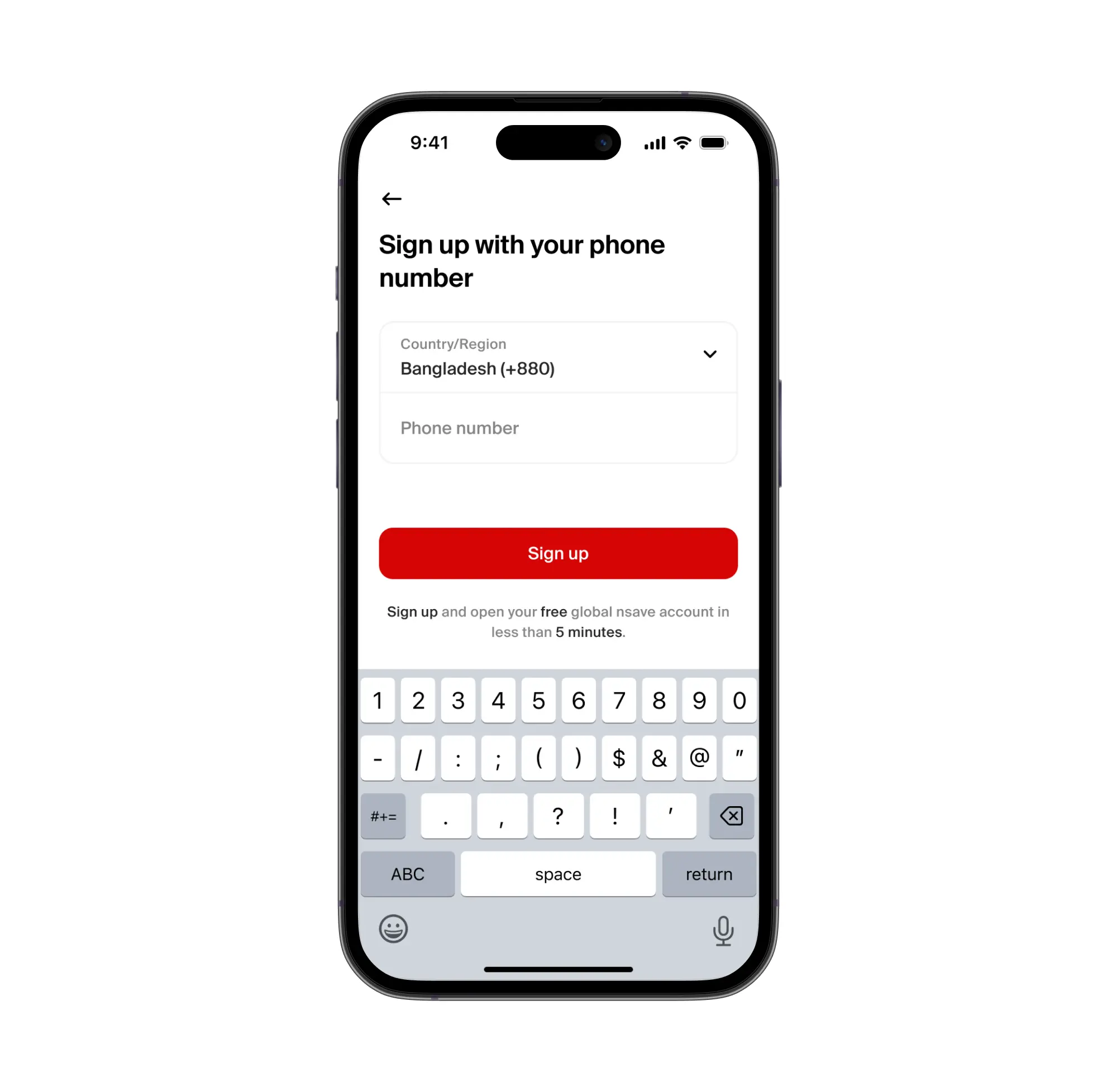
To open a nsave USD account, download the nsave app and complete identity verification using your passport or national ID , the process takes under 10 minutes. The Standard plan costs $0 per month (check the nsave app as fees are subject to change). Once verified, nsave assigns a personal US ACH routing number and account number , real US bank details that belong to you. No branch visit. No physical card required to start.
New to nsave? Watch how to set up your account in under 10 minutes:
Step 2: Set nsave as Your International Payout Destination
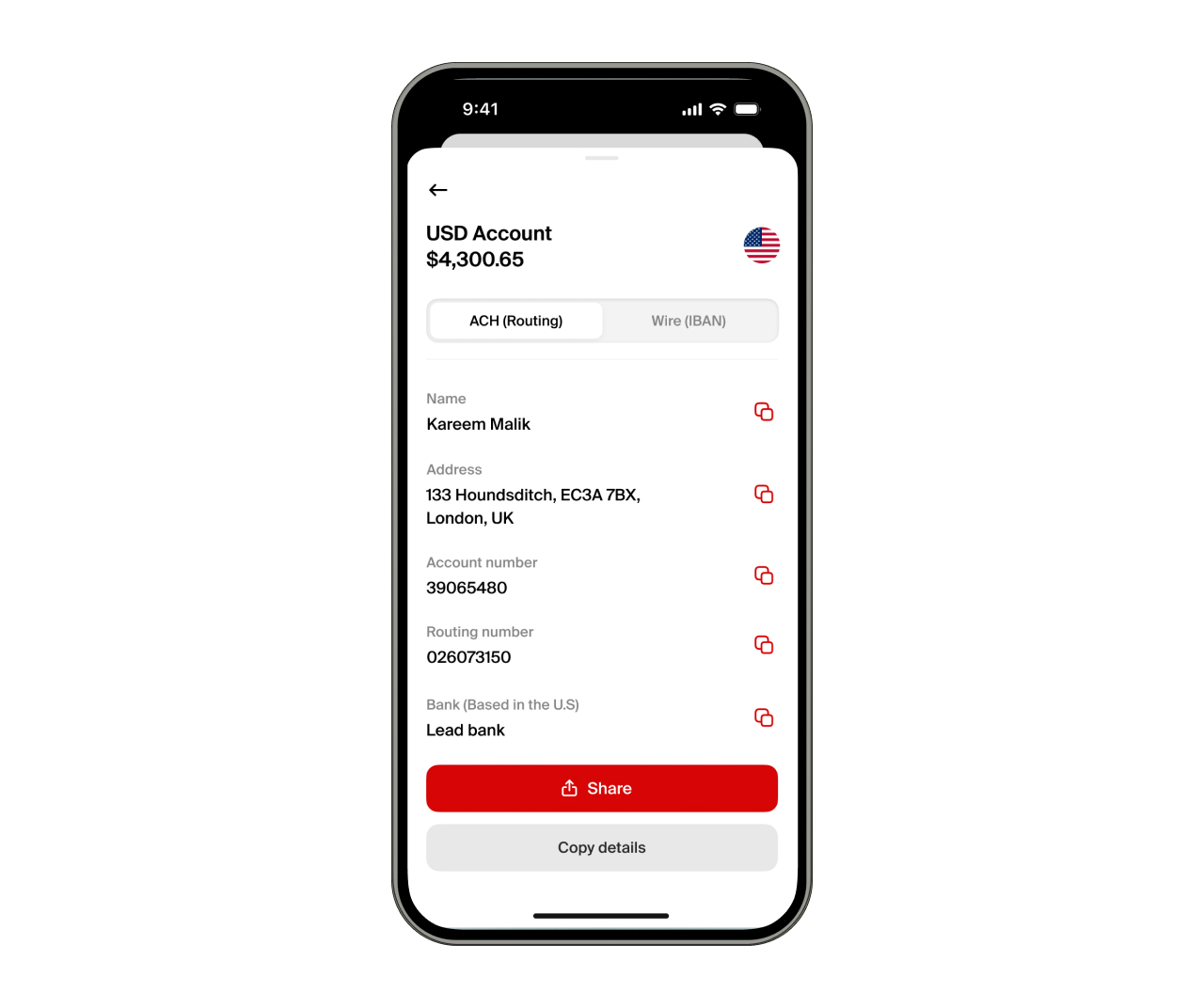
To receive international income via nsave, provide your nsave ACH routing number and account number to the platform or client paying you. Any platform that supports US bank account payouts , including Upwork, Fiverr, Toptal, Deel, PeoplePerHour, Freelancer.com, Payoneer, and Wise , can send funds directly to your nsave account. Receiving via ACH or SWIFT is free on both Standard and Pro plans (check the nsave app as fees are subject to change).
Step 3: Convert to BDT and Transfer to Your Local Account or bKash
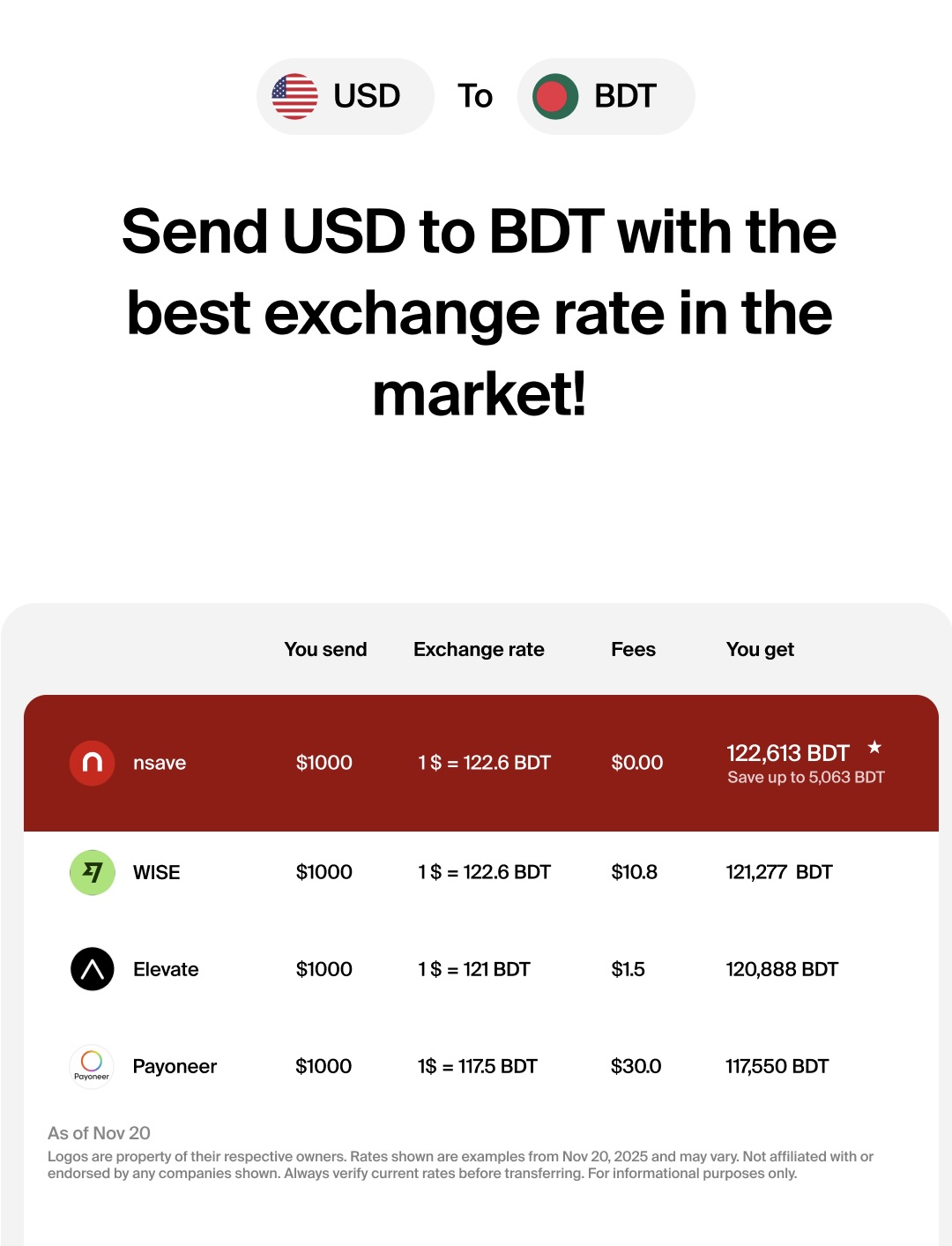
To convert USD to BDT, initiate a local currency withdrawal in the nsave app. The app shows the exact BDT amount before you confirm. You can convert and send BDT to your Bangladeshi bank account. From there, send to bKash directly via the bKash app's bank transfer feature.
For users with longer-term goals: nsave supports investing in 500+ US stocks, ETFs, bonds, and gold indices from $1 (check the nsave app for current fees and availability. Sharia-compliant investing is available.
Disclaimer: Investments involve risks, including the potential loss of capital. Past performance is not indicative of future results. Data provided is for illustrative purposes only. Consult a licensed financial advisor before making any investment decisions. Investment accounts are provided by a third-party broker dealer.
bKash and International Income
For Bangladeshis earning from abroad, bKash handles the local end , spending, sending, paying bills. The international leg requires a separate USD receiving account. The table below shows where each option stands.
| nsave | Payoneer | Wise | bKash | |
|---|---|---|---|---|
| Personal US ACH routing number | Yes | Yes | No | No |
| Receive from Upwork / Fiverr directly | YesFree | Yes | Limited | No |
| Hold USD | Yes | No | No | No |
| Convert to BDT | Yes, low fee | Yes$1.50–$3.00 + FX | YesFX fee varies | No |
| Send BDT to bKash | Via bank transfer | Via bank transfer | Via bank transfer | Is bKash |
| Invest in US stocks / ETFs | Yes | No | No | No |
| Sharia-compliant investing | Yes | No | No | N/A |
Confirm current rates and fees on nsave app as they may change.
Investments involve risks, including the potential loss of capital. Past performance is not indicative of future results. Data provided is for illustrative purposes only. Consult a licensed financial advisor before making any investment decisions. Investment accounts are provided by a third-party broker dealer.
Key Takeaways
A bKash account is a mobile financial service account linked to your Bangladeshi mobile number, opened for free via the bKash app in minutes using your NID and a face scan. The USSD code is *247#. Current daily limits as of March 2025: BDT 50,000 for cash in and send money; monthly limit BDT 3,00,000. Maximum account balance: BDT 5,00,000. Cash out rates: BDT 14.90 per BDT 1,000 at Priyo Agents and ATMs (up to BDT 50,000 per month at the Priyo rate), BDT 18.50 per BDT 1,000 at other agents.
bKash handles everything on the BDT side. For users earning in USD from abroad, a USD receiving account comes first. Using nsave, you get a US ACH routing number that Upwork, Fiverr, and other platforms can pay directly and BDT conversion has a low fee shown upfront , arriving in your Bangladeshi bank, from where it reaches bKash.
Frequently Asked Questions
How to create a bKash account?
Download the bKash app, enter your active mobile number, scan your National ID (NID) using the app's camera, take a live selfie for biometric face-matching against the Election Commission database, and set a 4-digit PIN. The account activates instantly.
Can I open bKash without an app?
Yes. You can visit any bKash agent point with your original NID and a passport-sized photograph to register via their eKYC system. Alternatively, basic registration can be done via USSD by dialing *247# from your mobile phone.
What is my bKash account number?
Your bKash account number is simply the 11-digit mobile phone number you used to register the account.
How many bKash accounts can one NID have?
You can only open one personal bKash account per National ID (NID).
How to check bKash balance?
Open the bKash app and tap the "Balance" button at the top of the home screen. If you do not have a smartphone or internet access, dial *247# from your registered mobile number, select "My bKash," and then choose "Check Balance."
What is the bKash USSD code?
The bKash USSD code is *247#. Dialing this from your registered mobile phone allows you to access basic bKash services (like sending money or checking your balance) without needing the internet.
What is the cash out charge?
If you cash out at one of your saved "Priyo Agents" or at a partner ATM, the charge is BDT 14.90 per BDT 1,000 (applicable for up to BDT 50,000 per month). For all other regular bKash agents, the standard charge is BDT 18.50 per BDT 1,000.
The information in this article is provided for general informational and educational purposes only and does not constitute financial, legal, or tax advice from nsave or any of its affiliates. It is not a substitute for advice from a qualified financial advisor. We make no representations or warranties, whether expressed or implied, that the content is accurate, complete, or up to date.
Fees, exchange rates, incentives, and product availability may change and can vary by user and jurisdiction. Examples are illustrative only. Before making any financial decisions, seek advice from a qualified financial advisor who can assess your individual circumstances and objectives.
nsave helps freelancers and professionals from Bangladesh, Nigeria, Pakistan, Egypt, and beyond receive and manage USD abroad. As a non-bank payment provider, your money is not protected by the Financial Services Compensation Scheme (FSCS).
