
Easypaisa Account: How to Open, Use, and Manage

As of June 2026, you open an Easypaisa account in minutes by downloading the app or dialling *786#, you use it to send money, pay bills, cash out, and receive payments, and you manage it through the same app or USSD menu with the helpline 3737 as backup. According to a 2026 PR Newswire release on Easypaisa platform scale, Easypaisa processed more than 4.5 billion transactions in 2025 worth over PKR 15 trillion, roughly 13% of Pakistan's GDP, and now reaches around 1 in every 5 Pakistanis. For millions of people, including those who have never set foot in a branch, Easypaisa is simply how money moves.
This guide is written for any Pakistani opening an Easypaisa account for the first time, or anyone who just opened one and wants to know what it can do.
By the end, you will know how to open an account, what the USSD code is, what each service costs, the current transaction limits, and how to fix the problems that trip people up most. There is also a corporate change that landed in 2025 and 2026 that most users have not fully registered yet. More on that below.
What Is Easypaisa?
Easypaisa is a State Bank of Pakistan-licensed digital retail bank, operated by Easypaisa Bank Limited, that lets anyone with a Pakistani mobile number and CNIC send money, cash out, pay bills, and run a mobile wallet without visiting a branch.
It runs through the Easypaisa app and the USSD code *786#. Your Easypaisa wallet number is your registered mobile number. Notably, the wallet works on any handset, from a basic feature phone to a smartphone, because the USSD menu does not need internet.
According to a 2025 ProPakistani report on the Easypaisa rebrand, the company became Pakistan's first Digital Retail Bank on 28 January 2025, when the State Bank converted the former Telenor Microfinance Bank into Easypaisa Bank Limited and authorised it to begin commercial operations.
Knowing what Easypaisa is, and what it is not, prevents the most common confusion. Specifically, a personal wallet cannot receive an international wire transfer the way a foreign-currency bank account can, and it is capped by transaction limits set under the State Bank's tiered KYC framework.
Ultimately, those two facts decide how you should route money from outside Pakistan, which is where this guide is heading.
Account Levels and KYC Tiers
Easypaisa offers 3 account levels set by the State Bank of Pakistan's tiered KYC framework, each with its own transaction limits and verification requirements:
- Level 0 (basic): Opened instantly through the app or *786# with just your CNIC and mobile number. As of 2026, this level carries a daily limit of PKR 25,000, a monthly limit of PKR 50,000, and a yearly limit of PKR 200,000.
- Level 1 (biometric verified): Upgraded by completing a thumbprint scan at an Easypaisa agent or through in-app biometric verification. As of 2026, the daily limit rises to PKR 100,000, the monthly limit to PKR 300,000, and the yearly limit to PKR 3,600,000.
- Asaan Digital Account: Upgraded for higher-volume users, lifting both the daily and monthly limits to PKR 1,000,000 (10 lakh). As of 2026, the Asaan Digital upgrade carries a one-time PKR 100 fee and is completed remotely inside the app.
A new account always starts at Level 0. Because the level you sit on decides how much you can move, you should complete biometric verification early if you expect regular payments, otherwise you will hit a wall mid-month and have to wait for the cycle to reset.
How to Open an Easypaisa Account
To open an Easypaisa account, download the Easypaisa app from Google Play or the App Store, tap "Sign Up," enter your mobile number and CNIC, verify the OTP, and set a 5-digit PIN. The account activates instantly at Level 0.
Via the Easypaisa app (recommended)
- Download the "easypaisa" app from Google Play or the Apple App Store, confirming the publisher is Easypaisa Bank Limited.
- Open the app and tap "Sign Up" or "Register."
- Enter your mobile number. The app works on any network, including Telenor, Jazz, Zong, and Ufone.
- Enter the One-Time Password (OTP) sent to that number by SMS.
- Enter your full name and CNIC number exactly as they appear on your card.
- Set a 5-digit PIN. Because this PIN authenticates every transaction, you should never share it with anyone.
- Your account activates instantly at Level 0.
The requirements to open an Easypaisa account in Pakistan are a valid NADRA CNIC, a mobile number registered on that same CNIC, and a smartphone for the app. The SIM ownership matters because Easypaisa checks the linkage against PTA records, which means a SIM registered to someone else will fail verification.
Via USSD (*786#)
Alternatively, you can self-register without a smartphone by dialling *786#, entering your CNIC details, and setting a PIN. The account is created instantly at Level 0. However, the smartphone app gives you the full menu, free in-app transfers, and the debit card, so most users register through the app and keep USSD as the fallback.
Via agent
You can also visit any Easypaisa agent or Easypaisa Bank touchpoint with your original CNIC. The agent verifies your identity with a biometric thumbprint scan and registers the account, which opens you at a verified level with higher limits from day one. Subsequently, you receive a confirmation SMS once the account is active.
One CNIC links to only one personal Easypaisa account, and account opening is free with no annual fee. Easypaisa also offers a NewGen account for minors, opened against a guardian's CNIC, which gives younger users a supervised entry point into digital payments.
How to Access Your Easypaisa Account
To access your Easypaisa account, open the Easypaisa app and log in with your mobile number and PIN, or dial *786# from your registered number for menu-based USSD access.
The app login uses your mobile number and 5-digit PIN, with biometric login available after setup. Meanwhile, the USSD route at *786# needs no internet and works on any handset, which is why it stays the fallback when data is down or the phone is a basic one.
Easypaisa USSD Code
To access Easypaisa without an internet connection, dial *786# from your registered mobile number, enter your PIN, and navigate the menu. The menu covers balance checks, send money, cash out, bill payments, and mobile recharge.
The Easypaisa helpline is 3737 from a Telenor number, or 042-111-003-737 from any other network. International callers can use +92-341-1103737, and merchants can reach the merchant support desk on 345-545. If you forget your PIN, use the "Forgot PIN" option in the app, verify your CNIC and registered number, and set a new PIN. PIN recovery always requires CNIC and OTP verification, which is the safeguard that stops someone else resetting your PIN from a different phone.
Easypaisa Services
Easypaisa supports sending money, cash out at agents and ATMs, adding money from a bank or card, paying utility bills, mobile recharge, QR merchant payments, savings and term deposits, digital lending, and international remittance receipt.
Send Money (P2P): Transfer to any Easypaisa number, any other wallet such as JazzCash, or a bank account, through the app or *786#. Sending Easypaisa-to-Easypaisa through the app is free.
Cash Out: Withdraw physical cash at any Easypaisa agent or from an ATM using your Easypaisa debit card. Over-the-counter agent cash-out follows a published sliding slab, roughly 1.5% to 1.75% of the amount.
Add Money (Cash-In): Fund your wallet by depositing cash at an agent, which is free, or by transferring from a Pakistani bank account or a linked card.
Bill Payments: Pay electricity, gas, water, internet, and government challan bills directly from the app. There is no cap on the utility bill amount you can pay.
Mobile Recharge: Top up any prepaid number or settle a postpaid bill in seconds.
Merchant Payment (QR): Scan a merchant's QR code to pay in-store or online. According to a 2026 Business Recorder interview on Easypaisa merchant payments, the platform is part of the national push to grow monthly active QR merchants from 500,000 toward 2 million by mid-2026, which means QR acceptance now reaches well beyond big retailers into neighbourhood shops.
Savings, Term Deposits, and Lending: Because Easypaisa is now a licensed digital retail bank, it offers in-app savings, digital term deposits, and nano-loans, which sit alongside the wallet rather than needing a separate bank visit.
International Remittance: Easypaisa can receive remittance sent through partner channels, with the funds landing in your wallet as PKR. That conversion-to-PKR step is the catch for anyone earning in dollars, and it is the reason the receiving-money question deserves its own section below.
Easypaisa Transaction Limits and Charges
As of 2026, a Level 0 Easypaisa account carries a daily limit of PKR 25,000 and a monthly limit of PKR 50,000, a Level 1 biometric-verified account a daily limit of PKR 100,000 and a monthly limit of PKR 300,000, and an Asaan Digital account a daily and monthly limit of PKR 1,000,000.
| Account level | Daily limit | Monthly limit | Yearly limit |
|---|---|---|---|
| Level 0 (basic) | PKR 25,000 | PKR 50,000 | PKR 1,000,000 |
| Level 1 (biometric) | PKR 100,000 | PKR 300,000 | PKR 3,600,000 |
| Asaan Digital | PKR 1,000,000 | PKR 1,000,000 | Subject to turnover rules |
According to the official Easypaisa Schedule of Charges, cash deposit (cash-in) is free at authorised agents and digital channels, Easypaisa-to-Easypaisa transfer is free via the app, inter-bank fund transfer to other banks runs up to 1% of the amount with low-to-zero fee waivers on small monthly volumes, the Asaan Digital upgrade is a one-time PKR 100, and ATM or agent cash withdrawal follows a sliding slab of roughly 1.5% to 1.75% over the counter.
The app shows the exact service charge before you confirm any transaction. Therefore, the reliable habit is to read that figure on screen rather than work from a memorised table, because fees are subject to change.
You should always confirm the current limits and fees in the Easypaisa app or on the official website before a large transfer.
How to Check Your Easypaisa Account Information
To check your Easypaisa balance, open the app and view it on the home screen, or dial *786# and select the balance option. Your transaction history and remaining limits sit in the same menu.
Your account number is your registered mobile number, shown in the account section of the app. Transaction history shows type, amount, date, and transaction ID for each entry, which is worth glancing at before a large payment so you are not surprised by a block mid-transfer.
Common Easypaisa Account Issues
The most common Easypaisa account issues are PIN-related login locks, failed or stuck transfers during a service outage, accounts opened fraudulently on a CNIC, NewGen accounts locked at age 18, and scam calls impersonating Easypaisa staff.
Login lock (wrong PIN): Repeated wrong PIN entries lock the account. To recover, use "Forgot PIN" in the app with your CNIC and registered number, or call 3737 to reset it.
Transaction failed or stuck: First, check your balance and your remaining limit. If both are clear and it still fails, the cause is often a temporary service issue rather than your account, so wait and retry before assuming the money is lost.
Limit exceeded: Daily limits reset at midnight and monthly limits reset at the start of the cycle. If you regularly hit the ceiling, you should upgrade your level through biometric verification rather than waiting out each reset, because the higher tier removes the bottleneck permanently rather than for one cycle.
NewGen account locked at 18: A NewGen minor account is tied to a child CNIC, so when you turn 18 the account locks until you re-verify with your adult CNIC and biometrics. Accordingly, if a recently re-verified account still shows debit-blocked, the usual fix is to escalate beyond the helpline, which the community has strong views on below.
What the official process leaves out is how this actually feels on the ground, and that is where the community record is more honest than any help page.
Discussions within Pakistani technology communities as early as December 2025 report that a stranger can run an account on your CNIC for months without your knowledge. In one widely shared community thread on CNIC account fraud, a Pakistani user described signing up, being told an account already existed on their CNIC, transferring the ownership to their own number, and then watching PKR 10,080 vanish to a loan the previous holder had taken.
Therefore, you should insist on a written closure or resolution confirmation and, where money or fraud is involved, lodge a complaint with the State Bank's Sunwai portal and the Banking Mohtasib so it stays on record.
Discussions within Pakistani saving and investing communities as early as 2026 capture how painful the NewGen age-18 lock can be. In a community thread on a locked NewGen account, a user described turning 18, re-submitting an adult CNIC and both-hand biometrics, seeing every attempt marked successful, and still being unable to send around PKR 25,000 that was mostly their mother's.
The community's repeated advice in that thread was to escalate to the State Bank Sunwai portal and the Banking Mohtasib rather than rely on the in-app complaints, because users reported the regulator route is what actually unblocked similar accounts.
Scam Awareness: The Patterns Pakistanis Actually Report
The most reported Easypaisa scams are phishing links posing as card verification, fake support calls that push an in-app approval, and confusion over genuine but unexplained credits, all designed to make you hand over your PIN, OTP, or an approval you should not give.
Reading real reports is a low-effort way to protect yourself, so the next three paragraphs each cover one verified pattern from the community.
Discussions within Pakistani technology communities as early as November 2025 report a card-verification phishing scam. In a community thread on an Easypaisa card scam, a user described ordering a physical debit card, then receiving an SMS link to a fake verification page that asked for their name, account number, and current balance, followed by a WhatsApp call that talked them into approving an in-app request, after which around PKR 8,000 disappeared. The defence the community settled on was blunt: Easypaisa never asks you to approve a request or enter your PIN to "receive" a card, so any such call is a scam.
Similarly, discussions within Pakistani technology communities as early as 2024 describe approval-bait calls aimed at new users. In that same community discussion, one user explained how, a day or two after opening their wallet, a caller posing as a vendor offered a "bonus" in return for approving a request inside the app, a request that would actually have sent their money out.
JazzCash and Easypaisa alike never ask for your PIN or OTP by phone, SMS, or email, which is the single line that exposes every one of these calls for what it is.
Notably, not every surprise credit is a scam, and the community is good at telling the difference. In a community thread on an unexpected Easypaisa credit, Pakistani users compared notes on small amounts arriving from "EPC Pvt Ltd" and worked out, between them, that it was a redemption from the MiliGold or ARY gold investment they had bought inside the app years earlier rather than a trap.
Ultimately, the pattern across every thread is the same: your money is safe until you personally authorise a transfer or hand over a credential.
Can I Use JazzCash Instead of Easypaisa?
Yes, JazzCash is a State Bank of Pakistan-regulated branchless banking service operated by Mobilink Microfinance Bank that performs the same core functions as Easypaisa, including send money, cash out, bill payments, mobile recharge, and QR merchant payments.
The practical differences come down to network and habit. Because Easypaisa and JazzCash are interconnected through Raast and 1Link, you can send from one wallet to the other, and many users keep both to cover whichever agent or merchant is nearer.
For receiving international income, neither JazzCash nor Easypaisa accepts a direct USD payout from a foreign client the way a dedicated USD account does, because the funds have to arrive as PKR first. That upstream gap, receiving dollars and converting them, is where a nsave USD account fits before either wallet.
Can I Use SadaPay or NayaPay Instead of Easypaisa?
Yes, SadaPay and NayaPay are State Bank of Pakistan-licensed Electronic Money Institutions that offer app-based wallets with free debit cards and are popular for everyday spending and online payments.
People often choose them for low or no ATM charges and clean app experiences.
Discussions within Pakistani technology communities as early as 2026 capture how users juggle these wallets in practice. In a community thread on a wallet service outage, one user described trying to move roughly PKR 9,000 from Easypaisa to their own SadaPay account during a multi-day outage and watching the amount get deducted without arriving, while others swapped USSD workarounds to reach their money. That thread is a useful reminder that these wallets sit under the same State Bank rules and the same occasional downtime that govern the wider market.
For international income, SadaPay and NayaPay share the same limitation as every local wallet, because a USD payout from Upwork, Fiverr, or a foreign employer needs a dollar-receiving account before it becomes PKR. A nsave USD account receives that income first, holds it in USD, and converts to PKR when you choose, after which the funds reach SadaPay or NayaPay through a bank or Raast transfer.
How to Receive International Earnings and Send to Easypaisa with nsave
To receive international earnings and move them to Easypaisa, open a nsave USD account, direct your foreign income to it using your personal US ACH routing number and account number, convert to PKR, and transfer to your Pakistani bank account, from which you can move funds to Easypaisa.
An ACH routing number and account number are the two identifiers the US banking system uses to route a domestic transfer, which is why any platform that pays via US bank transfer accepts them.
Step 1: Open Your nsave USD Account
To open your nsave USD account, download the nsave app and verify your identity using your Pakistani CNIC or passport. The Standard plan carries no monthly fee and identity verification completes in under 10 minutes with no branch visit required.

Once verified, your account dashboard displays your personal ACH routing number and account number. Notably, these are US account details assigned to you individually, because individually assigned details are what international clients and platforms recognise as a standard US payout destination.
Step 2: Share Your nsave ACH Details as Your Payout Destination
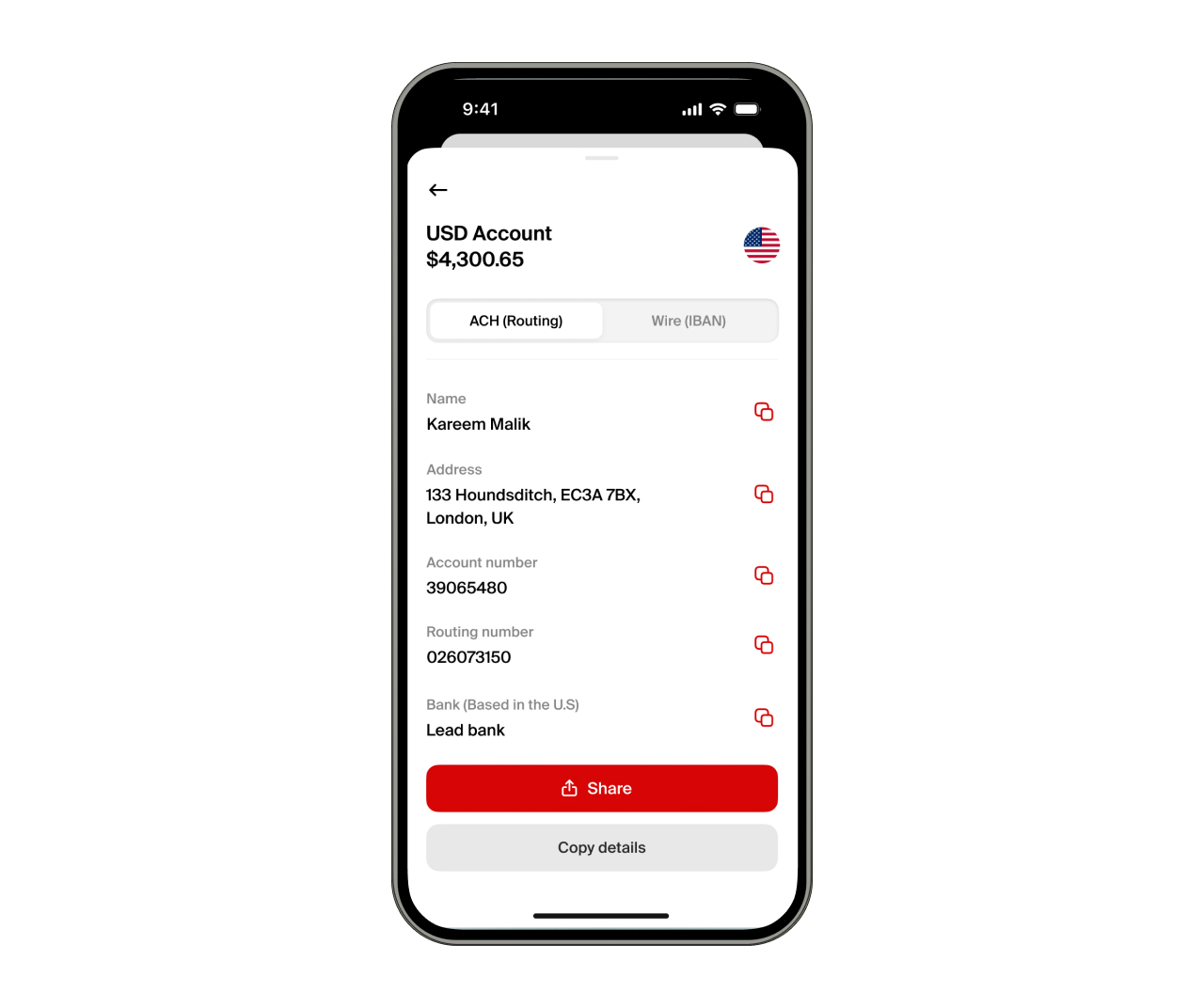
To receive USD via nsave, you should update your payout settings on your platform. Accordingly, there are 5 common payout destinations Pakistani freelancers configure with nsave ACH details:
- Upwork: Settings → Get Paid → US Bank (ACH) → enter your nsave routing number and account number.
- Fiverr: Earnings → Withdraw → Bank Transfer → enter the same ACH details.
- Toptal, Freelancer.com, PeoplePerHour: Navigate to each platform's bank payout setup and enter the same ACH details.
- Direct clients: Add your nsave ACH routing number and account number to your standard invoice.
- SWIFT-paying clients from the UK, EU, or Australia: SWIFT is the international messaging network banks outside the US use to send cross-currency payments, so for these clients you should share your nsave SWIFT receiving details instead, available inside the app.
Step 3: Hold USD and Access Investment Options
As of June 2026, nsave provides the opportunity to earn 3.2% annual rewards on your USD balance on the Standard plan, paid daily. Alternatively, the nsave Pro plan raises that rate to 4.2% at $9.99 per month.
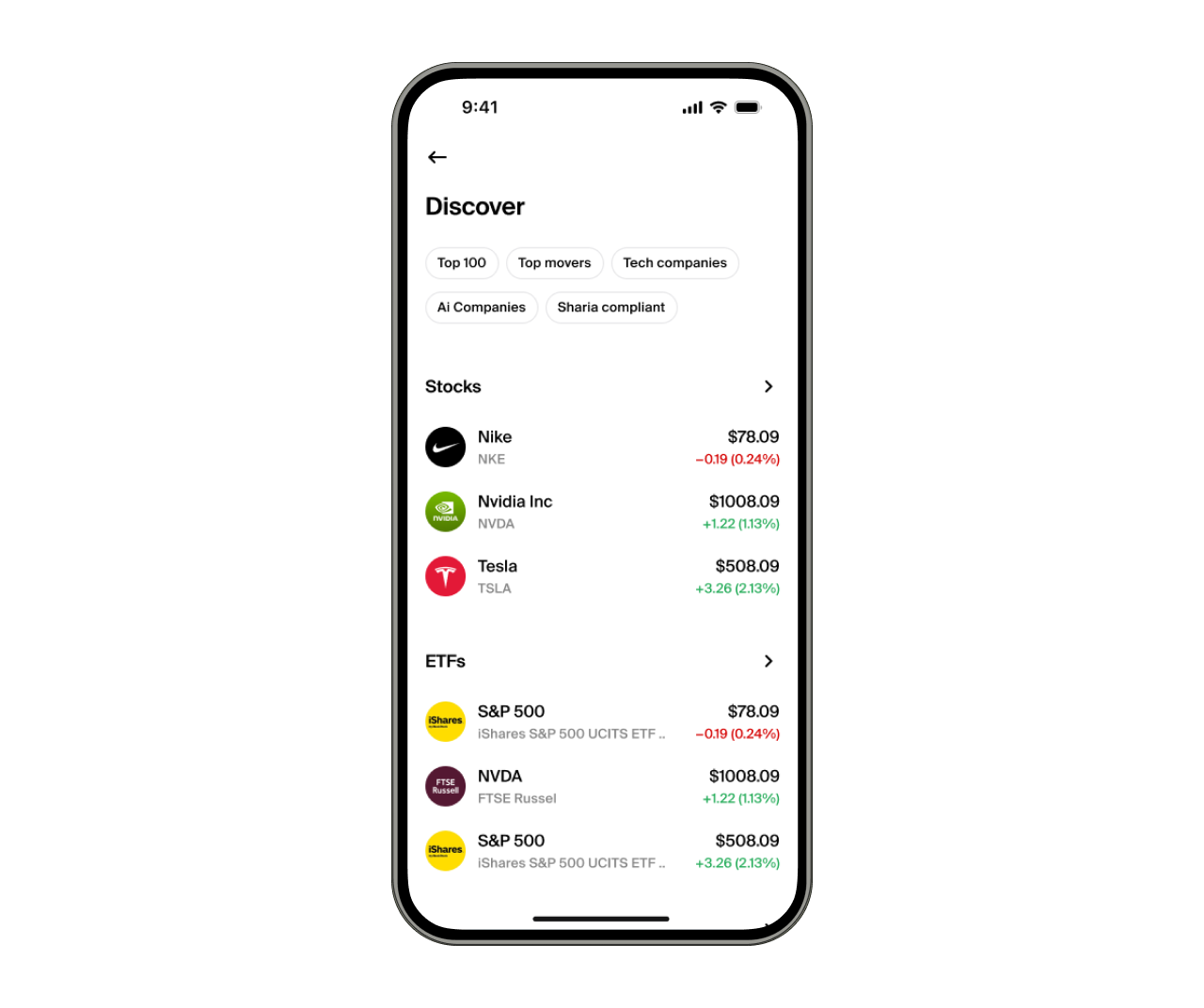
Your USD balance can also be held for weeks or months according to your own timeline. Additionally, nsave gives you access to invest in US stocks, ETFs, gold indices, or bonds from as little as $1 with no order fees, with Sharia-compliant options also available.
Investments involve risks, including the potential loss of capital. Past performance is not indicative of future results. Data provided is for illustrative purposes only. Consult a licensed financial adviser before making any investment decisions. Investment accounts are provided by a third-party broker dealer.
Step 4: Convert to PKR and Withdraw to Your Account
Finally, to withdraw from nsave, tap Withdraw in the app and send funds to any local Pakistani account for Free (for small transfers, a nominal fee may apply), with the exact PKR amount displayed before you confirm.

Congratulations, you should receive your funds usually within 5 minutes, but it may take up to 1 business day depending on the recipient's bank. In rare cases, it may take a little longer
How long do transfers take?
ACH transfers are typically received within 1-3 business days and are usually credited towards the end of the day. The only exception to that is when the ACH transfer is scheduled on a specific day.
SWIFT payments usually take longer and are more complex because they pass through multiple intermediary banks before reaching your account. This can take up to 2-10 working days.
nsave is not a bank. Funds are not FSCS-protected. Customer funds are held in regulated UK and EEA financial institutions, separated from company funds, and protected through safeguarding rules designed for electronic money services.
Easypaisa's Ownership and Direction in 2026
In 2025 and 2026, Easypaisa changed what it is and who owns it. According to a 2026 Profit by Pakistan Today report on the Easypaisa carve-out, Telenor completed the sale of its telecom business to PTCL Group for roughly PKR 108 billion on 31 December 2025 but deliberately kept Easypaisa, the separately licensed financial arm, with Telenor holding 55% and China's Ant Group holding 45%. Then, in June 2026, Telenor retained Citigroup to sell that 55% controlling stake, which would mark its full exit from Pakistan.
The numbers behind that sale show why the platform matters. According to a 2026 Business Recorder report on Easypaisa's results, Easypaisa posted a full-year 2025 profit after tax of PKR 17.04 billion, and its first-quarter 2026 profit before tax rose to PKR 3.66 billion, a 4.4-fold jump on the same quarter a year earlier.
For an ordinary user, none of this changes how the app works day to day, because any ownership transfer needs State Bank approval before it can close, and your wallet, balance, and limits stay exactly where they are while the deal is explored.
Key Takeaways
An Easypaisa account is a licensed digital-bank wallet linked to your Pakistani mobile number, opened free through the app or *786# using your CNIC and a 5-digit PIN. The USSD code is *786#, and the helpline is 3737 from Telenor or 042-111-003-737 from any other network. As of 2026, a new account starts at Level 0 with a PKR 25,000 daily and PKR 50,000 monthly limit, rising to PKR 100,000 daily and PKR 300,000 monthly at Level 1 after biometric verification, and up to PKR 1,000,000 on an Asaan Digital account. Crucially, Easypaisa never asks for your PIN or OTP by phone, so any caller who does is running a scam.
Easypaisa handles everything on the PKR side. For anyone earning in USD from abroad, a dollar-receiving account comes first. Using nsave, you get a US routing number that Upwork, Fiverr, and other platforms can pay directly, and PKR conversion starts at a minimum of USD 1 per transfer (you should check the nsave app as fees are subject to change), with the converted funds reaching your Pakistani bank and then Easypaisa.
Frequently Asked Questions
How do I create an Easypaisa account?
To create an Easypaisa account, download the app, enter your mobile number, verify the OTP, enter your CNIC and full name, and set a 5-digit PIN. The account activates instantly at Level 0. You can also register by dialling *786#.
Can I open Easypaisa without the app?
Yes, you can open Easypaisa without the app by dialling 786# and following the menu. Anyone on any network can also register through an Easypaisa agent with their original CNIC and a biometric thumbprint scan, which opens the account at a verified level.
What is my Easypaisa account number?
Your Easypaisa account number is the 11-digit mobile number you registered with. You can view it in the account section of the app.
How many Easypaisa accounts can one CNIC have?
Only one personal Easypaisa account can be opened per CNIC. A guardian can additionally hold a NewGen minor account under the same CNIC.
How do I check my Easypaisa balance?
To check your balance, open the app and view it on the home screen, or dial 786# and select the balance option. Your transaction history and remaining limits sit in the same menu.
What is the Easypaisa USSD code?
The Easypaisa USSD code is 786#. Dialling it from your registered number lets you send money, check your balance, cash out, and pay bills without an internet connection.
What is the Easypaisa helpline number?
The Easypaisa helpline is 3737 from a Telenor number, or 042-111-003-737 from any other network. International callers can use +92-341-1103737, and merchants can reach the merchant support desk on 345-545.
Is Easypaisa free to use?
Cash deposit and Easypaisa-to-Easypaisa app transfers are free, while bank transfers run up to 1% and agent cash withdrawals run roughly 1.5% to 1.75%. The app shows the exact charge before you confirm, so you should always read that figure on screen as fees are subject to change.
Can freelancers receive international payments on Easypaisa?
Easypaisa can receive remittance through partner channels, but the funds arrive as PKR, not a direct USD payout. This is why some freelancers receive into a USD account such as nsave first and convert on their own timing.
The information in this article is provided for general informational and educational purposes only and does not constitute financial, legal, or tax advice from nsave or any of its affiliates. It is not a substitute for advice from a qualified financial adviser. We make no representations or warranties, whether expressed or implied, that the content is accurate, complete, or up to date.
Fees, exchange rates, incentives, and product availability may change and can vary by user and jurisdiction. Examples are illustrative only. Before making any financial decisions, seek advice from a qualified financial adviser who can assess your individual circumstances and objectives.
nsave helps freelancers and professionals from Bangladesh, Nigeria, Pakistan, Egypt, and other emerging markets receive and manage USD abroad. As a non-bank payment provider, your money is not protected by the Financial Services Compensation Scheme (FSCS). Customer funds are held in regulated, UK and EEA financial institutions, separated from company funds, and protected through safeguarding rules designed for electronic money services.
