
Upwork in Bangladesh: How to Create Account, Get Paid & Withdraw Earnings
Bangladesh ranks second globally on Upwork, not as an emerging market, but as an established one. This article is for someone who has decided to use Upwork and wants to know exactly how it works: profile setup, proposals, and getting paid.
Upwork is fully available in Bangladesh and freelancing income from the platform is legal. Before you finish this guide, you will know how to build a profile that passes review, how to win your first contract, and critically, which withdrawal methods actually work and which ones don't.
Freelancing in Bangladesh ranks second globally on Upwork. A young English-speaking workforce, cheap smartphones, and ICT ministry training programmes like the Learning and Earning Development Project built that position over the last decade.
How Upwork Works
Upwork is a freelance marketplace where clients post projects and freelancers submit proposals to win them. The model is straightforward: a client posts a job, freelancers spend Connects to submit proposals, the client selects and hires one, work is delivered through the platform, and payment is released via Upwork's escrow system.
Two contract types operate on Upwork:
- Hourly contracts: time is tracked weekly using Upwork's desktop app; earnings are available 10 days after the billing period ends.
- Fixed-price contracts: This is structured as milestones; client approves each milestone and funds are released 5 days after approval.
Upwork has 16M+ registered freelancers globally. Bangladesh is the second-largest national group on the platform, which means competition is real, but so is the proof that it works here.
Is Upwork Available in Bangladesh?
Yes, Upwork is fully available in Bangladesh, and Bangladeshi freelancers can register, work, and withdraw earnings without restriction. Freelancing income from Upwork is legal in Bangladesh. Upwork is listed among the 55 ICT-ministry-approved platforms for which a freelancer-specific income incentive was announced in January 2022.
How to Create an Upwork Profile from Bangladesh
To create an Upwork profile, go to upwork.com, select "Work as a Freelancer," and complete all required sections before submitting for approval , incomplete profiles may be rejected.
Your profile requires these sections to be complete before Upwork reviews it:
- Headline: One line naming your skill and the result you deliver, not a job title
- Overview: Should be three to five sentences, client-focused, naming specific deliverables
- Skills tags: Select the tags that match your actual service
- Hourly rate: Set a rate that reflects your experience level
- Portfolio: Minimum two to three samples before submitting
A profile below 100% completion may not pass review.
To create an Upwork account in Bangladesh, users must complete identity verification using a government-issued ID such as NID. Meaning users without a valid government-issued ID cannot access Upwork in Bangladesh. Upwork’s global Terms of Service (2026) strictly require users to be at least 18 years old to enter into legal contracts on the platform.
Some high-competition categories, including web development and digital marketing , have profile waitlists. If your profile enters a waitlist, submit a complete profile and wait. There is no workaround. A complete profile submitted early has a better position in the queue.
Upwork Connects
To submit a proposal on Upwork, you spend Connects, each job costs between 6 and 16 Connects depending on job budget size.
Connects are Upwork's proposal currency. New accounts receive 10 free Connects on signup. As of April 2026, Upwork has slightly adjusted pricing. Connects now cost $0.15 each, and standard bundles are 10 for $1.50 or 80 for $12.
Spend Connects efficiently with these filters:
- Jobs posted within the last 24 hours
- Under 20 proposals already submitted
- Entry Level or Intermediate experience level
- Budget matching your rate range
How to Win Your First Job on Upwork
To win your first job on Upwork, write a proposal that opens by addressing the client's specific problem, not only by introducing yourself.
A good structure that gets replies:
- First sentence: name the client's specific problem or project directly
- Second sentence: name your relevant experience or attach one matching sample
- Third sentence: offer a specific deliverable or timeline
Target these job types as a beginner:
- Entry Level filter active
- Budget under $500
- Posted within the last 48 hours
- Under 15 proposals submitted
Set a rate that is competitive for your experience level. A beginner with no reviews should price at the lower end of the market rate for their skill. Underpricing to zero does not win clients , it signals inexperience.
Clients click through to your profile before replying to a proposal. A complete, professional profile doubles the conversion rate of a good proposal.
Freelancing in Bangladesh is not as easy as people say it is, the freelancing platform's client acquisition mechanism operates independently of skill level, usually leaving even more qualified users zero to few gigs.
For example, if a client posts "I need a WordPress landing page for my SaaS product," open your proposal with: "I've built SaaS landing pages in WordPress , here's a recent one," and include a link or screenshot directly after , not a list of credentials.
Upwork Service Fee in Bangladesh
According to Upwork’s 2026 Pricing Schedule, Upwork charges a service fee of 0–15% on each contract for both Freelancers basic plan and plus plan, deducted from the freelancer's earnings before withdrawal.
Fiver charges a 20% flat fee, one of the highest while Upwork charges a 0-15% variable fee, depending on the project complexity and skill demand.
What are the Available Upwork Payment Methods in Bangladesh?
The payment methods available to Bangladeshi freelancers on Upwork are Direct to Local Bank, Direct to U.S. Bank (ACH) and Payoneer, and Wise , PayPal and bKash are not available as withdrawal methods in Bangladesh.
Each method works differently:
Direct to U.S. Bank (ACH): Free withdrawal from Upwork to a US-domiciled bank account. Requires a US ACH routing number and account number. Most Bangladeshi freelancers don't have a US bank account, but a nsave USD account provides exactly this: a personal US ACH routing number and account number, opened online in under 10 minutes using a passport or national ID, at $0/month on the Standard plan. This is the most efficient withdrawal path. The nsave-bKash recent partnership also allows direct transfer to a bKash wallet.
Payoneer : free to receive from Upwork. Payoneer then charges approximately 2% when you withdraw to a local Bangladeshi bank account in BDT. The Payoneer–bKash partnership allows direct transfer to a bKash wallet for some users. If freelancers use an international payout platform like Payoneer, and face access issues due to email authentication, you can still fallback to direct bank withdrawals in Bangladesh.
Direct to Local Bank: $0.99 per transfer, 2–4 business days, converted to BDT at Upwork's own exchange rate. Bangladeshi bank compliance checks on inbound international transfers can add delays beyond Upwork's stated timeline. Some banks require additional documentation.
Wise: Upwork lists Wise as a withdrawal option in some regions. Wise is known for transparent mid-market exchange rates on conversions.
PayPal: not available in Bangladesh. Do not set this as a withdrawal method.
bKash: not a supported Upwork withdrawal destination. It cannot be used as a direct payout method on Upwork. Using global USD payment platforms like nsave, you can transfer funds to a bKash wallet.
The withdrawal method you choose determines more than just how you receive money , it determines how much of it you keep, how long you wait, and what you can do with it once it arrives. Most Bangladeshi freelancers default to Payoneer because it is familiar, not because it is the most efficient route. The difference shows up in conversion rates, holding costs, and the fact that your USD earns nothing while sitting in a Payoneer balance waiting for the right time to withdraw.
Getting your earnings to Bangladesh at full value , fewer fees, best BDT rate, no money sitting idle , is a separate problem from winning the work. The most efficient path starts with where you receive your USD, not where you send it. This section covers how to use a nsave USD account as your Upwork ACH withdrawal destination, how your balance earns while you hold it, and how to convert to BDT when you are ready.
How to Withdraw Upwork Earnings with nsave
To withdraw Upwork earnings to a nsave USD account, add your nsave ACH routing number and account number as a "Direct to U.S. Bank (ACH)" withdrawal method in Upwork's payment settings, this withdrawal is free.
Step 1: Open Your nsave USD Account
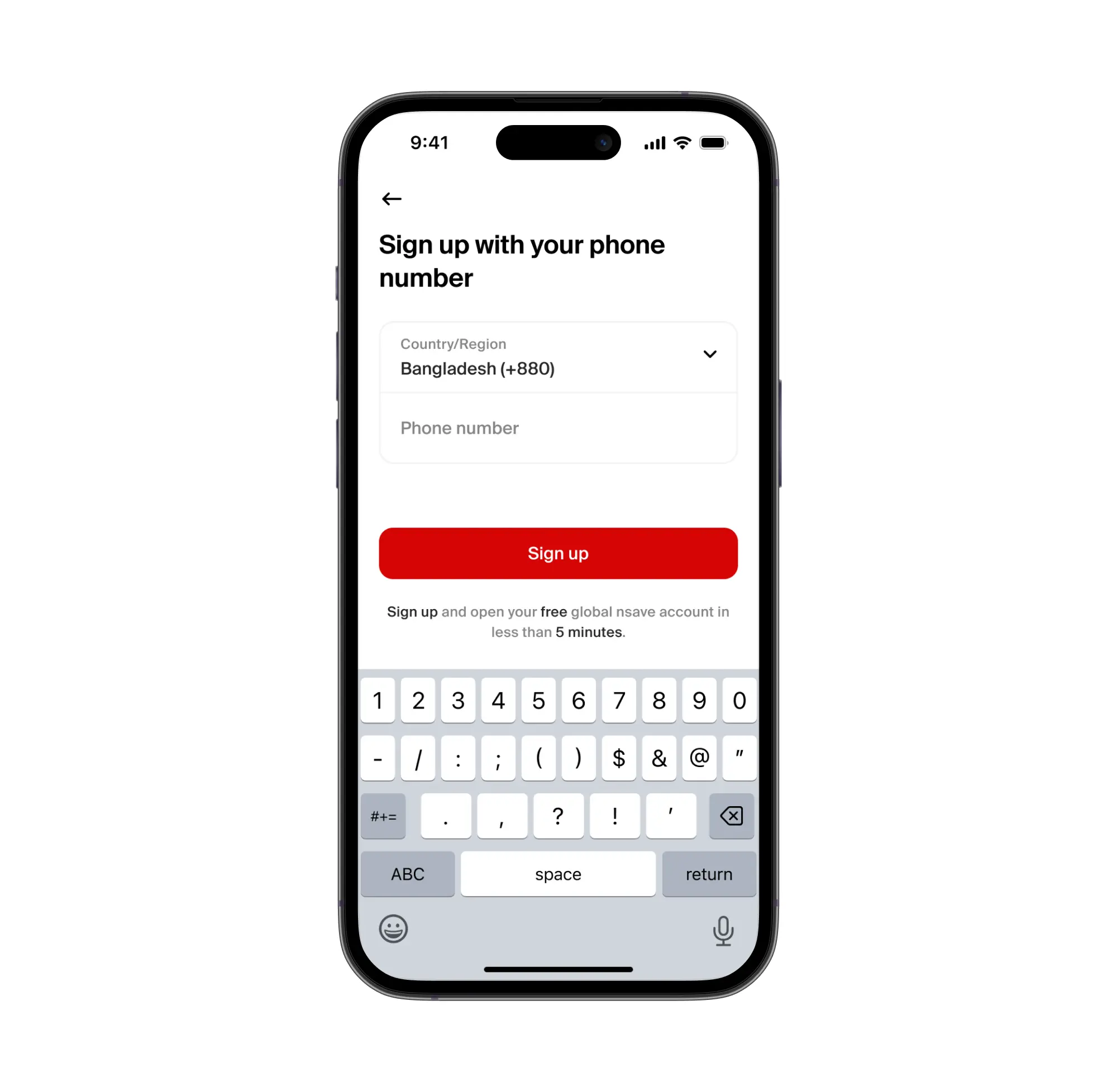
To open a nsave USD account, download the nsave app, verify your identity using your passport or national ID, and complete onboarding in under 10 minutes, no branch visit, no minimum deposit required.
The Standard plan is free. Once verified, nsave issues a personal US ACH routing number and account number. This is what makes free Upwork ACH withdrawal possible from Bangladesh.
New to nsave? Watch how to set up your account in under 10 minutes
Step 2: Add nsave as Your Upwork Withdrawal Method

To add nsave as your withdrawal method on Upwork, go to Settings → Get Paid → Add Withdrawal Method, select "Direct to U.S. Bank (ACH)," and enter your nsave routing number and account number.
The method activates after a three-calendar-day security hold. This is Upwork's standard process for all new withdrawal methods , not specific to nsave. Once active, you can withdraw manually or set up automatic withdrawals on a schedule. Withdrawal via ACH is free on Upwork's end.
Step 3: You can Earn Rewards while Holding
To earn on your nsave USD balance between withdrawal and conversion, no additional action is needed. The Standard plan pays 3.2% annual rewards on USD holdings, credited daily. The Pro plan ($9.99/month) pays 4.2%.
Investments involve risks, including the potential loss of capital. Past performance is not indicative of future results. Data provided is for illustrative purposes only. Consult a licensed financial advisor before making any investment decisions. Investment accounts are provided by a third-party broker dealer
For freelancers who want to invest a portion of their earnings rather than converting everything to BDT, nsave provides access to 500+ US stocks, ETFs, bonds, and gold indices from $1 (check nsave app for current fees as fees may change).
Step 4: Convert to BDT and Send to Your Local Account or bKash
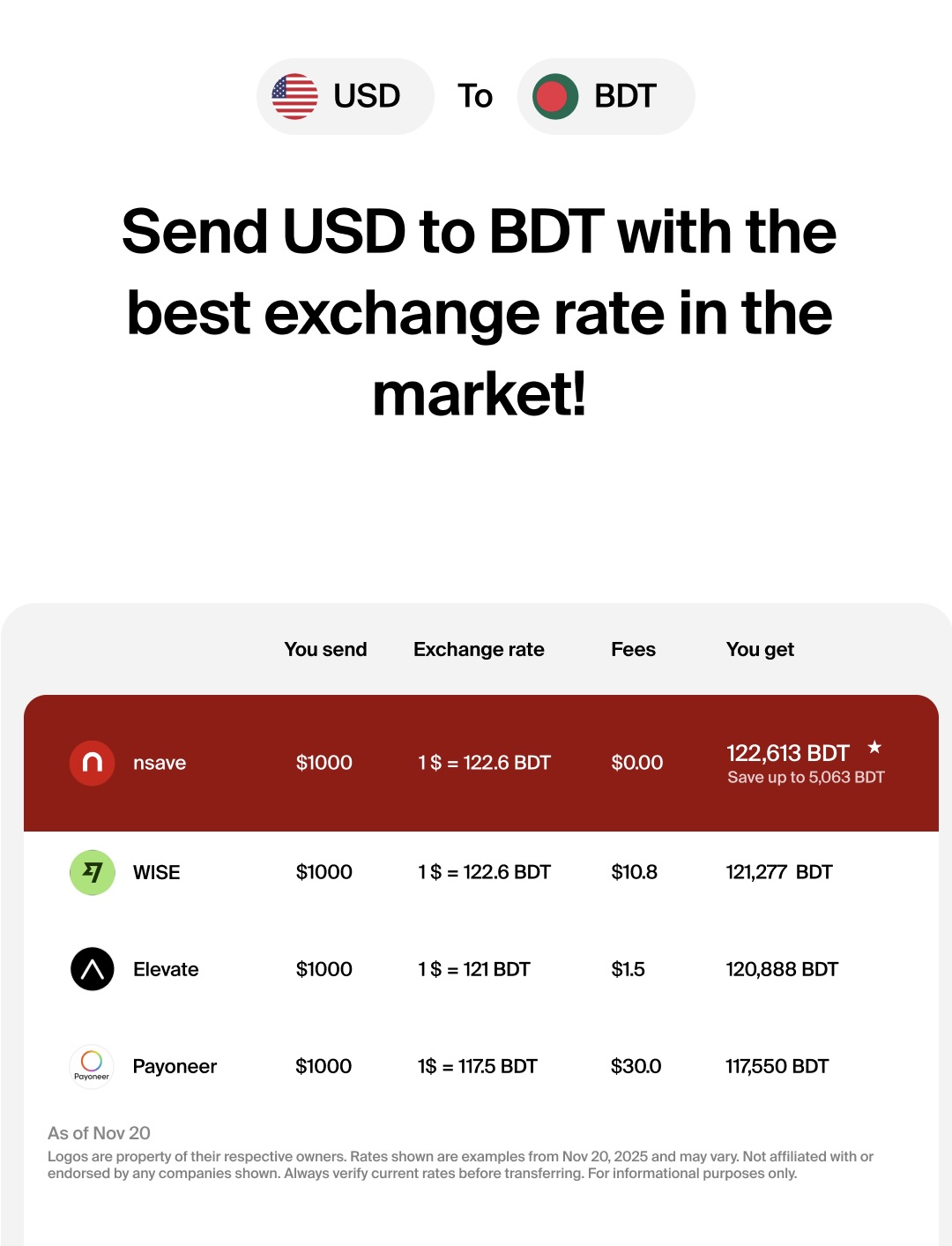
To convert USD earnings to BDT and send to a Bangladeshi bank account or bKash, open the nsave app, select the payout option, enter the amount, and review the exact BDT figure and fee before confirming.
Check today's rate and fee at nsave.com/send-money-home. The app displays the exact BDT amount you will receive before you confirm the transaction , no hidden conversion costs at the destination bank. Funds land in your Bangladeshi account or bKash wallet after processing.
Can I Withdraw Upwork Earnings via Payoneer in Bangladesh?
Yes, Payoneer is a supported Upwork withdrawal method and the most widely used option among Bangladeshi freelancers. Upwork transfers to Payoneer for free. Payoneer then charges approximately 2% when you withdraw to a local bank account in BDT. The Payoneer–bKash partnership allows direct transfer to a bKash wallet for some users, which may be faster than a bank transfer.
Can I Withdraw Upwork Earnings via Wise in Bangladesh?
Wise is listed as a withdrawal option on Upwork in some regions and is known for transparent mid-market exchange rates on conversions. According to Wise, while you can send Bangladeshi Taka (BDT) to bank accounts, bKash, or Nagad, Bangladesh residents cannot open a Wise multi-currency account, order a Wise card, or get USD account details to receive payments directly.
Can I Withdraw Upwork Earnings Directly to a Local Bangladeshi Bank?
Yes, Upwork's Direct to Local Bank option supports Bangladesh. The fee is $0.99 per transfer, and funds arrive in 2–4 business days in BDT at Upwork's conversion rate.
The main friction: Bangladeshi banks apply central bank compliance checks to inbound international transfers, which cause processing delays beyond Upwork's stated timeline. Some freelancers report needing to provide source-of-funds documentation to their bank.
During Bangladesh internet outages, freelancing platforms such as Upwork, Fiverr, and Freelancer.com become inaccessible, which can affect buyers' experience as freelancers cannot deliver work, contact clients, or even receive payments.
For freelancers who want to receive in USD first and convert at a time of their choosing, withdrawing to a nsave USD account gives that flexibility , and earns 3.2% annually on the balance while you wait.
Upwork Withdrawal Options Compared for Bangladeshi Freelancers
For Bangladeshi freelancers on Upwork, the choice of withdrawal method is not just about fees, it is about how long your money sits before you can use it, what rate you get on conversion, and whether your USD earns anything in the meantime.
| nsave (ACH) | Payoneer | Wise | Direct to local bank | |
|---|---|---|---|---|
| Upwork withdrawal fee | Free | Free | Varies | $0.99 |
| BDT conversion fee | Low fee, shown upfront | ~2% | Mid-market rateTransfer fee applies | Upwork's rate |
| Rewards on USD balance | 3.2% p.a. Free 4.2% p.a. Pro | None | None | N/A |
| BDT payout method | Bank bKash | Bank bKash | N/A | Bank direct |
| Processing time | App-controlled | 2–3 days | Varies | 2–4 business days |
| Works in Bangladesh | Yes | Yes | YesSome features restricted | Yes |
*check nsave app for current fees as fees may change
*Investments involve risks, including the potential loss of capital. Past performance is not indicative of future results. Data provided is for illustrative purposes only. Consult a licensed financial advisor before making any investment decisions. Investment accounts are provided by a third-party broker dealer
Key Takeaways
Upwork is fully available in Bangladesh, and with Bangladesh ranking second globally on the platform, it is a proven earning channel. The mechanics: create a complete profile, spend Connects on proposals that match your portfolio, and price competitively until your first reviews are in.
Upwork's variable service fee runs 0–15% per contract, with an average effective rate of 12–13% in 2025. For withdrawal: PayPal and bKash are not supported. Payoneer is the most common route; Direct to Local Bank works but converts at Upwork's rate with potential bank delays.
Using a nsave USD account as your ACH withdrawal destination receives earnings for free, earns 3.2% annually on your held USD balance, and lets you convert to BDT at your chosen time ,with the exact BDT amount shown before you confirm.
This article is provided for general information purposes only and does not constitute legal, tax, or financial advice from nsave or any of its affiliates. It is not intended as a substitute for obtaining advice from a qualified financial advisor or other professional. We make no representations, warranties, or guarantees, whether expressed or implied, that the content in this article is accurate, complete, or up to date.
The information provided in this article is for informational and educational purposes only and should not be construed as financial advice. Before making any financial decisions, it is highly recommended that you seek advice from a qualified financial advisor who can consider your individual financial circumstances and objectives.
nsave helps freelancers and professionals from Bangladesh, Nigeria, Pakistan, Egypt, and beyond receive and manage USD abroad. As a non-bank payment provider, your money is not protected by the Financial Services Compensation Scheme (FSCS).
