
JazzCash Account: How to Open, Use, and Manage

As of June 2026, you open a JazzCash account in minutes by downloading the app or dialling *786#, you use it to send money, pay bills, cash out, and receive freelance payments, and you manage it through the same app or USSD menu with the helpline 4444 as backup.
According to a 2026 GlobeNewswire release on JazzCash registrations, JazzCash crossed 60 million registered customers in May 2026 and processed PKR 16.8 trillion (roughly USD 59.7 billion) in transaction value in the year to March 2026, a 56% rise year-on-year. For millions of Pakistanis, including people who have never set foot in a bank branch, JazzCash is simply how money moves.
This guide is written for any Pakistani opening a JazzCash account for the first time, or anyone who just opened one and wants to know what it can do.
By the end, you will know how to open an account, what the USSD code is, what each service costs, the current transaction limits, and how to fix the problems that trip people up most. There is also a feature that landed in June 2026 that most users have not noticed yet. More on that below.
What Is JazzCash?
JazzCash is a branchless banking service operated by Mobilink Microfinance Bank (MMBL) under a licence from the State Bank of Pakistan, letting anyone with a Pakistani mobile number and CNIC send money, cash out, pay bills, and receive freelance payments without a traditional bank account.
It runs through the JazzCash app and the USSD code *786#. Your JazzCash account number is your registered mobile number. Notably, the platform works on any handset, from a basic feature phone to a smartphone, because the USSD menu does not need internet. JazzCash is not a bank in the high-street sense.
Rather, it is a licensed branchless banking and mobile financial service, regulated by the State Bank of Pakistan, that holds customer funds under SBP rules.
Knowing what JazzCash is, and what it is not, prevents the most common confusion. Specifically, it cannot receive an international wire transfer the way a foreign-currency bank account can, and a personal wallet is capped by transaction limits set under SBP's tiered KYC framework. Ultimately, those two facts decide how you should route money from outside Pakistan, which is where this guide is heading.
Account Levels and KYC Tiers
JazzCash offers 3 account levels set by the State Bank of Pakistan's tiered KYC framework, each with its own transaction limits and verification requirements:
- Level 0 (Basic Account): This tier is opened instantly via the app or by dialing *786# with just your CNIC and mobile number. It carries a daily limit of PKR 25,000 and a monthly transaction limit of PKR 50,000.
- Level 1 (Biometric Verified Account): This tier is upgraded by completing a physical thumbprint scan at any authorized JazzCash agent or Mobilink Microfinance Bank (MMBL) branch. The daily limit increases up to PKR 50,000 for standard debits (and up to PKR 100,000 for specific credit structures), while the maximum overall monthly limit rises to PKR 300,000.
- Asaan Digital Account: This is a standalone digital tier available to Level 1 users looking for high-volume limits. Upgrading requires a one-time processing fee of PKR 100 alongside a live selfie check and valid digital KYC submission directly within the app. It lifts both the daily debit limit and the monthly debit limit to PKR 1,000,000 (PKR 1 Million), with an advanced credit transaction tolerance cap of up to PKR 3,000,000.
A new account always starts at Level 0. Because the level you sit on decides how much you can move, you should complete biometric verification early if you expect regular payments, otherwise you will hit a wall mid-month and have to wait for the cycle to reset.
How to Open a JazzCash Account
To open a JazzCash account, download the JazzCash app from Google Play or the App Store, tap "Register," enter your CNIC and mobile number, verify the OTP, and set a 4-digit MPIN. The account activates instantly at Level 0.
Via the JazzCash app (recommended)
- Download the "JazzCash" app from Google Play or the Apple App Store, confirming the publisher is Mobilink Microfinance Bank.
- Open the app and tap "Register" or "Sign Up."
- Enter your mobile number. The app works on any network, including Jazz, Zong, Ufone, and Telenor.
- Enter the One-Time Password (OTP) sent to that number by SMS.
- Enter your full name and CNIC number exactly as they appear on your card.
- Set a 4-digit MPIN. Because this PIN authenticates every transaction, you should never share it with anyone.
- Your account activates instantly at Level 0.
The requirements to open a JazzCash account in Pakistan are a valid NADRA CNIC, a mobile number registered on that same CNIC, and a smartphone for the app. The SIM ownership matters because JazzCash checks the linkage against PTA records, which means a SIM registered to someone else will fail verification.
Via USSD (*786#)
Biometric-verified Jazz and Warid users can self-register without a smartphone by dialling *786#, entering their CNIC issuance date, and setting an MPIN. The account is created instantly at Level 0. However, this route works only on Jazz and Warid numbers, so Ufone, Zong, and Telenor users must register through the app.
Via agent
Alternatively, you can visit any JazzCash agent or MMBL branch with your original CNIC. The agent verifies your identity with a biometric thumbprint scan and registers the account, which opens you directly at Level 1 with higher limits from day one. Subsequently, you receive a confirmation SMS once the account is active.
One CNIC links to only one personal JazzCash account, and account opening is free with no annual fee. JazzCash also offers a NextGen account for minors aged 12 to 17, opened by a guardian against their own CNIC, which gives younger users a supervised entry point into digital payments.
How to Access Your JazzCash Account
To access your JazzCash account, open the JazzCash app and log in with your mobile number and MPIN, or dial *786# from your registered number for menu-based USSD access.
The app login uses your mobile number and 4-digit MPIN, with biometric login available after setup. Meanwhile, the USSD route at *786# needs no internet and works on any handset, which is why it stays the fallback when data is down or the phone is a basic one.
JazzCash USSD Code
To access JazzCash without an internet connection, dial 786# from your registered mobile number, enter your MPIN, and navigate the menu. The menu covers balance checks, send money, cash out, bill payments, and mobile recharge. To check your remaining limit specifically, you dial 78669#.
The JazzCash helpline is 4444 from a Jazz number, or 111-124-444 from any network. If you forget your MPIN, tap "Forgot MPIN" in the app, enter your CNIC and date of birth, and a temporary MPIN arrives by SMS. PIN recovery always requires CNIC verification, which is the safeguard that stops someone else resetting your PIN from a different phone.
JazzCash Services
JazzCash supports sending money, cash out at agents and ATMs, adding money from a bank or card, paying utility bills, mobile recharge, QR merchant payments, Raast transfers, receiving freelance payments through Payoneer, and nano loans.
Send Money (P2P): Transfer to any JazzCash number, any other wallet such as Easypaisa, or a bank account, through the app or *786#. Notably, sending to a CNIC is the one transfer type that can be cancelled, which gives you a recovery window if you send to the wrong person.
Cash Out: Withdraw physical cash at any JazzCash agent or from over 16,000 ATMs nationwide using your JazzCash debit card. The charge follows a published fee slab that rises with the amount withdrawn.
Add Money: Fund your wallet by transferring from any Pakistani bank account or a linked Visa or Mastercard, or by depositing cash at an agent.
Raast: Raast is Pakistan's national instant payment system, launched by the State Bank of Pakistan in 2021 to enable interoperable, real-time digital payments across the financial sector. You register your CNIC as a Raast ID inside the app to receive instant, free transfers. Because it carries no fee, Raast is the route you should prefer for moving money between your own accounts and to people you trust.
Bill Payments: Pay electricity, gas, water, internet, and government challan bills directly from the app. There is no cap on the utility bill amount you can pay.
Mobile Recharge: Top up any prepaid number or settle a postpaid bill in seconds.
Merchant Payment (QR): Scan a merchant's Raast QR code to pay in-store or online. According to a 2026 VEON newsroom release on Pakistan's national payments platform, JazzCash onboarded its 1 millionth Raast QR-enabled small business earlier in 2026, which means QR acceptance now reaches well beyond big retailers into neighbourhood shops.
Freelance Payments (Payoneer): Receive international earnings into your wallet through the JazzCash Payoneer Billing Service. According to a 2026 JazzCash freelance-payments page on Payoneer transfers, the Payoneer-to-JazzCash route carries a daily limit of PKR 150,000 and a monthly limit of PKR 500,000, with Payoneer's standard fee of 3% plus USD 1 per withdrawal. That fee structure is the catch freelancers feel most, and it is the reason the receiving-money question deserves its own section below.
JazzCash Transaction Limits and Charges
As of 2025, a Level 0 JazzCash account carries a monthly transaction limit of around PKR 50,000, a Level 1 biometric-verified account around PKR 200,000 per month with a PKR 50,000 daily cap, and an Asaan Digital account up to PKR 1 million per month.
| Account Level | Daily Limit | Monthly Limit |
|---|---|---|
| Level 0 (Basic) | PKR 25,000 | PKR 50,000 |
| Level 1 (Biometric) | PKR 100,000 | PKR 300,000 |
| Asaan Digital Account | PKR 1,000,000 | PKR 1,000,000 |
Cash-out and ATM withdrawal charges follow a published slab that rises with the amount, and ATM withdrawals above a set threshold attract a service fee. Notably, freelancers receiving remittance through Payoneer get 2 free ATM cash withdrawals in the calendar month the payment arrives, after which standard charges apply.
The app shows the exact service charge before you confirm any transaction. Therefore, the reliable habit is to read that figure on screen rather than work from a memorised table, because fees are subject to change. You should always confirm the current limits and fees in the JazzCash app or on the official website before a large transfer.
How to Check Your JazzCash Account Information
To check your JazzCash balance, open the app and view it on the home screen, or dial 786# and select the balance option. To check your remaining limit, you dial 78669#.
Your account number is your registered mobile number, shown in the "My Account" section of the app. Transaction history sits under the statement view, with type, amount, date, and transaction ID for each entry.
Your remaining daily and monthly limits are visible under the limit check, which is worth glancing at before a large payment so you are not surprised by a block mid-transfer.
Common JazzCash Account Issues
The most common JazzCash account issues are MPIN-related login locks, failed transactions from exceeded limits, accounts opened fraudulently on a CNIC, and scam calls impersonating JazzCash staff.
Login lock (wrong MPIN): Repeated wrong MPIN entries lock the account. To recover, use "Forgot MPIN" in the app with your CNIC and date of birth, or call 4444 to reset it.
Transaction failed: First, check your balance and your remaining limit under the limit view. If both are clear and it still fails, the transaction may be held in AML screening, which can take up to 2 days to clear before the amount returns or completes.
Limit exceeded: Daily limits reset at midnight and monthly limits reset at the start of the cycle. If you regularly hit the ceiling, you should upgrade your level through biometric verification rather than waiting out each reset, because the higher tier removes the bottleneck permanently rather than for one cycle.
Money sent but not usable yet: A State Bank of Pakistan cooling-off measure can hold funds received through certain wallet transfers for a short window before you can spend or withdraw them. Accordingly, if a recently received amount does not appear available, the usual cause is that holding period rather than a failed transfer.
If your registration stalls or the app reports your CNIC is already in use, the fix depends on what went wrong. For a genuine duplicate you did not create, contact the helpline and ask them to close the fraudulent account before you register again.
For a SIM you no longer hold, replace it at your network operator first, then retry MPIN recovery, because every recovery step is tied to the SIM that matches your CNIC.
What the official process leaves out is how this actually feels on the ground, and that is where the community record is more honest than any help page.
Discussions within Pakistani technology communities as early as 2025 report that a stranger can run a wallet account on your CNIC for months without your knowledge. In one widely shared community thread on the SBP wallet rule, a Pakistani user described finding an account opened on their CNIC and spending months of emails and helpline calls before it was closed.
Therefore, you should insist on a written closure confirmation and, where money or fraud is involved, register the complaint with the Banking Mohtasib and the FIA so it stays on record.
JazzCash Scams to Avoid as a Pakistani
The most reported JazzCash scams are fake "insurance activation" calls, fake "money deducted" panic calls, and "account locked" social-engineering calls, all designed to make you hand over your MPIN or OTP.
Reading real reports is a low-effort way to protect yourself, so the next four paragraphs each cover one verified pattern from the community.
Discussions within Pakistani community forums as early as December 2025 report a recurring "JazzCash insurance" call. In a community thread on the insurance scam, Pakistani users described calls from numbers with an 051 code pressing them to press a button that silently activates a daily deduction of around PKR 11, with the same complaint surfacing across thread after thread. The defence the community settled on was simple: do not press any button, and never confirm anything to an unknown caller.
Similarly, discussions within Pakistani technology communities as early as 2026 report a fake-deduction panic call. In a community thread on a new JazzCash scam, a Pakistani user described dozens of calls claiming around PKR 22,000 had been deducted, then being steered into the pending-payments screen to "reverse" it, when entering the MPIN there actually approves the scammer's payment request.
Discussions within those same Pakistani technology communities as early as 2026 also settled on the rule that protects you, captured bluntly in the thread's reply chain: you only lose money if you enter your MPIN, so the amount goes nowhere as long as you do nothing.
Likewise, discussions within Pakistani community forums as early as 2024 describe an account-lock scam. In a community thread on a repeat JazzCash scam, a Pakistani user explained how scammers deliberately trigger login locks, then call to "help fix" the locked account and ask the person to send all their money across. JazzCash itself never asks for your MPIN or OTP by phone, SMS, or email, which is the single line that exposes every one of these calls for what it is.
Notably, discussions within Pakistani technology communities as early as 2024 also answered a practical question many readers share. In that same community discussion, a 16-year-old asked whether ignoring the calls was enough, and the community's answer was that a locked login simply blocks access for the day rather than draining funds, so blocking the numbers and waiting it out is a valid response. Ultimately, the pattern across every thread is identical: your money is safe until you personally authorise a transfer.
What's New: T-Bills Inside the JazzCash App
In June 2026, JazzCash added a feature that changes what the app is for. According to a 2026 VEON press release on Government Treasury Bills, JazzCash and Mobilink Bank introduced direct retail investment in Pakistani 3-month Government Treasury Bills inside the JazzCash app, with a minimum ticket of PKR 5,000 (about USD 18). For context, a Treasury Bill is a short-term debt instrument issued by a government to raise money, repaid in full at maturity. Until now, government securities in Pakistan were reachable mainly through banks and brokerages, so building T-Bill access into a wallet 60 million people already use is a genuine shift in who can participate.
Any eligible JazzCash customer with a verified account and an active Mobilink Bank deposit account can buy 3-month T-Bills through the app. According to a 2026 Profit by Pakistan Today report on the launch, JazzCash is targeting one million active investors through the product, against roughly 1.4 million existing public-market participants in the whole country. Meanwhile, according to a 2026 ProPakistani report on JazzWorld's Q1 results, the platform was already issuing more than 202,000 digital loans per day, which shows how much financial activity now runs through the same app.
JazzCash CEO Murtaza Ali framed the strategy plainly at the Islamabad launch: "Inclusion cannot stop at payments. It must also give people access to tools that help them save, invest and build financial resilience." For an ordinary wallet user, that means a regulated, government-backed instrument now sits one screen away from where they already pay their bills.
Can I Use Easypaisa Instead of JazzCash?
Yes, Easypaisa is a State Bank of Pakistan-regulated mobile wallet operated by Telenor Microfinance Bank that performs the same core functions as JazzCash, including send money, cash out, bill payments, mobile recharge, and QR merchant payments.
The practical differences come down to network and habit. Because Easypaisa and JazzCash are interconnected through Raast and 1Link, you can send from one wallet to the other, and many users keep both to cover whichever agent or merchant is nearer.
However, for receiving international income, neither Easypaisa nor JazzCash accepts a direct USD payout from a foreign client the way a dedicated USD account does, because the funds have to arrive as PKR first. That upstream gap, receiving dollars and converting them, is where a nsave USD account fits before either wallet.
Can I Use SadaPay or NayaPay Instead of JazzCash?
Yes, SadaPay and NayaPay are State Bank of Pakistan-licensed Electronic Money Institutions that offer app-based wallets with free debit cards and are popular for everyday spending and online payments.
People often choose them for low or no ATM charges and clean app experiences.
Discussions within Pakistani technology communities as early as 2025 capture this habit directly. In a community thread on the SBP wallet rule, one Pakistani user described routinely moving money between their NayaPay and SadaPay accounts depending on where they needed to spend it, and worried aloud about how the cooling-off period would interrupt that flow. That thread is a useful reminder that these wallets sit under the same SBP rules that govern the wider market.
For international income, SadaPay and NayaPay share the same limitation as every local wallet, because a USD payout from Upwork, Fiverr, or a foreign employer needs a dollar-receiving account before it becomes PKR. A nsave USD account receives that income first, holds it in USD, and converts to PKR when you choose, after which the funds reach SadaPay or NayaPay through a bank or Raast transfer.
Can I Withdraw Crypto to JazzCash?
Withdrawing from a cryptocurrency exchange to JazzCash is something many Pakistani users attempt, usually by selling USDT through peer-to-peer trades, but the route carries real counterparty risk and is not a regulated payment channel.
For context, USDT is a stablecoin, a cryptocurrency designed to track the value of the US dollar one-to-one. Selling it peer-to-peer means a buyer pays rupees into your wallet in exchange for the coin you release on the exchange.
Discussions within Pakistani technology communities as early as 2025 are candid about how this plays out. In a community thread on sending money from Binance to JazzCash, Pakistani users walked a newcomer through peer-to-peer selling of USDT where the buyer pays into the wallet directly, while warning repeatedly that disputes can freeze funds and that some sellers turn out to be fraudulent. Discussions within those same Pakistani technology communities as early as 2025 also converged on one safety habit, set out in the thread's advice replies: trade only with high-rated counterparties and run a small test transaction first.
For someone whose goal is simply to receive money earned abroad in USD, the peer-to-peer crypto route adds legal exposure and dispute risk that a regulated channel avoids. With nsave, you receive funds directly into a USD account using your own US account and routing number, hold them in dollars, and convert to PKR for transfer to your local bank without touching an informal exchange.
How to Receive International Earnings and Send to JazzCash with nsave
To receive international earnings and move them to JazzCash, open a nsave USD account, direct your foreign income to it using your personal US ACH routing number and account number, convert to PKR, and transfer to your Pakistani bank account, from which you can move funds to JazzCash.
To receive USD from international clients or platforms and convert to PKR at a time of your choosing, open an nsave USD account, share your ACH routing number and account number as your payout destination, and then initiate a PKR withdrawal when ready.
An ACH routing number and account number are the two identifiers the US banking system uses to route a domestic transfer, which is why any platform that pays via US bank transfer accepts them.
Step 1: Open Your nsave USD Account
To open your nsave USD account, download the nsave app and verify your identity using your Pakistani CNIC or passport. The Standard plan carries no monthly fee and identity verification completes in under 10 minutes with no branch visit required.

Once verified, your account dashboard displays your personal ACH routing number and account number. Notably, these are US account details assigned to you individually, because individually assigned details are what international clients and platforms recognise as a standard US payout destination.
Step 2: Share Your nsave ACH Details as Your Payout Destination
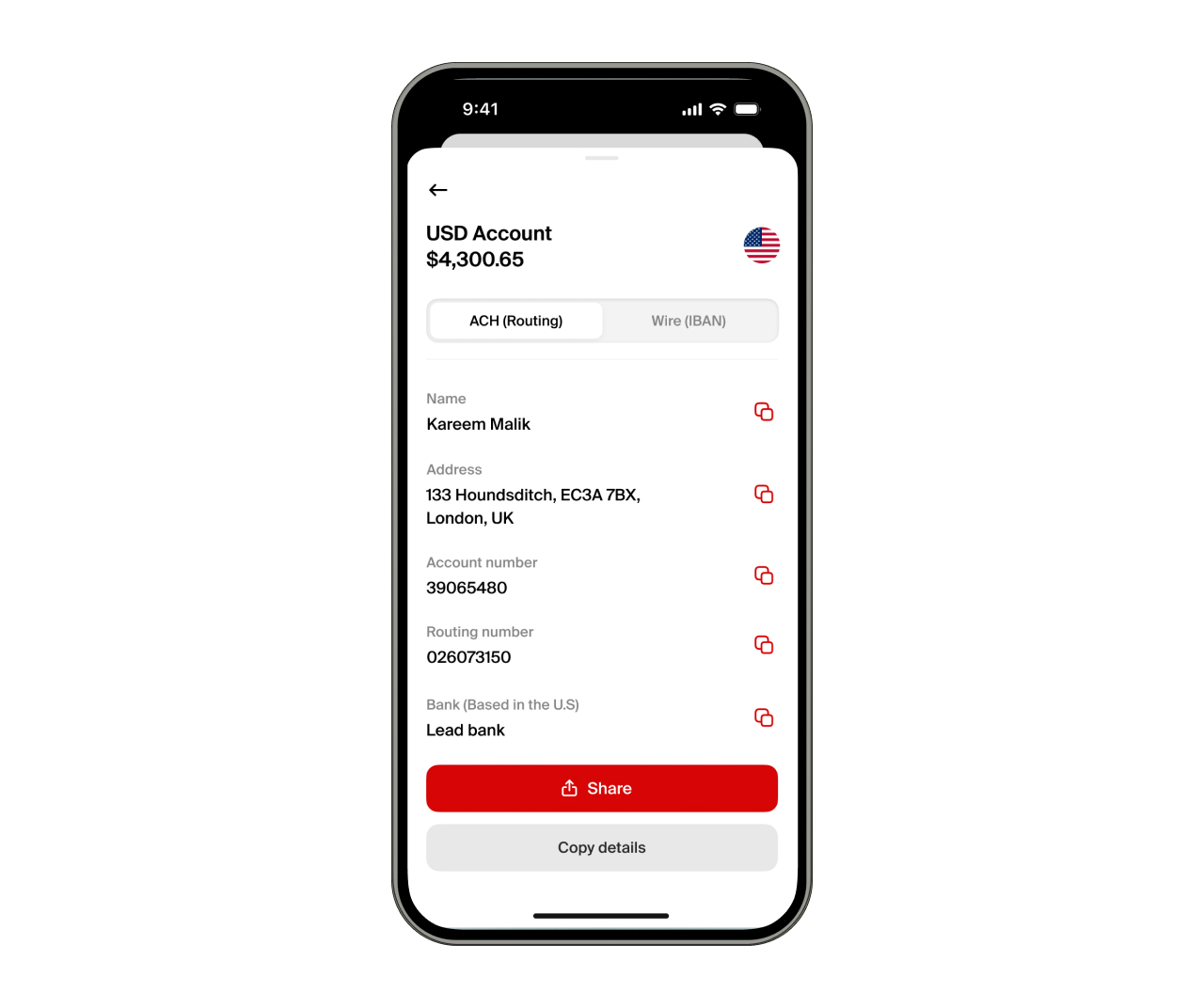
To receive USD via nsave, you should update your payout settings on your platform. Accordingly, there are 5 common payout destinations Pakistani freelancers configure with nsave ACH details:
- Upwork: Settings → Get Paid → US Bank (ACH) → enter your nsave routing number and account number.
- Fiverr: Earnings → Withdraw → Bank Transfer → enter the same ACH details.
- Toptal, Freelancer.com, PeoplePerHour: Navigate to each platform's bank payout setup and enter the same ACH details.
- Direct clients: Add your nsave ACH routing number and account number to your standard invoice.
- SWIFT-paying clients from the UK, EU, or Australia: SWIFT is the international messaging network banks outside the US use to send cross-currency payments, so for these clients you should share your nsave SWIFT receiving details instead, available inside the app.
Step 3: Hold USD and Access Investment Options
As of June 2026, nsave provides the opportunity to earn 3.2% annual rewards on your USD balance on the Standard plan, paid daily. Alternatively, the nsave Pro plan raises that rate to 4.2% at $9.99 per month.
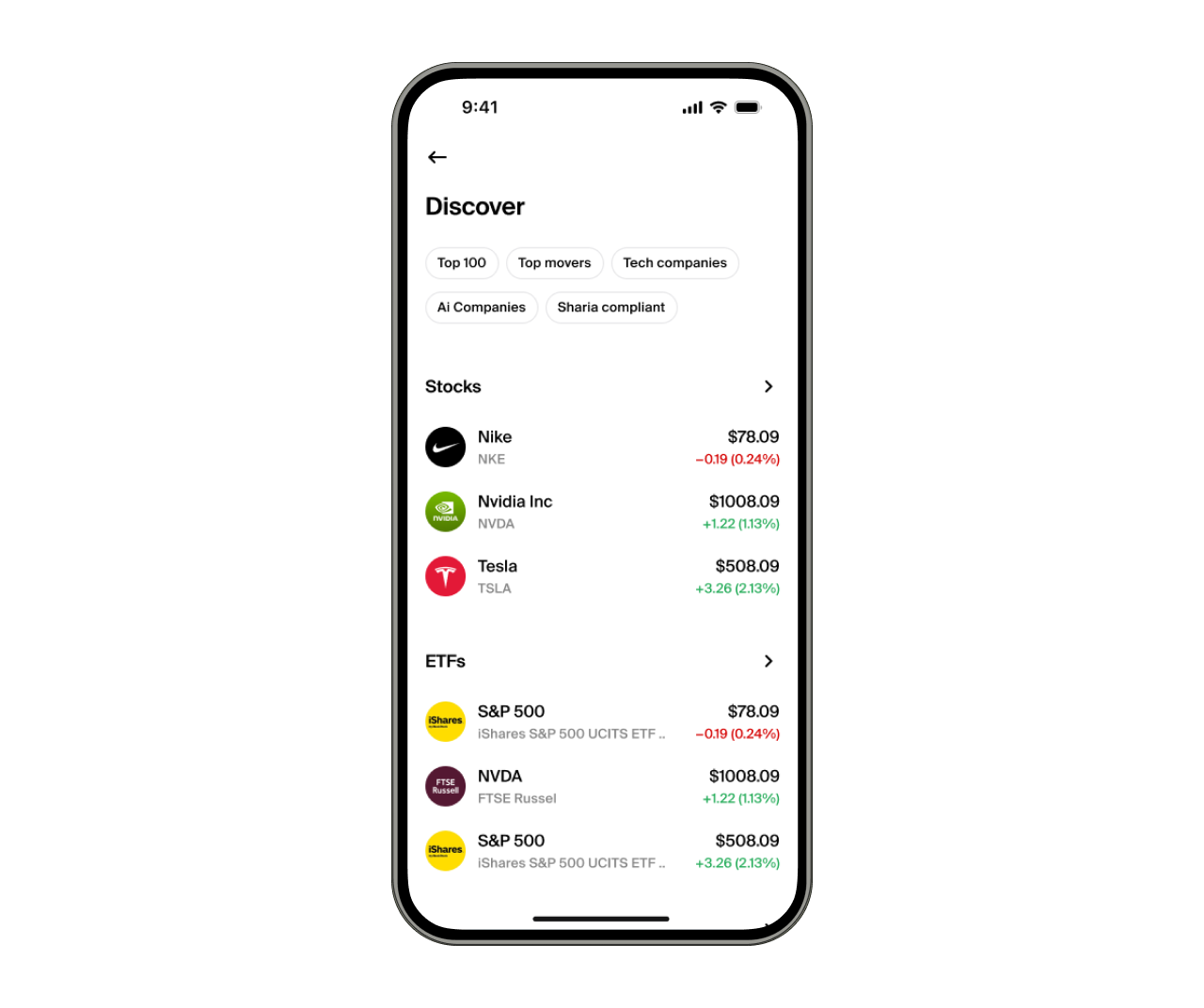
Your USD balance can also be held for weeks or months according to your own timeline. Additionally, nsave gives you access to invest in US stocks, ETFs, gold indices, or bonds from as little as $1 with no order fees, with Sharia-compliant options also available.
Investments involve risks, including the potential loss of capital. Past performance is not indicative of future results. Data provided is for illustrative purposes only. Consult a licensed financial adviser before making any investment decisions. Investment accounts are provided by a third-party broker dealer.
Step 4: Convert to PKR and Withdraw to Your Account
Finally, to withdraw from nsave, tap Withdraw in the app and send funds to any local Pakistani account for Free (for small transfers, a nominal fee may apply), with the exact PKR amount displayed before you confirm.

Congratulations, you should receive your funds usually within 5 minutes, but it may take up to 1 business day depending on the recipient's bank. In rare cases, it may take a little longer
How long do transfers take?
ACH transfers are typically received within 1-3 business days and are usually credited towards the end of the day. The only exception to that is when the ACH transfer is scheduled on a specific day.
SWIFT payments usually take longer and are more complex because they pass through multiple intermediary banks before reaching your account. This can take up to 2-10 working days.
nsave is not a bank. Funds are not FSCS-protected. Customer funds are held in regulated UK and EEA financial institutions, separated from company funds, and protected through safeguarding rules designed for electronic money services.
Disclaimer: Investments involve risks, including the potential loss of capital. Past performance is not indicative of future results. Data provided is for illustrative purposes only. Consult a licensed financial adviser before making any investment decisions. Investment accounts are provided by a third-party broker dealer.
Key Takeaways
A JazzCash account is a branchless banking wallet linked to your Pakistani mobile number, opened free through the app or *786# using your CNIC and a 4-digit MPIN. The USSD code is 786#, the limit-check code is 78669#, and the helpline is 4444 or 111-124-444. As of 2025, a new account starts at Level 0 with a monthly limit around PKR 50,000, rising to around PKR 200,000 at Level 1 after biometric verification and up to PKR 1 million on an Asaan Digital account. Crucially, JazzCash never asks for your MPIN or OTP by phone, so any caller who does is running a scam.
JazzCash handles everything on the PKR side. For anyone earning in USD from abroad, a dollar-receiving account comes first. Using nsave, you get a US routing number that Upwork, Fiverr, and other platforms can pay directly, and PKR conversion starts at a minimum of USD 1 per transfer (you should check the nsave app as fees are subject to change), with the converted funds reaching your Pakistani bank and then JazzCash.
Frequently Asked Questions
How do I create a JazzCash account?
To create a JazzCash account, download the app, enter your mobile number, verify the OTP, enter your CNIC and full name, and set a 4-digit MPIN. The account activates instantly at Level 0. Jazz and Warid users can also register by dialling *786#.
Can I open JazzCash without the app?
Yes, you can open JazzCash without the app. Jazz and Warid users can register by dialling *786# and following the menu. Anyone on any network can register through a JazzCash agent with their original CNIC and a biometric thumbprint scan, which opens the account at Level 1.
What is my JazzCash account number?
Your JazzCash account number is the 11-digit mobile number you registered with. You can view it in the "My Account" section of the app.
How many JazzCash accounts can one CNIC have?
Only one personal JazzCash account can be opened per CNIC. A guardian can additionally hold up to 2 NextGen minor accounts under the same CNIC.
How do I check my JazzCash balance?
To check your balance, open the app and view it on the home screen, or dial 786# and select the balance option. To check your remaining transaction limit, you dial 78669#.
What is the JazzCash USSD code?
The JazzCash USSD code is 786#. Dialling it from your registered number lets you send money, check your balance, cash out, and pay bills without an internet connection.
What is the JazzCash helpline number?
The JazzCash helpline is 4444 from a Jazz number, or 111-124-444 from any network. You use it to reset your MPIN, report a scam number, or block your account if your phone is lost.
Can freelancers receive international payments on JazzCash?
Yes, JazzCash can receive freelance payments through the Payoneer Billing Service, but not a direct USD payout. Funds arrive as PKR with Payoneer's standard 3% plus USD 1 fee, which is why some freelancers receive into a USD account such as nsave first and convert on their own timing.
The information in this article is provided for general informational and educational purposes only and does not constitute financial, legal, or tax advice from nsave or any of its affiliates. It is not a substitute for advice from a qualified financial adviser. We make no representations or warranties, whether expressed or implied, that the content is accurate, complete, or up to date.
Fees, exchange rates, incentives, and product availability may change and can vary by user and jurisdiction. Examples are illustrative only. Before making any financial decisions, seek advice from a qualified financial adviser who can assess your individual circumstances and objectives.
nsave helps freelancers and professionals from Bangladesh, Nigeria, Pakistan, Egypt, and other emerging markets receive and manage USD abroad. As a non-bank payment provider, your money is not protected by the Financial Services Compensation Scheme (FSCS). Customer funds are held in regulated, UK and EEA financial institutions, separated from company funds, and protected through safeguarding rules designed for electronic money services.
