
How to Send Money From Fiverr to nsave


Introduction
If you're a freelancer earning on Fiverr, you can withdraw your payments directly into your nsave account. This can be useful if you work with international clients or want a place to receive and hold your earnings in USD or other foreign currencies.
Using nsave allows freelancers to receive USD payments, manage their balance digitally, and convert funds when needed.
This guide explains how to send money from Fiverr to nsave, including the steps to connect Fiverr through Payoneer’s bank transfer setup, the information you need to provide, and how long the transfer typically takes.
Why Fiverr Freelancers Use nsave
Many Fiverr freelancers use nsave because it allows them to:
- Receive USD payments from international platform
- Convert funds when they need local currency
- Low transfer fees when sending money home
- Stability compared to home-country banking systems
- A simple, mobile-first experience for holding and managing earnings
Step-by-Step Guide: How to Send Money From Fiverr to nsave
1. Go to your Fiverr Earnings page
Log in to your Fiverr account.
Navigate to: Dashboard → Earnings
This is where you manage all withdrawal and payout methods.
Click Add payout method.
2. Choose “Bank Transfer”
A pop-up will appear asking you to select a payout method
Select Bank Transfer (USD), and click Continue.
3. Verify your phone number
Fiverr sends a verification code.
Enter the code and click Submit.
After verification, you will be redirected to Payoneer, which Fiverr uses to process bank transfers.
4. Log in to Payoneer (or create an account)
Fiverr uses Payoneer to process bank transfers.
If you already have a Payoneer account:
- Click Already have a Payoneer account?
- Sign in using your existing credentials.
If you don’t have one:
- Follow the steps to create a Payoneer account.
5. Add a new bank account inside Payoneer
Inside Payoneer, you will see the option:
Select a payment method → Add a New Bank Account
Click Add a New Bank Account.
This is where you will enter your nsave USD account details.
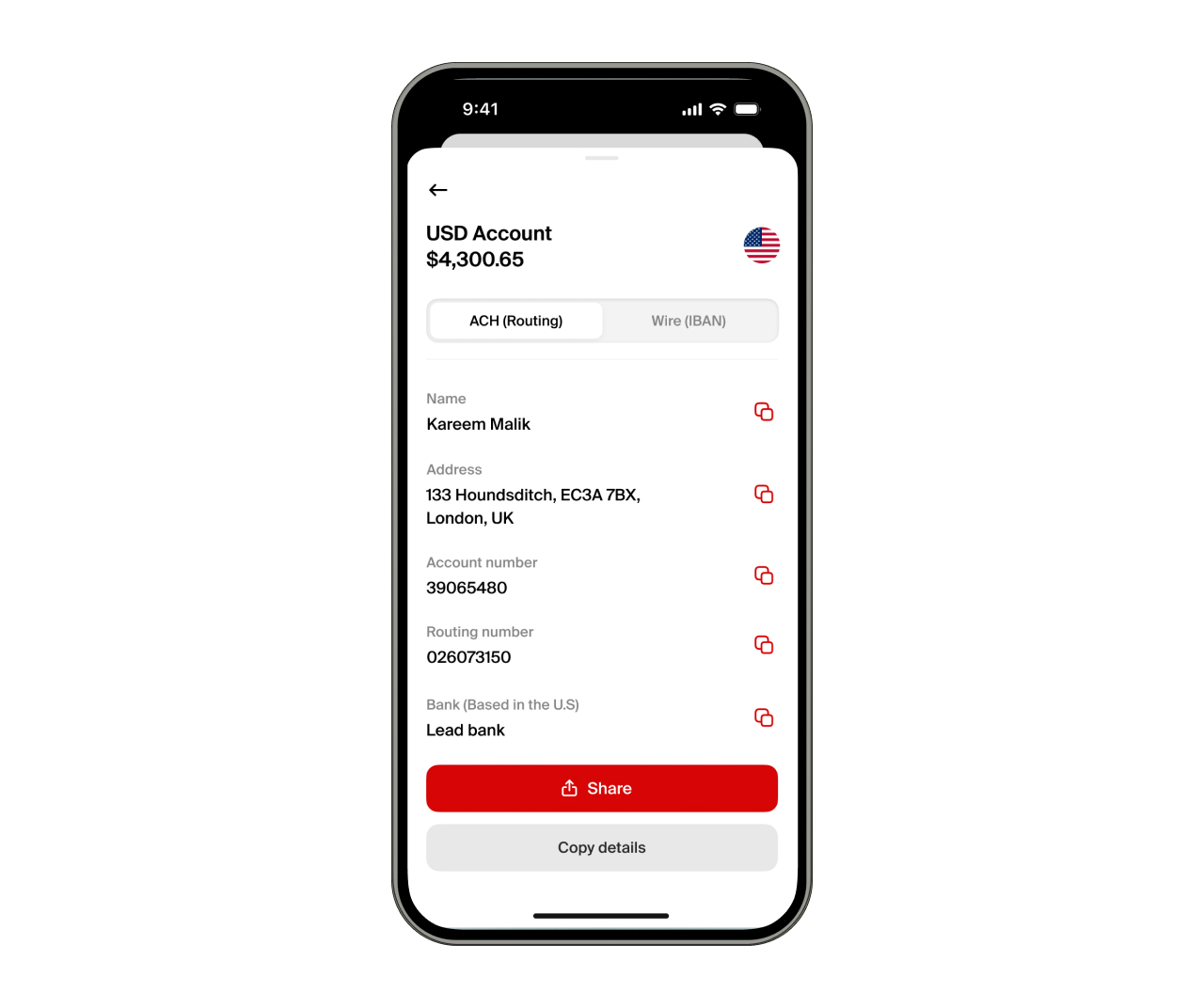
6. Open your nsave app and copy your USD ACH details
Open the nsave app and access your USD account details.
Locate your ACH banking information, which includes:
- Routing Number
- Account Number
- Account Type
- Bank Name
- Account Holder Name
Enter these details in the Payoneer form exactly as shown in the nsave app.
7. Submit and confirm the bank account
Once the details are entered and saved, Payoneer will connect your bank account to Fiverr.
Your nsave USD account will now be available as a withdrawal option for Fiverr payments.
8. Withdraw your Fiverr earnings to nsave
To withdraw your earnings:
- Go to Fiverr → Earnings
- Click Withdraw
- Select Bank Transfer
- Confirm the payout
Transfers through Payoneer ACH typically take 1–2 business days. Once processed, your USD balance will appear in your nsave account.
Summary
Sending money from Fiverr to nsave involves a few simple steps:
- Go to Fiverr → Earnings → Add payout method
- Select Bank Transfer (Payoneer)
- Verify your phone number
- Log in to Payoneer
- Add your nsave USD ACH account
- Withdraw your earnings whenever needed
By connecting Fiverr to nsave, freelancers can receive USD payments from international clients and platforms, manage their funds digitally, and convert or send money when required.